🚀 Software Engineering Notes
Welcome to my living collection of software engineering notes.
This book is built as a fast, practical reference for topics I want to review regularly: problem solving, systems and cloud concepts, C++ fundamentals, design patterns, and quantum topics. The goal is simple: keep useful material in one place and make it easy to revisit.
What This Book Is
- A study hub for core software engineering topics.
- A personal knowledge base that keeps growing over time.
- A reader-friendly reference with short sections, examples, formulas, and categorized notes.
Start Here
If you are opening these notes for the first time, these are good entry points:
- Quantum Physics
- AI + Machine Learning
- Object-Oriented Programming
- Array / String
- Creational Patterns
Explore by Topic
⚛️ Quantum
☁️ Microsoft Azure
🏭 Design Patterns
🧠 LeetCode
- Design
- Array / String
- Two Pointers
- Sliding Window
- Matrix
- Hashmap
- Intervals
- Stack
- Linked List
- Binary Tree
- Graph
- Trie
- Backtracking
- Divide & Conquer
- Kadane’s Algorithm
- Binary Search
- Heap
- Bit Manipulation
- Math
- Dynamic Programming
💻 C++
- Standard I/O
- Object-Oriented Programming
- Copying Objects
- Linked List
- Pointers
- Static Members and Friends
- Overloading Operators
- Aggregation and Composition
- Inheritance and Derivation
- Polymorphism
- Multiple Inheritance
- Templates
- Realization
- Iterators and STL
What to Expect
- Concise explanations instead of long textbook-style chapters.
- Notes organized by subject so review is fast.
- Mathematical notation where needed for physics and quantum sections.
- Problem-solving notes grouped by interview pattern.
- A structure that favors quick lookup over formal prose.
Best Way to Use These Notes
- Use the sidebar to jump between sections.
- Use the search to find a concept quickly.
- Treat chapters as reference pages, not necessarily linear reading.
- Revisit the same topic multiple times and refine your understanding.
Feedback and Contributions
If you spot an error, unclear explanation, or missing topic, contributions and suggestions are welcome.
Quantum Physics
Table of Contents
- Birth of Quantum Mechanics
- Photoelectric Effect and Wave-Particle Duality
- Bohr Model of the Atom
- Wave Function, Superposition, and Wave Packets
- Uncertainty Principle
- Schrodinger Equation
- Expectation Value
Birth of Quantum Mechanics
Blackbody Radiation
A blackbody is an ideal object that:
- Absorbs 100% of incident electromagnetic radiation.
- Emits radiation that depends only on its temperature.
- Has an emission spectrum independent of its material.
A cavity with a small hole approximates a blackbody because radiation entering the hole undergoes many reflections and is almost completely absorbed before escaping.
Intensity and Spectral Intensity
Total intensity (power per unit area):
\[ I = \frac{E}{A t} \]
Spectral intensity (power per unit area per unit frequency):
\[ I_f = \frac{dE}{dA , dt , df} \]
Total intensity is obtained by integrating over all frequencies:
\[ I = \int_0^\infty I_f , df \]
Temperature Dependence
As temperature increases:
- The peak of the spectrum shifts to higher frequency.
- The peak wavelength decreases.
- The total emitted intensity increases rapidly.
Hotter objects change visible color:
- ~3000 K → red glow
- ~6000 K → yellow-white
- ~12000 K → bluish-white
Wien’s Displacement Law
Peak frequency form:
\[ f_{\text{peak}} = (5.88 \times 10^{10} , \text{Hz/K}) , T \]
Peak wavelength form:
\[ \lambda_{\text{peak}} = \frac{2.90 \times 10^{-3},\mathrm{m\cdot K}}{T} \]
Scaling behavior:
- If \(T\) doubles → \(f_{\text{peak}}\) doubles.
- If \(T\) doubles → \(\lambda_{\text{peak}}\) halves.
Stefan–Boltzmann Law
Total emitted intensity:
\[ I = \sigma T^4 \]
where
\[ \sigma = 5.67 \times 10^{-8},\mathrm{W,m^{-2},K^{-4}} \]
If temperature doubles, total emitted power increases by \(2^4 = 16\).
Classical Prediction: Rayleigh–Jeans Law
Classical equipartition assumes each mode has average energy:
\[ E = k_B T \]
Number of modes per unit frequency is proportional to \(f^2\).
Rayleigh–Jeans law:
\[ I_f^{RJ}(f,T) = \frac{2 f^2}{c^2} k_B T \]
Total energy prediction:
\[ \int_0^\infty f^2 , df = \infty \]
This divergence at high frequency is called the ultraviolet catastrophe.
Planck’s Quantum Hypothesis
Planck proposed that energy is quantized:
\[ E = n h f, \quad n = 0,1,2,\dots \]
where
\[ h = 6.626 \times 10^{-34},\mathrm{J\cdot s} \]
Average energy per mode becomes:
\[ \langle E \rangle = \frac{h f}{e^{hf/k_B T} - 1} \]
Planck’s radiation law:
\[ I_f(f,T) = \frac{2 f^2}{c^2} \frac{h f}{e^{hf/k_B T} - 1} \]
Why Planck’s Law Resolves the Catastrophe
At high frequency (\(hf \gg k_B T\)):
\[ e^{hf/k_B T} \gg 1 \]
Thus
\[ \langle E \rangle \rightarrow 0 \]
High-frequency modes are exponentially suppressed, preventing divergence.
Low-Frequency Limit (Classical Recovery)
When \(hf \ll k_B T\), use the approximation:
\[ e^{hf/k_B T} \approx 1 + \frac{hf}{k_B T} \]
Substituting:
\[ \langle E \rangle \approx k_B T \]
Planck’s law reduces to the Rayleigh–Jeans result at low frequencies.
Photon Energy
Energy of a single photon:
\[ E = h f \]
Using wavelength:
\[ E = \frac{hc}{\lambda} \]
Key Constants
Planck constant:
\[ h = 6.626 \times 10^{-34},\mathrm{J\cdot s} \]
Boltzmann constant:
\[ k_B = 1.381 \times 10^{-23} , \text{J/K} \]
Speed of light:
\[ c = 3.00 \times 10^8 , \text{m/s} \]
Stefan–Boltzmann constant:
\[ \sigma = 5.67 \times 10^{-8} , \text{W/m}^2\text{K}^4 \]
Conceptual Takeaways
- Classical physics fails because it assumes continuous energy.
- The number of modes grows with \(f^2\), causing divergence.
- Quantization suppresses high-frequency energy.
- Planck’s law matches experiment at all frequencies.
- At low frequency → classical behavior.
- At high frequency → quantum behavior dominates.
Photoelectric Effect and Wave-Particle Duality
The Photoelectric Effect
The photoelectric effect occurs when light shines on a metal surface and electrons are ejected.
Key experimental observations:
- No electrons are emitted below a certain threshold frequency.
- Increasing light intensity increases the number of emitted electrons.
- Increasing light frequency increases the kinetic energy of emitted electrons.
- Emission occurs instantly, even at low intensity.
These results could not be explained using classical wave theory.
Classical Prediction (Incorrect)
Classical wave theory predicted:
- Energy should depend on intensity, not frequency.
- Electrons should accumulate energy gradually.
- There should be a measurable time delay before emission.
Experiments showed this was completely wrong.
Einstein’s Explanation (1905)
Einstein proposed that light consists of particles called photons.
Each photon carries energy:
\[ E = h f \]
When a photon strikes an electron:
- Part of its energy is used to overcome the metal’s work function.
- The remainder becomes kinetic energy.
Photoelectric Equation
Energy conservation gives:
\[ h f = W + K_{\text{max}} \]
where:
- \(W\) = work function (minimum energy needed to remove electron)
- \(K_{\text{max}}\) = maximum kinetic energy of emitted electrons
Thus:
\[ K_{\text{max}} = h f - W \]
Threshold Frequency
The threshold frequency \(f0\) occurs when \(K{\text{max}} = 0\):
\[ h f_0 = W \]
So:
\[ f_0 = \frac{W}{h} \]
If \(f < f_0\), no electrons are emitted — regardless of intensity.
This was impossible under classical physics.
Experimental Graph
If we plot \(K_{\text{max}}\) vs frequency:
\[ K_{\text{max}} = h f - W \]
This is a straight line:
- Slope = \(h\)
- Intercept = \(-W\)
- Zero crossing = \(f_0\)
This experiment allowed direct measurement of Planck’s constant.
Intensity vs Frequency
- Intensity controls number of photons → number of electrons emitted
- Frequency controls energy per photon → kinetic energy of electrons
Do not confuse these.
Wave–Particle Duality
Blackbody radiation suggested light energy is quantized.
The photoelectric effect showed:
- Light behaves like discrete particles.
- Energy transfer is localized and instantaneous.
Thus light exhibits particle-like behavior.
But interference experiments show light also behaves like a wave.
Conclusion:
Light has wave–particle duality.
It cannot be described fully as only a wave or only a particle.
Momentum of a Photon
Photons carry momentum even though they have no mass.
Using:
\[ E = p c \]
Since \(E = h f\) and \(f = \frac{c}{\lambda}\):
\[ p = \frac{h}{\lambda} \]
This will later connect to de Broglie matter waves.
Key Constants
Planck constant:
\[ h = 6.626 \times 10^{-34},\mathrm{J\cdot s} \]
Electron rest mass:
\[ m_e = 9.11 \times 10^{-31},\mathrm{kg} \]
Speed of light:
\[ c = 3.00 \times 10^8,\mathrm{m,s^{-1}} \]
Conceptual Takeaways
- Light energy is quantized.
- Frequency determines photon energy.
- Intensity determines photon number.
- Wave and particle descriptions are both necessary.
Bohr Model of the Atom
Atomic Spectra
When atoms are excited, they emit light at discrete wavelengths.
Instead of a continuous spectrum, hydrogen produces sharp spectral lines.
These lines form series:
- Lyman series → ultraviolet
- Balmer series → visible
- Paschen series → infrared
This showed that atomic energy levels are discrete.
The Rydberg Formula
The wavelengths of hydrogen spectral lines follow the Rydberg formula:
\[ \frac{1}{\lambda} = R_H \left( \frac{1}{n_f^2} - \frac{1}{n_i^2} \right) \]
where
- \(R_H = 1.097 \times 10^7 , \mathrm{m^{-1}}\)
- \(n_i\) = initial energy level
- \(n_f\) = final energy level
For emission:
\[ n_i > n_f \]
Bohr’s Model (1913)
Niels Bohr proposed a model of the hydrogen atom with three key assumptions:
- Electrons move in circular orbits around the nucleus.
- Only certain quantized orbits are allowed.
- Radiation is emitted only when electrons transition between energy levels.
Quantization of Angular Momentum
Bohr proposed that the electron’s angular momentum is quantized:
\[ m v r = n \hbar \]
where
- \(n = 1,2,3,\dots\)
- \(\hbar = \frac{h}{2\pi}\)
This condition restricts electrons to specific allowed orbits.
Radius of Allowed Orbits
Solving the force balance between Coulomb attraction and centripetal force gives:
\[ r_n = n^2 a_0 \]
where
\[ a_0 = 5.29 \times 10^{-11} , \text{m} \]
is the Bohr radius.
Energy Levels of Hydrogen
The allowed energies of hydrogen are:
\[ E_n = -\frac{13.6 , \text{eV}}{n^2} \]
Properties:
- Energy levels become closer together as \(n\) increases.
- \(E = 0\) corresponds to a free electron.
Photon Emission During Transitions
When an electron moves between levels:
\[ \Delta E = E_i - E_f \]
A photon is emitted with energy:
\[ hf = E_i - E_f \]
Thus:
\[ \lambda = \frac{hc}{E_i - E_f} \]
This explains the hydrogen spectral lines.
Connection to de Broglie Waves
The Bohr orbit condition can be interpreted as a standing wave condition:
\[ 2\pi r = n\lambda \]
Only wavelengths that fit an integer number of times around the orbit are allowed.
This links atomic structure to matter waves.
Conceptual Takeaways
- Atomic energy levels are quantized.
- Spectral lines arise from electron transitions.
- Angular momentum is quantized in units of \(\hbar\).
- Bohr’s model explains hydrogen spectra but fails for multi-electron atoms.
Wave Function, Superposition, and Wave Packets
The Wave Function
Quantum particles are described by a wave function:
\[ \psi(x,t) \]
The wave function contains all information about the particle.
The probability density of finding a particle is:
\[ P(x,t) = |\psi(x,t)|^2 \]
Normalization
Because the particle must exist somewhere:
\[ \int_{-\infty}^{\infty} |\psi(x,t)|^2 dx = 1 \]
This is called the normalization condition.
Plane Waves
A free particle can be described by a plane wave:
\[ \psi(x,t) = A e^{i(kx - \omega t)} \]
where
- \(k\) = wave number
- \(\omega\) = angular frequency
Relations:
\[ k = \frac{2\pi}{\lambda} \]
\[ p = \hbar k \]
\[ E = \hbar \omega \]
Superposition of Waves
Quantum wave functions obey the principle of superposition.
If \(\psi_1\) and \(\psi_2\) are valid solutions, then:
\[ \psi = \psi_1 + \psi_2 \]
is also a valid solution.
Interference between waves produces new spatial structures.
Superposition of Two Waves
Consider two waves:
\[ \psi_1 = A \sin(k_1 x) \]
\[ \psi_2 = A \sin(k_2 x) \]
Their sum is
\[ \psi = 2A \sin(k_{avg} x)\cos\left(\frac{\Delta k}{2}x\right) \]
This creates an envelope that localizes the wave.
Wave Packets
A wave packet is formed by combining many waves with different \(k\) values:
\[ \psi(x) = \int g(k)\cos(kx),dk \]
Wave packets represent localized particles.
Properties:
- Narrow packet → wide range of \(k\)
- Wide packet → narrow range of \(k\)
Spatial Localization
The spread in position and wave number satisfies
\[ \Delta x \Delta k \sim 1 \]
Using \(p = \hbar k\) gives the basis for the uncertainty principle.
Conceptual Takeaways
- The wave function describes probability amplitudes.
- Superposition allows interference and localization.
- A localized particle corresponds to a wave packet.
- Localization requires a range of momenta.
Uncertainty Principle
Position–Momentum Uncertainty
A wave packet cannot have both perfectly defined position and momentum.
The fundamental relation is
\[ \Delta x \Delta p \ge \frac{\hbar}{2} \]
This is the Heisenberg uncertainty principle.
Origin of the Uncertainty Relation
A localized particle requires many wave numbers.
From Fourier analysis:
\[ \Delta x \Delta k \approx \frac{1}{2} \]
Using
\[ p = \hbar k \]
we obtain
\[ \Delta x \Delta p \ge \frac{\hbar}{2} \]
Energy–Time Uncertainty
A similar relation exists for energy and time:
\[ \Delta E \Delta t \gtrsim \frac{\hbar}{2} \]
Short-lived states have large energy uncertainty.
Physical Interpretation
The uncertainty principle does not arise from measurement errors.
Instead it reflects a fundamental property of quantum states.
Key consequences:
- A particle cannot have a perfectly defined trajectory.
- Confinement increases momentum uncertainty.
Example: Particle in a Nucleus
If a proton is confined to
\[ \Delta x \sim 10^{-15} , \text{m} \]
then
\[ \Delta p \gtrsim \frac{\hbar}{2\Delta x} \]
This implies a large minimum kinetic energy.
Conceptual Takeaways
- Position and momentum cannot both be precisely known.
- Localization requires a wide momentum distribution.
- Quantum uncertainty is negligible for macroscopic objects.
Schrodinger Equation
Operators in Quantum Mechanics
Physical quantities are represented by operators.
Momentum operator:
$$ \hat{p} = -i\hbar \frac{\partial}{\partial x} $$
Energy operator:
$$ \hat{E} = i\hbar \frac{\partial}{\partial t} $$
Time-Dependent Schrödinger Equation
The fundamental equation of quantum mechanics is
\[ i\hbar \frac{\partial \psi}{\partial t} = -\frac{\hbar^2}{2m} \frac{\partial^2 \psi}{\partial x^2} + V(x),\psi \]
where
- \(m\) = particle mass
- \(V(x)\) = potential energy
Time-Independent Schrödinger Equation
If the potential does not depend on time:
\[ -\frac{\hbar^2}{2m} \frac{d^2 \psi}{dx^2} + V(x),\psi = E\psi \]
Solutions give the allowed energy levels.
Free Particle
For a free particle:
\[ V(x) = 0 \]
Solutions are plane waves:
$$ \psi = Ae^{ikx} + Be^{-ikx} $$
Energy:
$$ E = \frac{\hbar^2 k^2}{2m} $$
Particle in an Infinite Potential Well
Potential:
- \(V = 0\) inside the box
- \(V = \infty\) at the walls
Boundary conditions:
\[ \psi(0) = \psi(L) = 0 \]
Wave functions:
\[ \psi_n(x) = \sqrt{\frac{2}{L}} \sin\left(\frac{n\pi x}{L}\right) \]
Allowed energies:
\[ E_n = \frac{n^2 \pi^2 \hbar^2}{2mL^2} = \frac{n^2 h^2}{8mL^2} \]
Quantum Tunneling
If a particle encounters a barrier with
\[ E < V_0 \]
classically it cannot cross.
Quantum mechanically, the wave function penetrates the barrier.
Transmission probability decreases exponentially with barrier width.
Conceptual Takeaways
- Schrödinger’s equation governs quantum dynamics.
- Boundary conditions produce quantized energies.
- Wave functions determine probability distributions.
- Quantum particles can tunnel through barriers.
Expectation Value
Probability Density
The probability density of finding a particle at position \(x\) is
\[ P(x) = |\psi(x)|^2 \]
The total probability must equal 1.
Expectation Value of Position
The expectation value of position is
\[ \langle x \rangle = \int_{-\infty}^{\infty} x |\psi(x)|^2 dx \]
This represents the average result of many measurements.
Expectation Value of an Operator
For any observable operator \(\hat{O}\):
\[ \langle O \rangle = \int \psi^* \hat{O} \psi , dx \]
Momentum Expectation Value
Using the momentum operator:
\[ \langle \hat{p} \rangle = \int \psi^* \left( -i\hbar \frac{\partial}{\partial x} \right) \psi , dx \]
Energy Expectation Value
Using the energy operator:
\[ \langle \hat{E} \rangle = \int \psi^* \left( i\hbar \frac{\partial}{\partial t} \right) \psi , dx \]
Expectation vs Measurement
Important distinctions:
- The expectation value is not the most likely value.
- It is the average over many measurements.
Individual measurements may produce different results.
Conceptual Takeaways
- Quantum predictions are probabilistic.
- The wave function determines measurement statistics.
- Expectation values correspond to measurable averages.
Quantum Information
Table of Contents
- Quantum Interference
- Polarization and Wave Plates
- Dense Coding
- Quantum Teleportation
- Entanglement Swapping
- Quantum Key Distribution (QKD)
Quantum Interference
Beam Splitter and Superposition
A beam splitter (BS) creates a quantum superposition of paths rather than splitting a photon physically.
For a 50/50 beam splitter:
\[ | \text{in} \rangle \rightarrow \frac{1}{\sqrt{2}} | \text{transmitted} \rangle + \frac{i}{\sqrt{2}} | \text{reflected} \rangle \]
- The coefficients are probability amplitudes
- Probabilities are obtained by:
\[ P = |\text{amplitude}|^2 \]
Single Beam Splitter Experiment
A photon incident on a beam splitter is detected at one of two detectors:
\[ P(D_1) = P(D_2) = \frac{1}{2} \]
- The photon is never split between detectors
- This appears as classical randomness
Multiple Paths Without Interference
With multiple beam splitters and independent paths:
\[ P(D_1) = P(D_2) = P(D_3) = P(D_4) = \frac{1}{4} \]
- Probabilities distribute evenly
- No interference occurs when paths are independent
Mach–Zehnder Interferometer
A Mach–Zehnder interferometer consists of:
- Beam splitter (creates superposition)
- Mirrors (redirect paths)
- Second beam splitter (recombines paths)
Interference of Amplitudes
The total amplitude at a detector is:
\[ A_{\text{total}} = A_1 + A_2 \]
The probability is:
\[ P = |A_1 + A_2|^2 \]
This differs from classical addition:
\[ P \neq |A_1|^2 + |A_2|^2 \]
Example: Perfect Interference
For one detector:
\[ A = \frac{i}{2} + \frac{i}{2} = i \]
\[ P = |i|^2 = 1 \]
For the other detector:
\[ A = \frac{i^2}{2} + \frac{1}{2} = 0 \]
\[ P = 0 \]
Result:
- All photons arrive at one detector
- No photons arrive at the other
Role of Phase
A phase shift modifies a path:
\[ |\psi\rangle \rightarrow e^{i\phi} |\psi\rangle \]
Total amplitude becomes:
\[ A = A_1 + e^{i\phi} A_2 \]
- Interference depends on relative phase
- Phase determines constructive or destructive interference
Constructive and Destructive Interference
Constructive interference:
\[ |A_1 + A_2|^2 \text{ is maximized} \]
Destructive interference:
\[ A_1 + A_2 = 0 \]
Conditions for Interference
Interference occurs when:
- Paths are indistinguishable
- Phases are coherent
Blocking a path removes interference because only one amplitude remains.
Conceptual Takeaways
- Quantum systems combine amplitudes, not probabilities
- Interference arises from complex phase relationships
- A photon behaves as a superposition of paths
- Measurement removes interference by destroying coherence
Polarization and Wave Plates
Polarization as a Qubit
Photon polarization is a two-level quantum system:
\[ |H\rangle = \begin{bmatrix} 1 \\ 0 \end{bmatrix}, \quad |V\rangle = \begin{bmatrix} 0 \\ 1 \end{bmatrix} \]
General state:
\[ |\psi\rangle = \alpha |H\rangle + \beta |V\rangle \]
with normalization:
\[ |\alpha|^2 + |\beta|^2 = 1 \]
Jones Vector Representation
Polarization is represented as:
\[ \begin{bmatrix} E_x \\ E_y \end{bmatrix} \]
This encodes:
- Amplitude
- Relative phase
Linear Polarization
At angle \(\theta\):
\[ |\theta\rangle = \begin{bmatrix} \cos\theta \\ \sin\theta \end{bmatrix} \]
Special Polarization States
Diagonal:
\[ |D\rangle = \frac{1}{\sqrt{2}} \begin{bmatrix} 1 \\ 1 \end{bmatrix} \]
Anti-diagonal:
\[ |A\rangle = \frac{1}{\sqrt{2}} \begin{bmatrix} 1 \\ -1 \end{bmatrix} \]
Circular Polarization
Right circular:
\[ |R\rangle = \frac{1}{\sqrt{2}} \begin{bmatrix} 1 \\ i \end{bmatrix} \]
Left circular:
\[ |L\rangle = \frac{1}{\sqrt{2}} \begin{bmatrix} 1 \\ -i \end{bmatrix} \]
- Circular polarization arises from a phase difference of \(\pm \frac{\pi}{2}\)
Polarizing Beam Splitter (PBS)
An optical element that separates light into two orthogonal polarizations:
- Transmits \(|H\rangle\)
- Reflects \(|V\rangle\)
Measurement probabilities:
\[ P(H) = |\alpha|^2, \quad P(V) = |\beta|^2 \]
After measurement, the state collapses to one basis state.
Half-Wave Plate (HWP)
A half-wave plate introduces a phase shift between orthogonal components.
Matrix form:
\[ HWP(\theta) = \begin{bmatrix} \cos 2\theta & \sin 2\theta \\ \sin 2\theta & -\cos 2\theta \end{bmatrix} \]
Important Cases
\(\theta = 0^\circ\)
\[ HWP = \begin{bmatrix} 1 & 0 \\ 0 & -1 \end{bmatrix} \]
- Leaves \(|H\rangle\) unchanged
- Adds phase \(-1\) to \(|V\rangle\)
\(\theta = 45^\circ\)
\[ HWP = \begin{bmatrix} 0 & 1 \\ 1 & 0 \end{bmatrix} \]
- Swaps \(|H\rangle \leftrightarrow |V\rangle\)
\(\theta = 22.5^\circ\)
\[ HWP = \frac{1}{\sqrt{2}} \begin{bmatrix} 1 & 1 \\ 1 & -1 \end{bmatrix} \]
- Equivalent to the Hadamard transformation
\[ |H\rangle \rightarrow |D\rangle, \quad |V\rangle \rightarrow |A\rangle \]
Physical Interpretation of HWP
A half-wave plate:
- Splits the polarization into two orthogonal components
- Introduces a phase difference of \(\pi\)
- Recombines the components
This results in a rotation of polarization.
Key Observations
- The transformation depends on \(2\theta\), not \(\theta\)
- Wave plates perform unitary operations
- They act as quantum gates on polarization states
Conceptual Takeaways
- Polarization is a quantum two-level system
- Phase determines the difference between linear and circular states
- Measurement projects onto a basis and destroys superposition
- Wave plates implement controlled transformations of quantum states
Dense Coding
Overview
Dense coding is a quantum communication protocol that allows sending two classical bits by transmitting only one qubit, using a shared entangled pair.
Key idea:
- Classical limit: 1 qubit → 1 bit
- With entanglement: 1 qubit → 2 bits
Initial Setup
Alice and Bob share an entangled Bell state:
\[ |\Phi^+\rangle = \frac{1}{\sqrt{2}}(|00\rangle + |11\rangle) \]
Ownership:
- Alice holds qubit 1
- Bob holds qubit 2
This shared entanglement is the key resource.
Bell States
The four maximally entangled Bell states:
\[ |\Phi^+\rangle = \frac{1}{\sqrt{2}}(|00\rangle + |11\rangle) \]
\[ |\Phi^-\rangle = \frac{1}{\sqrt{2}}(|00\rangle - |11\rangle) \]
\[ |\Psi^+\rangle = \frac{1}{\sqrt{2}}(|01\rangle + |10\rangle) \]
\[ |\Psi^-\rangle = \frac{1}{\sqrt{2}}(|01\rangle - |10\rangle) \]
Interpretation:
- \( \Phi \): correlated bits (same values)
- \( \Psi \): anti-correlated bits (opposite values)
- \( + / - \): relative phase difference
Encoding by Alice
Alice encodes 2 classical bits by applying one of four operations to her qubit:
\[ I = \begin{pmatrix} 1 & 0 \\ 0 & 1 \end{pmatrix} \]
\[ X = \begin{pmatrix} 0 & 1 \\ 1 & 0 \end{pmatrix} \]
\[ Z = \begin{pmatrix} 1 & 0 \\ 0 & -1 \end{pmatrix} \]
\[ XZ = \begin{pmatrix} 0 & 1 \\ -1 & 0 \end{pmatrix} \]
Mapping:
| Bits | Operation | Resulting State |
|---|---|---|
| 00 | \( I \) | \( |\Phi^+\rangle \) |
| 01 | \( X \) | \( |\Psi^+\rangle \) |
| 10 | \( Z \) | \( |\Phi^-\rangle \) |
| 11 | \( XZ \) | \( |\Psi^-\rangle \) |
Key idea:
- Alice does not send two bits directly
- She transforms the shared entangled state
Transmission
After encoding:
- Alice sends her qubit to Bob
- Bob now has both qubits
Only one qubit is physically transmitted
Decoding by Bob
Bob performs a Bell-state measurement.
- Each Bell state corresponds to a unique 2-bit message
- If all four states are distinguishable:
\[ I = \log_2(4) = 2 \text{ bits} \]
This exceeds the classical limit.
Information Capacity
Ideal case:
\[ 2 \text{ classical bits per qubit} \]
Classical limit:
\[ 1 \text{ bit per qubit} \]
Entanglement doubles the capacity.
Physical Implementation (Linear Optics)
In practice, photons are used with polarization:
- \( |H\rangle \) = horizontal
- \( |V\rangle \) = vertical
Bell states become:
\[ |\Phi^+\rangle = \frac{1}{\sqrt{2}}(|HH\rangle + |VV\rangle) \]
\[ |\Phi^-\rangle = \frac{1}{\sqrt{2}}(|HH\rangle - |VV\rangle) \]
\[ |\Psi^+\rangle = \frac{1}{\sqrt{2}}(|HV\rangle + |VH\rangle) \]
\[ |\Psi^-\rangle = \frac{1}{\sqrt{2}}(|HV\rangle - |VH\rangle) \]
Alice’s Encoding with Wave Plates
Alice uses half-wave plates (HWPs):
- No HWP → \( |\Psi^+\rangle \)
- HWP(0°) → phase flip
- HWP(45°) → bit flip
- Both → combined transformation
These implement the operators \( I, X, Z, XZ \)
Bell-State Measurement (BSA)
Bob uses:
- Beam splitter (BS)
- Polarizing beam splitters (PBS)
- Detectors
The measurement outcome depends on photon behavior:
- Interference at BS
- Polarization splitting at PBS
Key Physical Effects
Bosonic Symmetry
Photons are identical particles:
\[ |H_1 V_2\rangle = |V_2 H_1\rangle \]
This leads to interference effects.
Hong–Ou–Mandel Interference
At a beam splitter:
- Some states → photons bunch (same output)
- Some states → photons separate (different outputs)
This determines which Bell states can be distinguished.
Detection Patterns
From the Bell-state analyzer:
- \( |\Psi^-\rangle \): photons exit different ports
- \( |\Psi^+\rangle \): same port, different detectors
- \( |\Phi^\pm\rangle \): same detector pattern
Key limitation:
- Cannot distinguish \( |\Phi^+\rangle \) vs \( |\Phi^-\rangle \)
Practical Limitation
Linear optics cannot fully distinguish all Bell states.
Result:
- Only 3 distinguishable outcomes
\[ I_{\text{max}} = \log_2(3) \approx 1.58 \text{ bits} \]
Improved Bell-State Analyzer
Using auxiliary entangled photons:
- Near-deterministic discrimination
- \( \sim 75% \) success rate
Still limited by linear optics constraints.
Conceptual Takeaways
- Entanglement enables higher communication capacity
- Information is encoded in global quantum states, not local bits
- Alice modifies a shared state, not her qubit alone
- Measurement requires joint operations on both qubits
- Physical implementations impose real limitations
Common Misconceptions
- Alice does not “store two bits in one qubit”
- Bob cannot decode without receiving Alice’s qubit
- Entanglement alone does not transmit information
- Without entanglement → dense coding is impossible
Quantum Teleportation
Overview
Quantum teleportation is a protocol that transfers an unknown quantum state from one location to another using:
- Entanglement
- Classical communication
Key idea:
- The quantum state is not copied
- The original is destroyed
- The state is reconstructed at the destination
The Problem
Given an unknown qubit:
\[ |\psi\rangle = \alpha|0\rangle + \beta|1\rangle \]
Goal:
\[ |\psi\rangle_A \rightarrow |\psi\rangle_B \]
Naively, one might try:
\[ |\psi\rangle |0\rangle \rightarrow |\psi\rangle |\psi\rangle \]
This is impossible.
No-Cloning Theorem
Unknown quantum states cannot be copied.
Reason:
Linearity implies:
\[ C(\alpha|0\rangle + \beta|1\rangle) = \alpha C|0\rangle + \beta C|1\rangle \]
But cloning would require:
\[ (\alpha|0\rangle + \beta|1\rangle)(\alpha|0\rangle + \beta|1\rangle) \]
These expressions are not equal for general \( \alpha, \beta \).
Conclusion:
- Cloning is impossible
- State must be transferred, not duplicated
Initial Setup
Three qubits:
- Qubit 1: unknown state \( |\psi\rangle \) (Alice)
- Qubit 2: entangled (Alice)
- Qubit 3: entangled (Bob)
Shared Bell state:
\[ |\Phi^+\rangle_{23} = \frac{1}{\sqrt{2}}(|00\rangle + |11\rangle) \]
Ownership:
- Alice → qubits 1 and 2
- Bob → qubit 3
Total Initial State
\[ |\Psi\rangle = |\psi\rangle_1 \otimes |\Phi^+\rangle_{23} \]
\[ = (\alpha|0\rangle + \beta|1\rangle) \frac{1}{\sqrt{2}}(|00\rangle + |11\rangle) \]
This is a three-qubit system.
Bell States
\[ |\Phi^\pm\rangle = \frac{1}{\sqrt{2}}(|00\rangle \pm |11\rangle) \]
\[ |\Psi^\pm\rangle = \frac{1}{\sqrt{2}}(|01\rangle \pm |10\rangle) \]
These form a complete basis for two qubits.
Bell Basis Expansion
The total state can be rewritten as:
\[ |\Psi\rangle = \frac{1}{2} \Big(|\Phi^+\rangle_{12} (\alpha|0\rangle + \beta|1\rangle)_3 - |\Phi^-\rangle_{12} (\alpha|0\rangle - \beta|1\rangle)_3 - |\Psi^+\rangle_{12} (\alpha|1\rangle + \beta|0\rangle)_3 - |\Psi^-\rangle_{12} (\alpha|1\rangle - \beta|0\rangle)_3\Big) \]
Key insight:
- Alice’s measurement outcome determines Bob’s state
Measurement by Alice
Alice performs a Bell-state measurement on qubits 1 and 2.
Result:
- One of four Bell states
- Produces 2 classical bits
After measurement:
- Original state is destroyed
- Bob’s qubit collapses into a related state
Conditional States at Bob
| Alice Outcome | Bob’s State |
|---|---|
| \( |\Phi^+\rangle \) | \( \alpha|0\rangle + \beta|1\rangle \) |
| \( |\Phi^-\rangle \) | \( \alpha|0\rangle - \beta|1\rangle \) |
| \( |\Psi^+\rangle \) | \( \alpha|1\rangle + \beta|0\rangle \) |
| \( |\Psi^-\rangle \) | \( \alpha|1\rangle - \beta|0\rangle \) |
Bob has a modified version of \( |\psi\rangle \).
Classical Communication
Alice sends 2 classical bits to Bob.
Important:
- Without this, Bob cannot recover the state
- No faster-than-light communication
Correction by Bob
Bob applies an operation depending on Alice’s result:
| Bits | Operation |
|---|---|
| 00 | \( I \) |
| 01 | \( Z \) |
| 10 | \( X \) |
| 11 | \( XZ \) |
After correction:
\[ |\psi\rangle_B = \alpha|0\rangle + \beta|1\rangle \]
Final Result
- Bob obtains the original quantum state
- Alice’s state is destroyed
\[ |\psi\rangle_A \rightarrow |\psi\rangle_B \]
No duplication occurs.
Physical Implementation (Optical Systems)
Qubits represented by polarization:
- \( |H\rangle \) = horizontal
- \( |V\rangle \) = vertical
Components:
- Beam splitter (BS)
- Polarizing beam splitters (PBS)
- Detectors
Bell-state analyzer:
- Can distinguish only some Bell states
Practical Limitation
Linear optics can distinguish:
\[ |\Psi^+\rangle, \quad |\Psi^-\rangle \]
But not:
\[ |\Phi^+\rangle, \quad |\Phi^-\rangle \]
Result:
\[ P_{\text{success}} = \frac{1}{2} \]
Teleportation is probabilistic in practice.
Conceptual Flow
- Entanglement shared
- Alice entangles unknown with Bell pair
- Alice measures (destroys original state)
- Classical bits sent to Bob
- Bob applies correction
- State reconstructed
Conceptual Takeaways
- Quantum information cannot be copied
- Entanglement enables state transfer
- Classical communication is required
- Information is transferred, not particles
- Measurement redistributes quantum information
Common Misconceptions
- Teleportation does not move matter
- Entanglement alone does not transmit information
- The state does not exist in two places
- Classical communication is essential
Entanglement Swapping
Overview
Entanglement swapping is a protocol that creates entanglement between two particles that have never interacted.
Key idea:
- Two independent entangled pairs are prepared
- A joint measurement is performed on one particle from each pair
- This creates entanglement between the remaining two particles
Initial Setup
Two Bell pairs:
\[ |\Phi^+\rangle_{12} = \frac{1}{\sqrt{2}}(|00\rangle + |11\rangle) \]
\[ |\Phi^+\rangle_{34} = \frac{1}{\sqrt{2}}(|00\rangle + |11\rangle) \]
Ownership:
- Alice → qubit 1
- Bob → qubit 4
- Middle station → qubits 2 and 3
Initially:
- (1,2) are entangled
- (3,4) are entangled
- (1,4) are not entangled
Total Initial State
\[ |\Psi\rangle = |\Phi^+\rangle_{12} \otimes |\Phi^+\rangle_{34} \]
\[ = \frac{1}{2} (|0000\rangle + |0011\rangle + |1100\rangle + |1111\rangle) \]
This is a four-qubit system.
Bell States
\[ |\Phi^\pm\rangle = \frac{1}{\sqrt{2}}(|00\rangle \pm |11\rangle) \]
\[ |\Psi^\pm\rangle = \frac{1}{\sqrt{2}}(|01\rangle \pm |10\rangle) \]
These form a complete basis for two qubits.
Bell Basis Expansion (Key Step)
Rewrite the total state in terms of Bell states of qubits (2,3):
\[ |\Psi\rangle = \frac{1}{2} \Big( |\Phi^+\rangle_{23} |\Phi^+\rangle_{14} + |\Phi^-\rangle_{23} |\Phi^-\rangle_{14} + |\Psi^+\rangle_{23} |\Psi^+\rangle_{14} + |\Psi^-\rangle_{23} |\Psi^-\rangle_{14} \Big) \]
Key insight:
- The system is a superposition of correlated Bell states
- Each Bell state of (2,3) is paired with the same Bell state of (1,4)
Measurement at the Middle Station
A Bell-state measurement is performed on qubits 2 and 3.
Result:
- One of four Bell states is obtained
- The system collapses to the corresponding term
After measurement:
- Original entanglement (1–2 and 3–4) is destroyed
Resulting State of (1,4)
Depending on the measurement outcome:
| Measurement (2,3) | Resulting State (1,4) |
|---|---|
| \( | \Phi^+\rangle \) | \( | \Phi^+\rangle \) |
| \( | \Phi^-\rangle \) | \( | \Phi^-\rangle \) |
| \( | \Psi^+\rangle \) | \( | \Psi^+\rangle \) |
| \( | \Psi^-\rangle \) | \( | \Psi^-\rangle \) |
Result:
- Qubits (1,4) become entangled
- Type of entanglement depends on measurement outcome
Classical Communication (Optional Correction)
If a specific Bell state is required:
- Measurement result must be sent to Alice or Bob
- A correction operation can be applied
This is similar to teleportation:
- Operations: \( I, X, Z, XZ \)
Final Result
\[ (1,2), (3,4) ;\rightarrow; (1,4) \]
- Entanglement is transferred
- Qubits 1 and 4 are now entangled
- They never interacted directly
Physical Interpretation
- Entanglement is not a local property
- It is a property of the global quantum state
Measurement:
- Does not create entanglement
- It selects one correlation pattern already present
Physical Implementation (Optical Systems)
Qubits represented by polarization:
- \( |H\rangle \), \( |V\rangle \)
Procedure:
- Two entangled photon pairs are generated
- Photons 2 and 3 interfere at a beam splitter
- A Bell-state measurement is performed
Practical Limitation
Linear optics:
- Cannot distinguish all Bell states
Typically distinguishable:
\[ |\Psi^+\rangle, \quad |\Psi^-\rangle \]
Result:
\[ P_{\text{success}} = \frac{1}{2} \]
Entanglement swapping is probabilistic in practice.
Conceptual Flow
- Prepare two entangled pairs
- Bring qubits (2,3) together
- Rewrite system in Bell basis
- Perform Bell-state measurement on (2,3)
- Collapse system to one term
- Qubits (1,4) become entangled
Conceptual Takeaways
- Entanglement can be created between non-interacting particles
- Measurement redistributes quantum correlations
- Entanglement is a global property
- Basis choice determines how correlations are revealed
- Essential for quantum communication networks
Common Misconceptions
- Measurement creates entanglement (it does not)
- Particles must interact to become entangled
- Entanglement is stored locally in particles
- The process transmits information instantly
Quantum Key Distribution
Overview
Quantum Key Distribution (QKD) is a method for securely sharing a secret key between two parties using quantum mechanics.
Key idea:
- Security is based on physical laws, not computational hardness
- Measurement of quantum states disturbs them
- Eavesdropping can be detected
Classical Motivation
The one-time pad provides perfect secrecy:
\[ C = M \oplus K \]
- \( M \): message
- \( K \): secret key
- \( C \): ciphertext
Problem:
- Alice and Bob must already share a secure key
- Key distribution is difficult
QKD addresses this problem by enabling Alice and Bob to establish a shared secret key whose security is guaranteed by quantum mechanics, provided they already share an authenticated public classical channel; in other words, QKD reduces the key-distribution problem to authentication rather than eliminating all trust assumptions.
Quantum Advantage
Two fundamental principles:
No-Cloning Theorem
Unknown quantum states cannot be copied.
Measurement Disturbance
Measuring a quantum state generally changes it.
Conclusion:
- An eavesdropper cannot observe communication without being detected
BB84 Protocol
Alice uses two orthogonal bases:
Rectilinear Basis (+)
\[ |0\rangle = |H\rangle, \quad |1\rangle = |V\rangle \]
Diagonal Basis (×)
\[ |0\rangle = |D\rangle, \quad |1\rangle = |A\rangle \]
Basis Relationship
The bases are related by superposition:
\[ |D\rangle = \frac{1}{\sqrt{2}}(|H\rangle + |V\rangle) \]
\[ |A\rangle = \frac{1}{\sqrt{2}}(|H\rangle - |V\rangle) \]
Key consequence:
- Measuring in the wrong basis gives random results
Protocol Steps
- Alice generates random bits
- Alice randomly chooses a basis (+ or ×)
- Alice sends encoded qubits
- Bob randomly chooses measurement bases
- Bob measures each qubit
Measurement Outcomes
- Same basis → deterministic result
- Different basis → random result (50/50)
Sifting Process
After transmission:
- Alice and Bob publicly announce bases only
- They discard all mismatched cases
Result:
- Remaining bits form the sifted key
Key Efficiency
Approximately:
\[ 50% \text{ of bits are discarded} \]
Eavesdropping (Intercept-Resend Attack)
Eve:
- Intercepts qubit
- Measures in random basis
- Resends qubit
Effect of Eavesdropping
If Eve uses the wrong basis:
- She disturbs the state
- Bob may receive incorrect value
Even when:
- Alice and Bob use the same basis
This introduces errors.
Error Detection
Alice and Bob:
- Reveal a subset of bits
- Compare results
If error rate is high:
- Eavesdropping is detected
- Key is discarded
Key Insight
Security arises because:
- Information gain ⇒ disturbance
- Disturbance ⇒ detectable errors
B92 Protocol
B92 is a simplified QKD protocol using:
- Only two non-orthogonal states
Encoding
Alice sends:
- Bit 0 → \( |H\rangle \)
- Bit 1 → \( |D\rangle \)
These states are not orthogonal:
\[ \langle H | D \rangle \neq 0 \]
Measurement Bases
Bob randomly measures in:
- H/V basis
- D/A basis
Measurement Behavior
If Alice sends \( |H\rangle \)
- H/V → always H
- D/A → random
If Alice sends \( |D\rangle \)
- D/A → always D
- H/V → random
Conclusive vs Inconclusive Results
A result is conclusive if it rules out one possibility.
Conclusive Results
- Detect V → must be \( |D\rangle \) → bit = 1
- Detect A → must be \( |H\rangle \) → bit = 0
Inconclusive Results
- Detect H or D → cannot determine bit → discard
Sifting Process
Bob:
- Announces positions of conclusive results
Alice:
- Keeps corresponding bits
Result:
- Shared secret key
Efficiency
- Many measurements are discarded
- Lower efficiency than BB84
Key Insight
Security arises from:
- Inability to perfectly distinguish non-orthogonal states
Conceptual Comparison
| Feature | BB84 | B92 |
|---|---|---|
| States used | 4 | 2 |
| Bases | 2 | implicit |
| Efficiency | higher | lower |
| Core principle | basis mismatch | non-orthogonality |
Conceptual Takeaways
- Quantum mechanics enables secure key distribution
- Measurement disturbs quantum states
- Eavesdropping introduces detectable errors
- BB84 uses basis incompatibility
- B92 uses non-orthogonal states
- Security is physical, not computational
Common Misconceptions
- Randomness alone provides security
- QKD transmits the key directly (it generates it)
- Eavesdropping can be hidden without errors
- Non-orthogonal states can be perfectly distinguished
Quantum Computation
Table of Contents
Quantum Gates
Quantum gates are the fundamental operations of quantum computation.
They act on qubits and are represented as unitary matrices.
- A quantum state is a vector
- A gate is a matrix
- Evolution is matrix multiplication
\[ |\psi’\rangle = U |\psi\rangle \]
Unlike classical gates:
- Quantum gates are reversible
- They operate on probability amplitudes, not bits
Single-Qubit Gates
Basis States
A single qubit is represented as:
\[ |0\rangle = \begin{bmatrix} 1 \\ 0 \end{bmatrix}, \quad |1\rangle = \begin{bmatrix} 0 \\ 1 \end{bmatrix} \]
A general state:
\[ |\psi\rangle = \alpha |0\rangle + \beta |1\rangle \]
with:
\[ |\alpha|^2 + |\beta|^2 = 1 \]
Pauli-X Gate (NOT Gate)
\[ X = \begin{bmatrix} 0 & 1 \\ 1 & 0 \end{bmatrix} \]
\[ X|0\rangle = |1\rangle, \quad X|1\rangle = |0\rangle \]
- Flips the qubit
- Equivalent to classical NOT
Pauli-Z Gate (Phase Flip)
\[ Z = \begin{bmatrix} 1 & 0 \\ 0 & -1 \end{bmatrix} \]
\[ Z|0\rangle = |0\rangle, \quad Z|1\rangle = -|1\rangle \]
- Does not change probabilities
- Changes phase
Hadamard Gate
\[ H = \frac{1}{\sqrt{2}} \begin{bmatrix} 1 & 1 \\ 1 & -1 \end{bmatrix} \]
\[ H|0\rangle = \frac{1}{\sqrt{2}}(|0\rangle + |1\rangle) \]
\[ H|1\rangle = \frac{1}{\sqrt{2}}(|0\rangle - |1\rangle) \]
- Creates superposition
- Converts deterministic states into probabilistic ones
Measurement and Probability
Measurement outcomes are determined by amplitudes:
\[ P(0) = |\alpha|^2, \quad P(1) = |\beta|^2 \]
Example:
\[ |\psi\rangle = \frac{1}{\sqrt{2}}(|0\rangle + |1\rangle) \]
\[ P(0) = P(1) = \frac{1}{2} \]
Phase Factors
Quantum states can acquire a phase:
\[ |\psi\rangle \rightarrow e^{i\theta} |\psi\rangle \]
Special cases:
\[ e^{i\pi} = -1, \quad e^{i\pi/2} = i \]
- Global phase: no physical effect
- Relative phase: affects interference and measurement
Gate Composition
Multiple gates are applied in sequence:
\[ U_2 U_1 |\psi\rangle \]
Order matters:
\[ ZX|0\rangle \neq XZ|0\rangle \]
Multi-Qubit Systems
Tensor Product
Multiple qubits are combined using the tensor product:
\[ |a\rangle \otimes |b\rangle \]
Example:
\[ |0\rangle \otimes |0\rangle = |00\rangle = \begin{bmatrix} 1 \\ 0 \\ 0 \\ 0 \end{bmatrix} \]
General rule:
\[ \begin{bmatrix} a \\ b \end{bmatrix} \otimes \begin{bmatrix} c \\ d \end{bmatrix} = \begin{bmatrix} ac \\ ad \\ bc \\ bd \end{bmatrix} \]
Multi-Qubit States
Two-qubit basis states:
- \(|00\rangle\)
- \(|01\rangle\)
- \(|10\rangle\)
- \(|11\rangle\)
These form a 4-dimensional vector space.
Multi-Qubit Gates
CNOT Gate
The Controlled-NOT gate flips the target qubit if the control qubit is 1.
\[ \text{CNOT} |00\rangle = |00\rangle \] \[ \text{CNOT} |01\rangle = |01\rangle \] \[ \text{CNOT} |10\rangle = |11\rangle \] \[ \text{CNOT} |11\rangle = |10\rangle \]
- Essential for entanglement
- Combines classical control with quantum behavior
SWAP Gate
Swaps two qubits:
\[ |00\rangle \rightarrow |00\rangle \]
\[ |01\rangle \rightarrow |10\rangle \]
\[ |10\rangle \rightarrow |01\rangle \]
\[ |11\rangle \rightarrow |11\rangle \]
- Exchanges quantum states
- Often implemented using multiple CNOT gates
Controlled-Z Gate (CZ)
Applies a phase flip when both qubits are 1:
\[ |00\rangle \rightarrow |00\rangle \]
\[ |01\rangle \rightarrow |01\rangle \]
\[ |10\rangle \rightarrow |10\rangle \]
\[ |11\rangle \rightarrow -|11\rangle \]
- Does not change bit values
- Changes phase relationships
Parameterized Gates
Rotation Gate (Rx)
\[ R_x(\theta) = \begin{bmatrix} \cos(\theta/2) & -i\sin(\theta/2) \\ -i\sin(\theta/2) & \cos(\theta/2) \end{bmatrix} \]
- Represents rotation around the x-axis
- Generalizes discrete gates into continuous operations
General U Gate
\[ U(\theta, \phi, \lambda) \]
- Most general single-qubit gate
- Can represent all rotations
Special cases:
- \(U(\theta, 0, 0) = R_y(\theta)\)
- \(U(\theta, -\pi/2, \pi/2) = R_x(\theta)\)
Key Takeaways
- Quantum gates are unitary matrix operations
- Qubits evolve via linear algebra
- Measurement depends on probability amplitudes
- Tensor products define multi-qubit systems
- CNOT enables entanglement
- Phase plays a critical role in quantum behavior
- Gate order matters — operations are not commutative
Quantum Teleportation Circuit
Quantum teleportation is a protocol that transfers an unknown quantum state from Alice to Bob using:
- Entanglement
- Classical communication
- Quantum gates
The original qubit is destroyed, and the state is reconstructed at Bob’s location.
\[ |\psi\rangle = \alpha |0\rangle + \beta |1\rangle \]
Goal:
\[ |\psi\rangle_A \rightarrow |\psi\rangle_B \]
Circuit Overview
The teleportation circuit consists of three qubits:
- Top wire: unknown state \(|\psi\rangle\)
- Middle wire: Alice’s entangled qubit
- Bottom wire: Bob’s entangled qubit
Key stages:
- Create entanglement (EPR pair)
- Perform Bell measurement (Alice)
- Send classical bits
- Apply correction (Bob)
The protocol uses:
- Hadamard (H)
- CNOT
- Measurement
- Conditional gates (X, Z)
Step-by-Step Process
Step 1: Create Entanglement (EPR Pair)
Alice and Bob share a Bell state:
\[ |\Psi^+\rangle = \frac{1}{\sqrt{2}}(|01\rangle + |10\rangle) \]
Created using:
- Hadamard on one qubit
- CNOT gate
This entanglement is the resource that enables teleportation.
Step 2: Combine with Unknown State
The full system becomes:
\[ |\psi\rangle \otimes |\Psi^+\rangle \]
This expands into a superposition of Bell states:
\[ |\psi\rangle \otimes |\Psi^+\rangle = \frac{1}{2}( |00\rangle (\alpha|0\rangle + \beta|1\rangle) + |01\rangle (\alpha|1\rangle + \beta|0\rangle) + |10\rangle (\alpha|0\rangle - \beta|1\rangle) + |11\rangle (\alpha|1\rangle - \beta|0\rangle) ) \]
Key idea:
- The unknown state is now distributed across all three qubits
Step 3: Bell Measurement (Alice)
Alice applies:
- CNOT (between her qubits)
- Hadamard
Then measures both qubits.
Result:
\[ \frac{1}{2}( |00\rangle (\alpha|0\rangle + \beta|1\rangle) + |01\rangle (\alpha|1\rangle + \beta|0\rangle) + |10\rangle (\alpha|0\rangle - \beta|1\rangle) + |11\rangle (\alpha|1\rangle - \beta|0\rangle) ) \]
Key idea:
- Measurement collapses the system into one of four cases.
Bell States and Measurement
Alice’s measurement yields:
- \(|00\rangle\)
- \(|01\rangle\)
- \(|10\rangle\)
- \(|11\rangle\)
Each corresponds to a different transformation of Bob’s qubit.
Important:
Bob’s qubit is already close to \(|\psi\rangle\) — just modified by a known operation.
Classical Communication and Correction
Alice sends 2 classical bits to Bob.
Based on the result, Bob applies:
| Measurement | Operation |
|---|---|
| 00 | Identity |
| 01 | X |
| 10 | Z |
| 11 | XZ |
After correction:
\[ |\psi\rangle = \alpha|0\rangle + \beta|1\rangle \]
Bob now has the exact original state.
Key Insights
1. No Faster-Than-Light Communication
- Classical bits are required
- Teleportation is not instantaneous communication
2. State is Not Copied
- The original qubit is destroyed during measurement
- This obeys the no-cloning theorem
3. Entanglement is a Resource
- Without entanglement, teleportation is impossible
- It enables non-local correlations
4. Measurement Drives the Protocol
- Measurement collapses the system
- Converts quantum information into classical bits
5. Corrections Recover the State
- Bob’s qubit is always one operation away from \(|\psi\rangle\)
- Classical information tells him which one
Conceptual Takeaways
- Teleportation = entanglement + measurement + classical control
- Information is transferred without moving the particle
- Quantum states behave as global systems, not local objects
Superdense Coding Circuit
Superdense coding allows Alice to send 2 classical bits to Bob by transmitting only 1 qubit, using shared entanglement.
This is only possible because of entanglement as a resource.
The protocol works by encoding classical information into quantum states.
Protocol Overview
- Alice and Bob share an entangled Bell pair
- Alice encodes 2 classical bits using a quantum gate
- Alice sends her qubit to Bob
- Bob performs a joint measurement to recover the 2 bits
Step 1: Entanglement Preparation
Start with:
\[ |00\rangle \]
Apply:
- Hadamard on first qubit
- CNOT (control = first, target = second)
Result:
\[ |\Phi^+\rangle = \frac{1}{\sqrt{2}} (|00\rangle + |11\rangle) \]
This shared Bell state is distributed between Alice and Bob.
Step 2: Alice Encoding
Alice encodes two classical bits by applying one of four operations to her qubit:
| Bits | Operation | Resulting State |
|---|---|---|
| 00 | \(I\) | \( |\Phi^+\rangle \) |
| 01 | \(X\) | \( |\Psi^+\rangle \) |
| 10 | \(Z\) | \( |\Phi^-\rangle \) |
| 11 | \(Y\) | \( |\Psi^-\rangle \) |
- Each operation maps the shared state to a different Bell state
Key idea:
Alice is not sending bits directly—she is transforming entanglement
Step 3: Bob Decoding
After receiving Alice’s qubit, Bob performs:
- CNOT
- Hadamard (on first qubit)
This transforms Bell states into computational basis states:
\[ |\Phi^+\rangle \rightarrow |00\rangle \] \[ |\Psi^+\rangle \rightarrow |01\rangle \] \[ |\Phi^-\rangle \rightarrow |10\rangle \] \[ |\Psi^-\rangle \rightarrow |11\rangle \]
Then Bob measures and recovers the two classical bits.
Bell States and Encoding
The four Bell states:
\[ |\Phi^+\rangle = \frac{1}{\sqrt{2}}(|00\rangle + |11\rangle) \]
\[ |\Phi^-\rangle = \frac{1}{\sqrt{2}}(|00\rangle - |11\rangle) \]
\[ |\Psi^+\rangle = \frac{1}{\sqrt{2}}(|01\rangle + |10\rangle) \]
\[ |\Psi^-\rangle = \frac{1}{\sqrt{2}}(|01\rangle - |10\rangle) \]
Each represents a distinct global state.
Information Gain
Classically:
- 1 bit per bit sent
Quantum (superdense coding):
- 2 bits per qubit
\[ \log_2(4) = 2 \text{ bits} \]
However:
- In real systems (e.g., linear optics), not all Bell states are distinguishable
- Practical limit ≈ 1.58 bits per qubit
Key Insights
1. Entanglement Enables Compression
- Information is encoded into global correlations
- Not into a single qubit alone
2. Alice Does Not Send Two Bits Directly
- She modifies her half of an entangled state
- The message exists in the joint system
3. Bob Needs Both Qubits
- Without Alice’s qubit, Bob cannot decode anything
- Without prior entanglement, protocol fails
4. This is the Reverse of Teleportation
- Teleportation: send 1 qubit using 2 classical bits
- Superdense coding: send 2 classical bits using 1 qubit
Conceptual Takeaways
- Quantum information can be compressed into entanglement
- Operations on one qubit affect the entire system
- Measurement extracts classical information from quantum correlations
AI + Machine Learning
Table of Contents
Azure Machine Learning

- Purpose: Provides an end-to-end machine learning platform for data scientists and developers.
- Key Capabilities:
- Model training, deployment, and management.
- Automated Machine Learning (AutoML) for no-code/low-code solutions.
- Integration with popular frameworks such as TensorFlow, PyTorch, and Scikit-learn.
- Typical Use Cases:
- Predictive analytics
- Fraud detection
- Recommendation systems
Azure AI Services

- Purpose: Collection of AI-based services for vision, speech, language understanding, and more.
- Key Capabilities:
- Cognitive Services for text analytics, speech-to-text, image recognition, etc.
- Prebuilt AI models for language translation, anomaly detection, sentiment analysis.
- Typical Use Cases:
- Chatbots and virtual assistants
- Document processing and OCR
- Audio/video transcription
Azure AI Foundry

- Purpose: Helps organizations build, deploy, and operationalize AI solutions rapidly.
- Key Capabilities:
- Collaborative environment for data science teams.
- Accelerators and industry-specific solution templates.
- End-to-end MLOps to streamline AI solution lifecycle.
- Typical Use Cases:
- Data science collaboration
- Rapid AI prototyping
- Automated CI/CD for AI projects
Azure OpenAI Service

- Purpose: Provides access to advanced language models (e.g., GPT series) for building AI solutions.
- Key Capabilities:
- Natural language processing (NLP) and generation.
- Code generation, text summarization, translation, etc.
- Easily integrates with other Azure services for end-to-end solutions.
- Typical Use Cases:
- Chatbots with contextual awareness
- Intelligent document analysis
- Code completion or generation
Azure AI Search

- Purpose: Intelligent search and indexing service powered by AI.
- Key Capabilities:
- Natural language processing search queries.
- Cognitive skills for image, OCR, and text analytics.
- Synonym search and ranking capabilities.
- Typical Use Cases:
- Website and application content search
- Enterprise data search with AI-driven insights
- E-commerce product search
Compute
Table of Contents
- Azure Virtual Machines
- Azure Virtual Machine Scale Sets
- Azure App Service
- Azure Kubernetes Service (AKS)
- Azure Virtual Desktop
- Azure Functions
- Azure Container Instances (ACI)
- Azure Batch
Azure Virtual Machines

- Purpose: On-demand, scalable computing resources in the cloud.
- Key Capabilities:
- Wide range of VM sizes, regions, and OS options (Windows, Linux).
- Support for custom images and templates.
- Integration with Virtual Networks, storage, and other Azure services.
- Typical Use Cases:
- Lift-and-shift of existing applications to the cloud.
- Development and testing environments.
- Host custom software and workloads.
Azure Virtual Machine Scale Sets

- Purpose: Automatically scale virtual machines to handle demand changes.
- Key Capabilities:
- Automatic VM provisioning and de-provisioning.
- Load balancing integrations.
- Uniform or flexible orchestration modes.
- Typical Use Cases:
- Large-scale compute clusters.
- Stateless web tiers with variable traffic.
- Big data and containerized workloads.
Azure App Service

- Purpose: Fully managed platform for building, deploying, and scaling web apps and APIs.
- Key Capabilities:
- Supports multiple languages and frameworks (e.g., .NET, Node.js, Python, Java).
- Continuous integration and deployment (CI/CD).
- Built-in autoscaling, monitoring, and security features.
- Typical Use Cases:
- Enterprise web applications
- RESTful API hosting
- Minimal management overhead for web deployments
Azure Kubernetes Service (AKS)

- Purpose: Managed Kubernetes service to run containerized applications at scale.
- Key Capabilities:
- Automated provisioning and cluster management.
- Integration with Azure Container Registry (ACR) for container images.
- Autoscaling, rolling updates, and built-in monitoring.
- Typical Use Cases:
- Microservices-based architectures.
- Container orchestration for development and production.
- Hybrid and multi-cloud strategies (with Azure Arc).
Azure Virtual Desktop

- Purpose: Provide Windows 10/11 desktops and apps in the cloud.
- Key Capabilities:
- Multi-session Windows 10/11 environment.
- Optimizations for Microsoft 365 Apps.
- Integration with Azure Active Directory (Microsoft Entra ID).
- Typical Use Cases:
- Remote work scenarios.
- Secure access to corporate desktops and applications.
- Disaster recovery for on-premises desktop environments.
Azure Functions

- Purpose: Serverless compute platform for event-driven, on-demand code execution.
- Key Capabilities:
- Pay-per-execution billing model (consumption plan).
- Triggers and bindings to integrate with other Azure services.
- Built-in scaling and managed infrastructure.
- Typical Use Cases:
- Real-time file processing
- IoT data processing
- Webhooks and microservices
Azure Container Instances (ACI)

- Purpose: Run containers without managing servers or clusters.
- Key Capabilities:
- Fast, isolated compute for containerized workloads.
- Per-second billing.
- Integrates with Virtual Networks for secure deployments.
- Typical Use Cases:
- Batch processing
- Test and development containers
- Event-driven container workloads
Azure Batch

- Purpose: Large-scale parallel and high-performance computing (HPC) in the cloud.
- Key Capabilities:
- Automatically manage and scale compute nodes.
- Integration with Azure Storage for input/output data.
- Supports Docker containers and common HPC frameworks.
- Typical Use Cases:
- Rendering 3D images or simulations
- Financial risk modeling
- Genomic and scientific research
Management and Governance
Table of Contents
- Azure Subscriptions
- Azure Management Groups
- Azure Policy
- Azure Blueprints
- Azure Resource Groups
- Azure Tags
- Azure Arc
- Azure Resource Manager (ARM) Templates
- Azure Purview
- Azure Advisor
Azure Subscriptions

- Purpose: Logical container for Azure resources, billing, and usage.
- Key Capabilities:
- Payment and billing boundary.
- Resource access and usage quotas.
- Linked to Azure Active Directory tenant.
- Typical Use Cases:
- Organizing workloads by department or project.
- Enforcing budgetary constraints and spending thresholds.
Azure Management Groups

- Purpose: Hierarchical grouping of subscriptions for organizational governance.
- Key Capabilities:
- Apply policies and access controls across multiple subscriptions.
- Organize subscriptions by departments, regions, or functions.
- Typical Use Cases:
- Enterprise-wide compliance policies
- Consistent resource governance
Azure Policy

- Purpose: Enforce compliance and governance across resources.
- Key Capabilities:
- Policy assignments for resource configurations (e.g., allowed regions, tag requirements).
- Monitoring and remediation of non-compliant resources.
- Typical Use Cases:
- Regulatory compliance (e.g., ISO, PCI).
- Resource standardization and cost control.
Azure Blueprints

- Purpose: Package and deploy sets of resource templates and policies at scale.
- Key Capabilities:
- Create repeatable environments with ARM templates, policies, and RBAC.
- Versioning for consistent environment deployments.
- Typical Use Cases:
- Enterprise environment setup
- Standardized development/test/production deployments
Azure Resource Groups

- Purpose: Logical grouping of Azure resources for management, deployment, and monitoring.
- Key Capabilities:
- All resources in a group share a common lifecycle.
- Role-based access control at the resource group level.
- Typical Use Cases:
- Grouping related resources for an application.
- Easier deployment and deletion of entire stacks.
Azure Tags

- Purpose: Metadata labels to categorize resources (e.g., cost center, environment).
- Key Capabilities:
- Use tags for resource organization and cost allocation.
- Query resources by tags in Azure Portal and CLI.
- Typical Use Cases:
- Cost management and chargeback.
- Resource discovery and governance.
Azure Arc

- Purpose: Extend Azure management and services to on-premises, multi-cloud, and edge environments.
- Key Capabilities:
- Manage servers, Kubernetes clusters, and data services anywhere.
- Consistent policy enforcement and governance outside Azure.
- Typical Use Cases:
- Hybrid cloud strategies
- Central management across diverse environments
Azure Resource Manager (ARM) Templates

- Purpose: Infrastructure-as-Code for deploying and managing Azure resources declaratively.
- Key Capabilities:
- JSON-based templates to define infrastructure configurations.
- Parameterization for dynamic deployments.
- Consistent, repeatable environment provisioning.
- Typical Use Cases:
- Automated deployments with CI/CD.
- Version-controlled infrastructure configurations.
Azure Purview

- Purpose: Unified data governance service to manage and control data across on-premises, multi-cloud, and SaaS sources.
- Key Capabilities:
- Automated data discovery and classification.
- Data lineage for end-to-end tracking.
- Built-in data catalog for enterprise-wide data visibility.
- Typical Use Cases:
- Regulatory compliance (e.g., GDPR).
- Centralized data governance and discovery.
- Enterprise-wide data cataloging.
Azure Advisor

- Purpose: Personalized recommendations for best practices, cost optimization, performance, and security.
- Key Capabilities:
- Identifies idle resources, performance bottlenecks, and potential security risks.
- Recommends corrective actions.
- Typical Use Cases:
- Ongoing cost optimization.
- Performance tuning and reliability improvements.
- Security posture assessments.
Monitoring
Table of Contents
Azure Monitor

- Purpose: Centralized monitoring service for collecting, analyzing, and acting on telemetry from cloud and on-premises environments.
- Key Capabilities:
- Metrics, logs, and application insights.
- Alerts and automated remediation.
- Visualization with dashboards and workbooks.
- Typical Use Cases:
- Infrastructure and application performance monitoring.
- Log analytics for troubleshooting.
- Proactive alerting and incident management.
Azure Service Health

- Purpose: Personalized dashboard of Azure service issues and maintenance events.
- Key Capabilities:
- Real-time updates on service outages, planned maintenance.
- Alerts and notifications via various channels.
- Typical Use Cases:
- Tracking regional availability issues.
- Planning around maintenance windows.
Network
Table of Contents
- Azure VNet
- Azure Subnets
- Azure Network Interface (NIC)
- Azure Network Security Groups
- Azure Virtual Network Peering
- Azure DNS
- Azure ExpressRoute
- Azure Virtual Network Gateways
- Azure Load Balancer
- Azure Application Gateway
- Azure Front Door
- Azure Private Link
- Azure Bastion
Azure VNet

- Purpose: Fundamental building block for private networking in Azure.
- Key Capabilities:
- Isolated network segments within Azure.
- Subnets for segmented network design.
- Network security boundaries and controls.
- Typical Use Cases:
- Host Azure resources securely.
- Extend on-premises networks to the cloud.
- Control inbound and outbound traffic routing.
Azure Subnets

- Purpose: Logical subdivisions of an Azure VNet for resource segmentation.
- Key Capabilities:
- Control network traffic routes and isolation.
- Enforce security boundaries with Network Security Groups (NSGs).
- Typical Use Cases:
- Micro-segmentation of workloads.
- Separation of front-end, application, and database tiers.
Azure Network Interface (NIC)

- Purpose: Connects a VM to a VNet, assigning private and/or public IP addresses.
- Key Capabilities:
- One or multiple NICs per VM (dependent on VM size).
- IP configurations for inbound/outbound traffic.
- Typical Use Cases:
- Assigning multiple IP addresses to different subnets.
- Multi-homing scenarios.
Azure Network Security Groups (NSG)

- Purpose: Control inbound and outbound traffic at the subnet or NIC level.
- Key Capabilities:
- Rule-based filtering with priority.
- State-aware inspection of TCP traffic.
- Typical Use Cases:
- Restricting access to specific ports or protocols.
- Filtering traffic at scale for multi-tier applications.
Azure Virtual Network Peering

- Purpose: Connect two Azure VNets for direct network traffic flow.
- Key Capabilities:
- Low latency, high-bandwidth interconnection.
- No gateway or public internet traversal.
- Typical Use Cases:
- Merging networks across different regions or subscriptions.
- Multi-team or multi-environment connectivity.
Azure DNS

- Purpose: Host DNS domains and manage DNS records in Azure.
- Key Capabilities:
- Internal and external DNS zone hosting.
- Integration with Azure-based services and resources.
- Typical Use Cases:
- Custom domain mapping for public-facing apps.
- Private DNS zones for internal name resolution.
Azure ExpressRoute

- Purpose: Dedicated private connection from on-premises networks to Azure.
- Key Capabilities:
- Higher security, reliability, and speed than typical VPN.
- Bandwidth options up to 100 Gbps.
- Typical Use Cases:
- High-throughput data replication.
- Enterprise-scale hybrid connections.
Azure Virtual Network Gateways

- Purpose: Provide gateways for VPN or ExpressRoute connections.
- Key Capabilities:
- Configurable gateway SKUs for different throughput levels.
- Site-to-Site, Point-to-Site, and ExpressRoute gateway options.
- Typical Use Cases:
- Secure VPN tunnels to on-premises resources.
- Hybrid cloud scenarios.
Azure Load Balancer

- Purpose: Distribute network traffic across multiple VMs.
- Key Capabilities:
- Layer 4 (TCP/UDP) load balancing.
- High availability and network-level redundancy.
- Typical Use Cases:
- Balancing web server workloads.
- Ensuring high availability for backend services.
Azure Application Gateway

- Purpose: Application-level (Layer 7) load balancing and web application firewall (WAF).
- Key Capabilities:
- SSL offloading, session affinity, path-based routing.
- Integrated WAF for security.
- Typical Use Cases:
- Secure, scalable web application hosting.
- Advanced traffic routing rules for microservices.
Azure Front Door

- Purpose: Global, scalable entry point for web applications with intelligent routing.
- Key Capabilities:
- Layer 7 reverse proxy with edge computing capabilities.
- Global load balancing, caching, SSL offloading.
- Typical Use Cases:
- Distributing traffic across multiple regions.
- Accelerated content delivery with edge POPs.
Azure Private Link

- Purpose: Securely connect services within Azure over a private endpoint.
- Key Capabilities:
- Private connectivity to Azure PaaS services (e.g., Storage, SQL).
- Eliminates exposure to public internet.
- Typical Use Cases:
- High-security networks with restricted internet access.
- Compliance with strict data governance requirements.
Azure Bastion

- Purpose: Securely connect to Azure VMs without public IP addresses.
- Key Capabilities:
- Browser-based RDP/SSH over SSL.
- Fully managed PaaS service in the Azure portal.
- Typical Use Cases:
- Remote administration of VMs in a locked-down network.
- Enforcing just-in-time access without exposing RDP/SSH ports publicly.
Security
Table of Contents
Microsoft Entra ID

- Purpose: Identity and access management service (formerly Azure Active Directory).
- Key Capabilities:
- User and group management, SSO, conditional access.
- Integration with on-premises Active Directory for hybrid identity.
- Typical Use Cases:
- Centralized identity for cloud apps.
- Enterprise security with conditional access policies.
- User provisioning and lifecycle management.
Multi-Factor Authentication (MFA)

- Purpose: Adds a second layer of security to user sign-ins and transactions.
- Key Capabilities:
- Verifications via phone call, SMS, mobile app notifications.
- Conditional access integration (IP restrictions, device compliance).
- Typical Use Cases:
- Securing remote workforce.
- Protecting privileged accounts.
Microsoft Defender for Cloud

- Purpose: Unified security management and threat protection across hybrid environments.
- Key Capabilities:
- Security posture assessment (Secure Score).
- Threat detection and response (powered by Azure Security Center).
- Integration with Azure Sentinel (SIEM) for advanced threat analytics.
- Typical Use Cases:
- Detecting and mitigating security threats in Azure and on-premises.
- Compliance checks for PCI, ISO, HIPAA, etc.
- Centralized security policy management.
Storage
Table of Contents
- Azure Disks
- Azure Blob Containers
- Azure File Shares
- Azure Queues
- Azure Tables
- Azure Data Box
- Azure Data Lake Storage
Azure Disks

- Purpose: Persistent storage for Azure VMs.
- Key Capabilities:
- Managed or unmanaged disk options.
- Different performance tiers (Standard HDD, Standard SSD, Premium SSD, Ultra Disk).
- Typical Use Cases:
- VM operating system and data disks.
- High-performance storage for I/O-intensive workloads.
Azure Blob Containers

- Purpose: Object storage solution for unstructured data.
- Key Capabilities:
- Hot, Cool, and Archive tiers for cost optimization.
- Scalable, cost-effective data storage for images, videos, backups.
- Typical Use Cases:
- Data lake storage for analytics.
- Media content delivery.
- Backup and disaster recovery.
Azure File Shares

- Purpose: Fully managed file share service using the SMB or NFS protocol.
- Key Capabilities:
- Shared file access across multiple VMs or on-premises.
- Integration with Active Directory for access control.
- Typical Use Cases:
- Lift-and-shift legacy applications that use file shares.
- Centralized file storage and collaboration.
Azure Queues

- Purpose: Messaging service for decoupling and scaling application components.
- Key Capabilities:
- Simple, asynchronous message queue.
- Durable storage of messages.
- Typical Use Cases:
- Microservices communication.
- Asynchronous task processing.
Azure Tables

- Purpose: NoSQL key-value store for high-volume data.
- Key Capabilities:
- Schemaless design.
- Scalable and cost-effective for large datasets.
- Typical Use Cases:
- IoT data ingestion.
- Storing user profiles or session data.
Azure Data Box

- Purpose: Physical devices to securely transfer large amounts of data to Azure.
- Key Capabilities:
- Various device sizes and types.
- Encryption in transit and at rest.
- Typical Use Cases:
- One-time data migration or bulk data import.
- Offline data transfer when network bandwidth is limited.
Azure Data Lake Storage

- Purpose: Hyperscale repository for big data analytics workloads.
- Key Capabilities:
- High-performance, hierarchical file system for analytics.
- Integration with Azure analytics services (Databricks, Synapse).
- Typical Use Cases:
- Data lake for enterprise analytics pipelines.
- Big data processing and machine learning.
Creational Patterns
Table of Contents
Singleton
📖 Definition
Singleton Pattern is a creational design pattern that guarantees a class has only one instance and provides a global point of access to it.
Two requirements define the pattern:
- Single instance: No matter how many times any part of the code requests it, the same object is returned.
- Global access: Any component can reach the instance without needing it passed through constructors or method parameters.
Singleton is useful in scenarios like:
- Managing Shared Resources (database connections, thread pools, caches, configuration settings)
- Coordinating System-Wide Actions (logging, print spoolers, file managers)
- Managing State (user session, application state)
🧩 Class Diagram
To implement the singleton pattern, we must prevent external objects from creating instances of the singleton class. Only the singleton class should be permitted to create its own objects.
Additionally, we need to provide a method for external objects to access the singleton object.
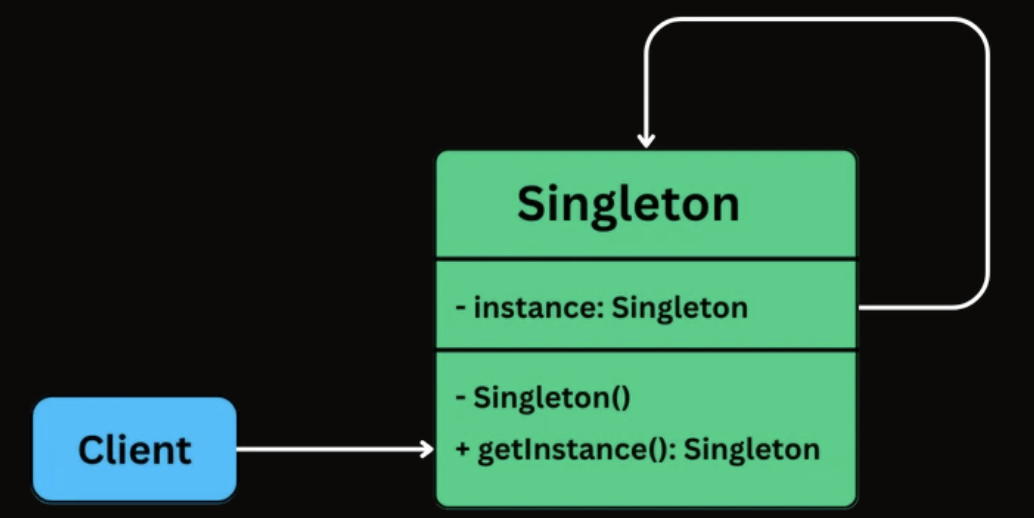
- An
instancefield stores the one and only Singleton object. - The constructor is private or otherwise restricted, so other code cannot create new instances directly.
- A
getInstance()(or similar) class-level method returns the shared instance and is accessible from anywhere.
🛠 Implementation
class Singleton {
    // Holds the single shared instance (initially not created)
    private static Singleton instance;

    // Private constructor prevents creating objects from outside the class
    private Singleton() {}

    // Global access point to get the Singleton instance
    public static Singleton getInstance() {

        // Create the instance only when first requested (initialization)
        if (instance == null) {
            instance = new Singleton();
        }

        // Return the shared instance
        return instance;
    }
}
Factory Method
📖 Definition
The Factory Method Design Pattern is a creational pattern that provides an interface for creating objects in a superclass, but allows subclasses to alter the type of objects that will be created.
It’s particularly useful in situations where:
- The exact type of object to be created isn’t known until runtime.
- Object creation logic is complex, repetitive, or needs encapsulation.
- You want to follow the Open/Closed Principle, open for extension, closed for modification.
🧩 Class Diagram
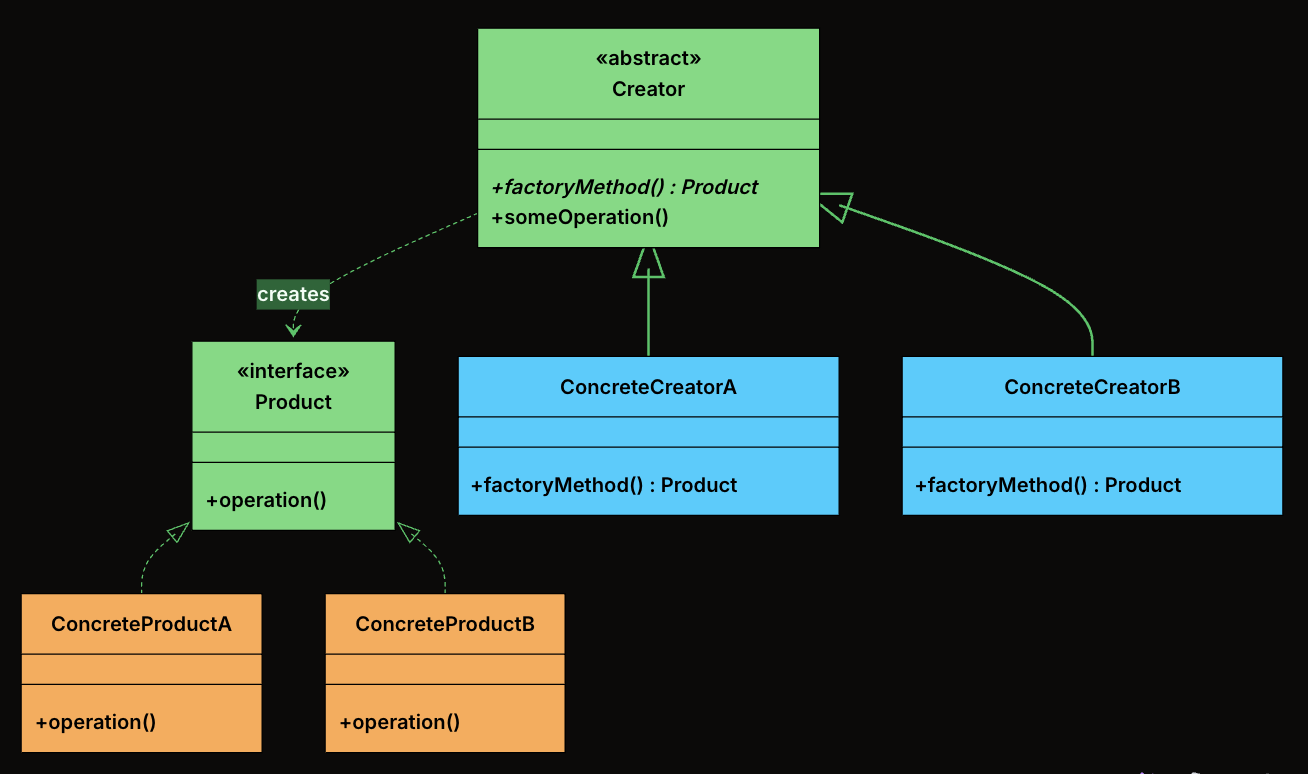
-
Product: The interface or abstract class that defines the contract for all objects the factory method creates. Every concrete product implements this interface, which means the rest of the system can work with any product without knowing its concrete type.
-
ConcreteProduct: The actual classes that implement the Product interface. Each one provides its own behavior.
-
Creator: An abstract class (or an interface) that declares the factory method, which returns an object of type Product.
-
ConcreteCreator: Subclasses of Creator that override the factory method to return a specific ConcreteProduct. Each creator is paired with exactly one product type.
🛠 Implementation
- Define the Product Interface
interface Notification {
    public void send(String message);
}
- Define Concrete Products
class EmailNotification implements Notification {
    @Override
    public void send(String message) {
        System.out.println("Sending email: " + message);
    }
}

class SMSNotification implements Notification {
    @Override
    public void send(String message) {
        System.out.println("Sending SMS: " + message);
    }
}

class PushNotification implements Notification {
    @Override
    public void send(String message) {
        System.out.println("Sending push notification: " + message);
    }
}

class SlackNotification implements Notification {
    @Override
    public void send(String message) {
        System.out.println("Sending Slack message: " + message);
    }
}
- Define Abstract Creator
abstract class NotificationCreator {
    // Factory Method - subclasses decide what to create
    public abstract Notification createNotification();

    // Shared logic that uses the factory method
    public void send(String message) {
        Notification notification = createNotification();
        notification.send(message);
    }
}
- Define Concrete Creators
class EmailNotificationCreator extends NotificationCreator {
    @Override
    public Notification createNotification() {
        return new EmailNotification();
    }
}

class SMSNotificationCreator extends NotificationCreator {
    @Override
    public Notification createNotification() {
        return new SMSNotification();
    }
}

class PushNotificationCreator extends NotificationCreator {
    @Override
    public Notification createNotification() {
        return new PushNotification();
    }
}

class SlackNotificationCreator extends NotificationCreator {
    @Override
    public Notification createNotification() {
        return new SlackNotification();
    }
}
- Client Code
public class FactoryMethodDemo {
    public static void main(String[] args) {
        NotificationCreator creator;

        // Send Email
        creator = new EmailNotificationCreator();
        creator.send("Welcome to our platform!");

        // Send SMS
        creator = new SMSNotificationCreator();
        creator.send("Your OTP is 123456");

        // Send Push Notification
        creator = new PushNotificationCreator();
        creator.send("You have a new follower!");

        // Send Slack Message
        creator = new SlackNotificationCreator();
        creator.send("Standup in 10 minutes!");
    }
}
Abstract Factory
📖 Definition
The Abstract Factory Design Pattern is a creational pattern that provides an interface for creating families of related or dependent objects without specifying their concrete classes.
It’s particularly useful in situations where:
- You need to create objects that must be used together and are part of a consistent family (e.g., GUI elements like buttons, checkboxes, and menus).
- Your system must support multiple configurations, environments, or product variants (e.g., light vs. dark themes, Windows vs. macOS look-and-feel).
- You want to enforce consistency across related objects, ensuring that they are all created from the same factory.
🧩 Class Diagram
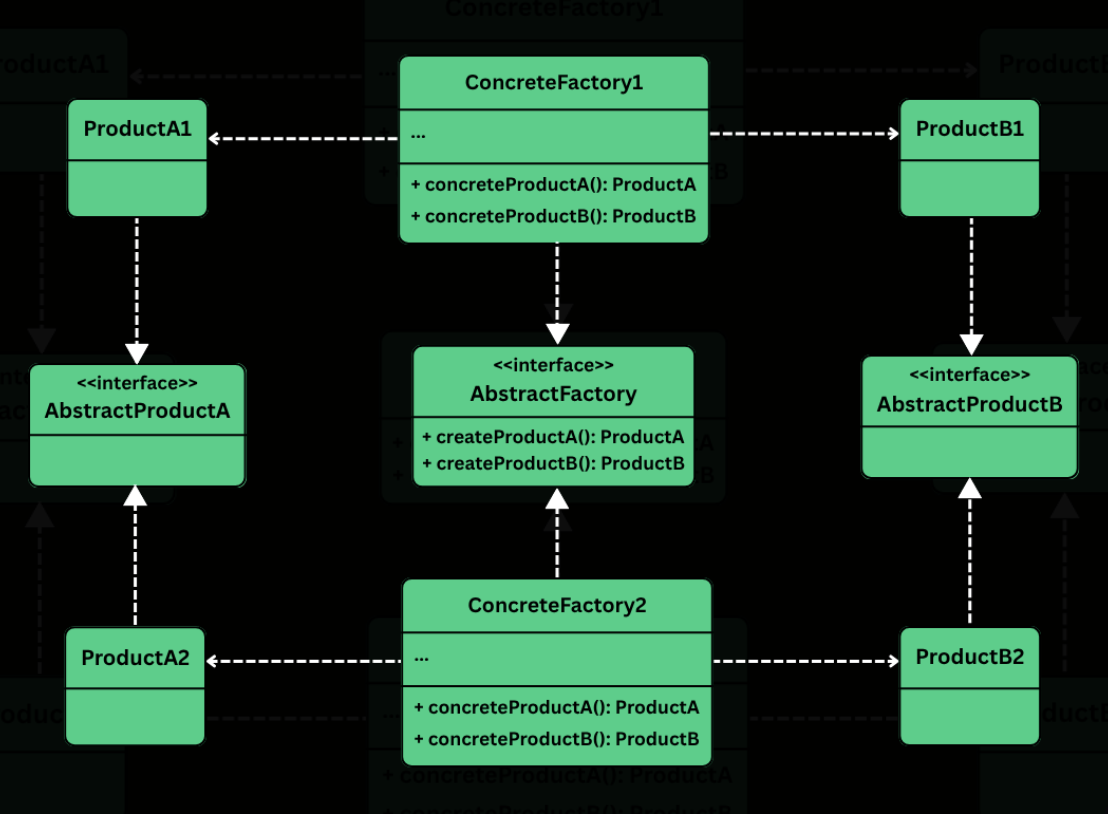
-
Abstract Factory
- Defines a common interface for creating a family of related products.
- Typically includes factory methods like createButton(), createCheckbox(), createTextField(), etc.
- Clients rely on this interface to create objects without knowing their concrete types.
-
Concrete Factory
- Implement the abstract factory interface.
- Create concrete product variants that belong to a specific family or platform.
- Each factory ensures that all components it produces are compatible (i.e., belong to the same platform/theme).
-
Abstract Product
- Define the interfaces or abstract classes for a set of related components.
- All product variants for a given type (e.g., WindowsButton, MacOSButton) will implement these interfaces.
-
Concrete Product
- Implement the abstract product interfaces.
- Contain platform-specific logic and appearance for the components.
-
Client
- Uses the abstract factory and abstract product interfaces.
- Is completely unaware of the concrete classes it is using — it only interacts with the factory and product interfaces.
- Can switch entire product families (e.g., from Windows to macOS) by changing the factory without touching UI logic.
🛠 Implementation
- Define Abstract Product Interfaces
- Button
interface Button {
    void paint();
    void onClick();
}
- Checkbox
interface Checkbox {
    void paint();
    void onSelect();
}
- Create Concrete Products
- Windows Products
class WindowsButton implements Button {
    @Override
    public void paint() {
        System.out.println("Painting a Windows-style button.");
    }

    @Override
    public void onClick() {
        System.out.println("Windows button clicked.");
    }
}

class WindowsCheckbox implements Checkbox {
    @Override
    public void paint() {
        System.out.println("Painting a Windows-style checkbox.");
    }

    @Override
    public void onSelect() {
        System.out.println("Windows checkbox selected.");
    }
}
- MacOS Products
class MacOSButton implements Button {
    @Override
    public void paint() {
        System.out.println("Painting a macOS-style button.");
    }

    @Override
    public void onClick() {
        System.out.println("macOS button clicked.");
    }
}

class MacOSCheckbox implements Checkbox {
    @Override
    public void paint() {
        System.out.println("Painting a macOS-style checkbox.");
    }

    @Override
    public void onSelect() {
        System.out.println("macOS checkbox selected.");
    }
}
- Define the Abstract Factory
interface GUIFactory {
    Button createButton();
    Checkbox createCheckbox();
}
- Implement Concrete Factories
- WindowsFactory
class WindowsFactory implements GUIFactory {
    @Override
    public Button createButton() {
        return new WindowsButton();
    }

    @Override
    public Checkbox createCheckbox() {
        return new WindowsCheckbox();
    }
}
- MacOSFactory
class MacOSFactory implements GUIFactory {
    @Override
    public Button createButton() {
        return new MacOSButton();
    }

    @Override
    public Checkbox createCheckbox() {
        return new MacOSCheckbox();
    }
}
- Client Code
class Application {
    private final Button button;
    private final Checkbox checkbox;

    public Application(GUIFactory factory) {
        this.button = factory.createButton();
        this.checkbox = factory.createCheckbox();
    }

    public void renderUI() {
        button.paint();
        checkbox.paint();
    }
}
- Wire Everything Together
public class AppLauncher {
    public static void main(String[] args) {
        // Simulate platform detection
        String os = System.getProperty("os.name");
        GUIFactory factory;

        if (os.contains("Windows")) {
            factory = new WindowsFactory();
        } else {
            factory = new MacOSFactory();
        }

        Application app = new Application(factory);
        app.renderUI();
    }
}
- Output (on MacOS)
Painting a macOS-style button.
Painting a macOS-style checkbox.
- Output (on Windows)
Painting a Windows-style button.
Painting a Windows-style checkbox.
Builder
📖 Definition
The Builder Design Pattern is a creational pattern that lets you construct complex objects step-by-step, separating the construction logic from the final representation.
Two ideas define the pattern:
- Step-by-step construction: Instead of passing everything to a constructor at once, you set each field through individual method calls. You only call the methods for the fields you need.
- Fluent interface: Each setter method returns the builder itself, allowing you to chain calls into a single readable expression that ends with
build().
🧩 Class Diagram
The Builder pattern involves four participants. In many real-world implementations, the Director is optional and is often skipped when using fluent builders.
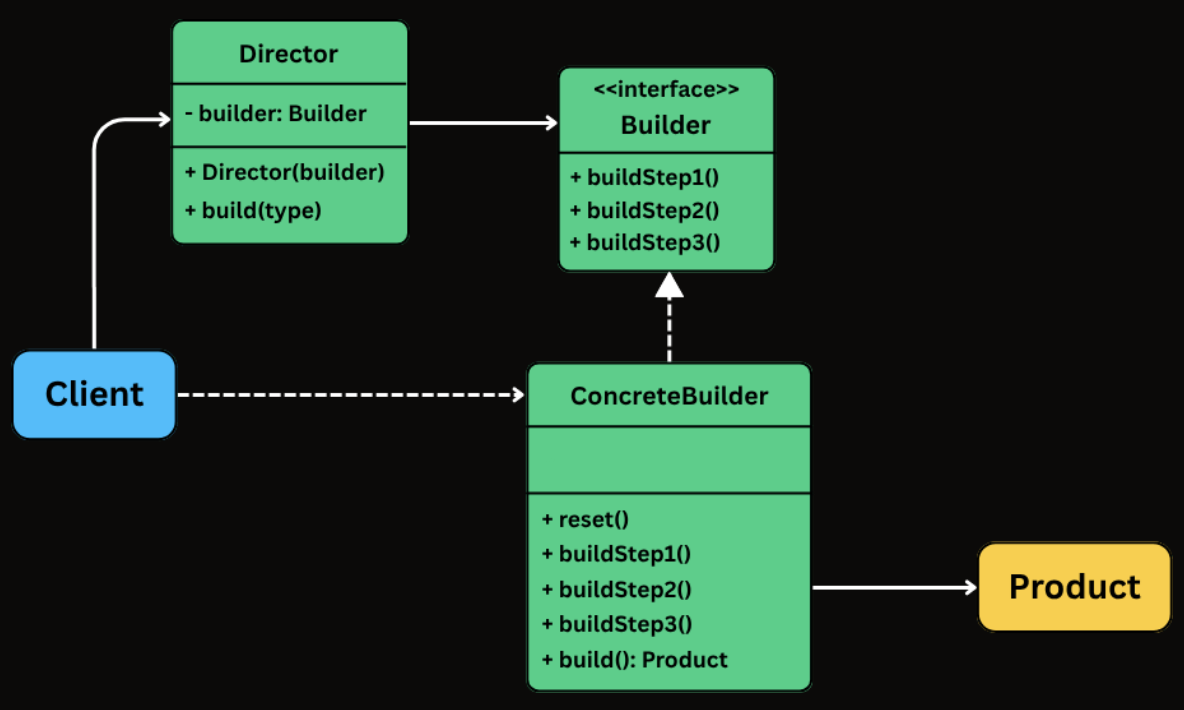
-
Builder
- Exposes methods to configure the product step by step.
- Typically returns the builder itself from each method to enable fluent chaining.
- Often implemented as a static nested class inside the product class.
-
ConcreteBuilder
- Implements the builder API (either via an interface or directly through fluent methods).
- Stores intermediate state for the object being constructed.
- Implements build() to validate inputs and produce the final product instance.
-
Product
- The complex object being constructed.
- Often immutable and created only through the builder.
- Commonly has a private constructor that copies state from the builder.
-
Director (Optional)
- Coordinates the construction process by calling builder steps in a specific sequence.
- Useful when you want to encapsulate standard configurations or reusable construction sequences.
- Often omitted in fluent builder style, where the client effectively plays this role by chaining builder calls.
🛠 Implementation
- Create the Product and Builder
class HttpRequest {
    // Required
    private final String url;

    // Optional
    private final String method;
    private final Map<String, String> headers;
    private final Map<String, String> queryParams;
    private final String body;
    private final int timeout;

    // Private constructor - only the Builder can call this
    private HttpRequest(Builder builder) {
        this.url = builder.url;
        this.method = builder.method;
        this.headers = Collections.unmodifiableMap(new HashMap<>(builder.headers));
        this.queryParams = Collections.unmodifiableMap(new HashMap<>(builder.queryParams));
        this.body = builder.body;
        this.timeout = builder.timeout;
    }

    public String getUrl() { return url; }
    public String getMethod() { return method; }
    public Map<String, String> getHeaders() { return headers; }
    public Map<String, String> getQueryParams() { return queryParams; }
    public String getBody() { return body; }
    public int getTimeout() { return timeout; }

    @Override
    public String toString() {
        return "HttpRequest{url='" + url + "', method='" + method +
               "', headers=" + headers + ", queryParams=" + queryParams +
               ", body='" + body + "', timeout=" + timeout + "}";
    }

    // Static nested Builder class
    public static class Builder {
        private final String url; // required
        private String method = "GET";
        private Map<String, String> headers = new HashMap<>();
        private Map<String, String> queryParams = new HashMap<>();
        private String body;
        private int timeout = 30000;

        public Builder(String url) {
            this.url = url;
        }

        public Builder method(String method) {
            this.method = method;
            return this;
        }

        public Builder addHeader(String key, String value) {
            this.headers.put(key, value);
            return this;
        }

        public Builder addQueryParam(String key, String value) {
            this.queryParams.put(key, value);
            return this;
        }

        public Builder body(String body) {
            this.body = body;
            return this;
        }

        public Builder timeout(int timeout) {
            this.timeout = timeout;
            return this;
        }

        public HttpRequest build() {
            return new HttpRequest(this);
        }
    }
}
- Using the Builder from Client Code
public class Main {
    public static void main(String[] args) {
        // Simple GET request - just the URL
        HttpRequest get = new HttpRequest.Builder("https://api.example.com/users")
                .build();

        // POST with body and custom timeout
        HttpRequest post = new HttpRequest.Builder("https://api.example.com/users")
                .method("POST")
                .addHeader("Content-Type", "application/json")
                .body("{\"name\":\"Alice\",\"email\":\"alice@example.com\"}")
                .timeout(5000)
                .build();

        // Authenticated PUT with query parameters
        HttpRequest put = new HttpRequest.Builder("https://api.example.com/config")
                .method("PUT")
                .addHeader("Authorization", "Bearer token123")
                .addHeader("Content-Type", "application/json")
                .addQueryParam("env", "production")
                .addQueryParam("version", "2")
                .body("{\"feature_flag\":true}")
                .timeout(10000)
                .build();
    }
}
Structural Patterns
Table of Contents
Adapter
📖 Definition
The Adapter Design Pattern is a structural design pattern that allows incompatible interfaces to work together by converting the interface of one class into another that the client expects.
It’s particularly useful in situations where:
- You’re integrating with a legacy system or a third-party library that doesn’t match your current interface.
- You want to reuse existing functionality without modifying its source code.
- You need to bridge the gap between new and old code, or between systems built with different interface designs.
🧩 Class Diagram
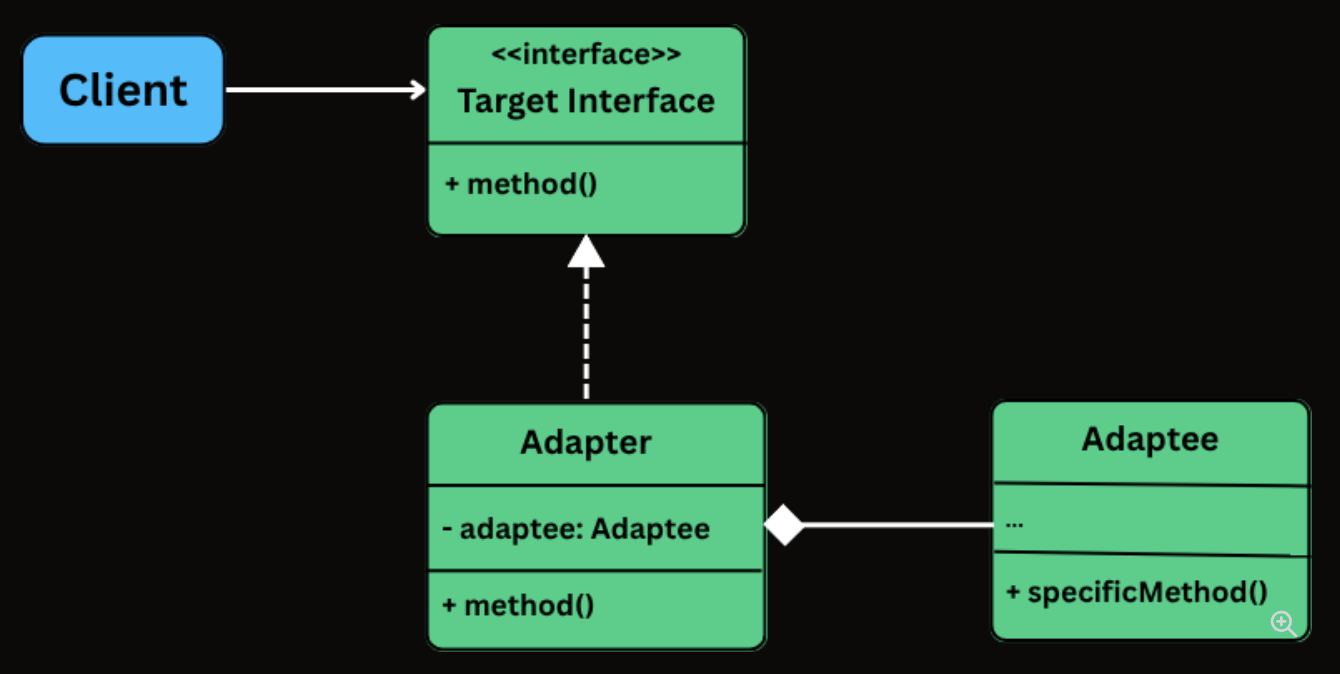
-
Target Interface: The interface that the client code depends on. Every method call from the client goes through this interface.
-
Adaptee: The existing class with a useful implementation but an incompatible interface.
-
Adapter: The translator. It implements the Target interface and holds a reference to the Adaptee, delegating calls with the necessary translation.
-
Client: The code that uses the Target interface. It is completely unaware of the Adaptee or the Adapter’s internal workings.
🛠 Implementation
- Define the Target Interface
interface PaymentProcessor {
    void processPayment(double amount, String currency);
    boolean isPaymentSuccessful();
    String getTransactionId();
}
- Create the Adaptee Class
class LegacyGateway {
    private long transactionReference;
    private boolean paymentSuccessful;

    public void executeTransaction(double totalAmount, String currency) {
        System.out.println("LegacyGateway: Executing " + currency + " " + totalAmount);
        transactionReference = System.nanoTime();
        paymentSuccessful = true;
        System.out.println("LegacyGateway: Done. Ref: " + transactionReference);
    }

    public boolean checkStatus(long ref) {
        System.out.println("LegacyGateway: Checking status for ref: " + ref);
        return paymentSuccessful;
    }

    public long getReferenceNumber() {
        return transactionReference;
    }
}
- Implement the Adapter Class
class LegacyGatewayAdapter implements PaymentProcessor {
    private final LegacyGateway legacyGateway;
    private long currentRef;

    public LegacyGatewayAdapter(LegacyGateway legacyGateway) {
        this.legacyGateway = legacyGateway;
    }

    @Override
    public void processPayment(double amount, String currency) {
        System.out.println("Adapter: Translating processPayment() for " + amount + " " + currency);
        legacyGateway.executeTransaction(amount, currency);
        currentRef = legacyGateway.getReferenceNumber(); // Store for later use
    }

    @Override
    public boolean isPaymentSuccessful() {
        return legacyGateway.checkStatus(currentRef);
    }

    @Override
    public String getTransactionId() {
        return "LEGACY_TXN_" + currentRef;
    }
}
- Client Code
public class ECommerceAppV2 {
    public static void main(String[] args) {
        // Modern processor
        PaymentProcessor processor = new InHousePaymentProcessor();
        CheckoutService modernCheckout = new CheckoutService(processor);
        System.out.println("--- Using Modern Processor ---");
        modernCheckout.checkout(199.99, "USD");

        // Legacy gateway through adapter
        System.out.println("\n--- Using Legacy Gateway via Adapter ---");
        LegacyGateway legacy = new LegacyGateway();
        processor = new LegacyGatewayAdapter(legacy);
        CheckoutService legacyCheckout = new CheckoutService(processor);
        legacyCheckout.checkout(75.50, "USD");
    }
}
Bridge
📖 Definition
The Bridge Design Pattern is a structural pattern that lets you decouple an abstraction from its implementation, allowing the two to vary independently.
It’s particularly useful in situations where:
- You have classes that can be extended in multiple orthogonal dimensions (e.g., shape vs. rendering technology, UI control vs. platform).
- You want to avoid a deep inheritance hierarchy that multiplies combinations of features.
- You need to combine multiple variations of behavior or implementation at runtime.
🧩 Class Diagram
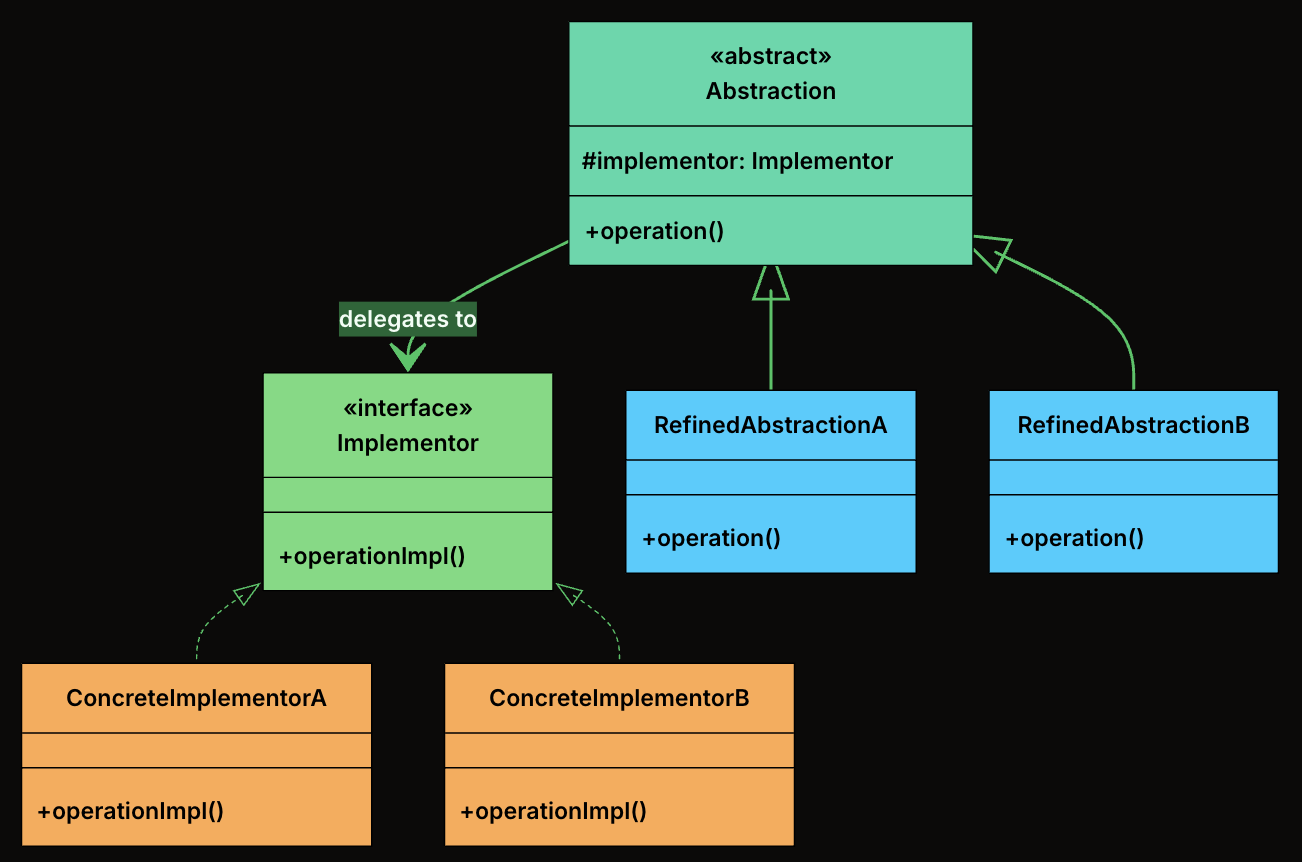
-
Abstraction: The high-level interface that clients interact with. It defines operations in terms that make sense to the domain (e.g., “draw a shape”) and delegates the low-level work to an implementor.
-
RefinedAbstraction: A concrete subclass of Abstraction that adds domain-specific state or behavior. It still delegates to the implementor for low-level operations.
-
Implementor: The interface that defines the low-level operations that concrete implementations must provide. This is the “other side” of the bridge.
-
ConcreteImplementors: A concrete class that implements the Implementor interface with a specific technology or strategy.
🛠 Implementation
- Define Implementator Interface
interface Renderer {
    void renderCircle(float radius);
    void renderRectangle(float width, float height);
}
- Create Concrete Implementations of the Renderer
- VectorRenderer
class VectorRenderer implements Renderer {
    @Override
    public void renderCircle(float radius) {
        System.out.println("Drawing a circle of radius " + radius + " using VECTOR rendering.");
    }

    @Override
    public void renderRectangle(float width, float height) {
        System.out.println("Drawing a rectangle " + width + "x" + height + " using VECTOR rendering.");
    }
}
- RasterRenderer
class RasterRenderer implements Renderer {
    @Override
    public void renderCircle(float radius) {
        System.out.println("Drawing pixels for a circle of radius " + radius + " (RASTER).");
    }

    @Override
    public void renderRectangle(float width, float height) {
        System.out.println("Drawing pixels for a rectangle " + width + "x" + height + " (RASTER).");
    }
}
- Define the Abstraction
abstract class Shape {
    protected Renderer renderer;

    public Shape(Renderer renderer) {
        this.renderer = renderer;
    }

    public abstract void draw();
}
- Create Concrete Shapes
- Circle
class Circle extends Shape {
    private final float radius;

    public Circle(Renderer renderer, float radius) {
        super(renderer);
        this.radius = radius;
    }

    @Override
    public void draw() {
        renderer.renderCircle(radius);
    }
}
- Rectangle
class Rectangle extends Shape {
    private final float width;
    private final float height;

    public Rectangle(Renderer renderer, float width, float height) {
        super(renderer);
        this.width = width;
        this.height = height;
    }

    @Override
    public void draw() {
        renderer.renderRectangle(width, height);
    }
}
- Client Code
public class BridgeDemo {
    public static void main(String[] args) {
        Renderer vector = new VectorRenderer();
        Renderer raster = new RasterRenderer();

        Shape circle1 = new Circle(vector, 5);
        Shape circle2 = new Circle(raster, 5);

        Shape rectangle1 = new Rectangle(vector, 10, 4);
        Shape rectangle2 = new Rectangle(raster, 10, 4);

        circle1.draw();     // Vector
        circle2.draw();     // Raster
        rectangle1.draw();  // Vector
        rectangle2.draw();  // Raster
    }
}
Decorator
📖 Definition
The Decorator Design Pattern is a structural pattern that lets you dynamically add new behavior or responsibilities to objects without modifying their underlying code.
It’s particularly useful in situations where:
- You want to extend the functionality of a class without subclassing it.
- You need to compose behaviors at runtime, in various combinations.
- You want to avoid bloated classes filled with if-else logic for optional features.
🧩 Class Diagram
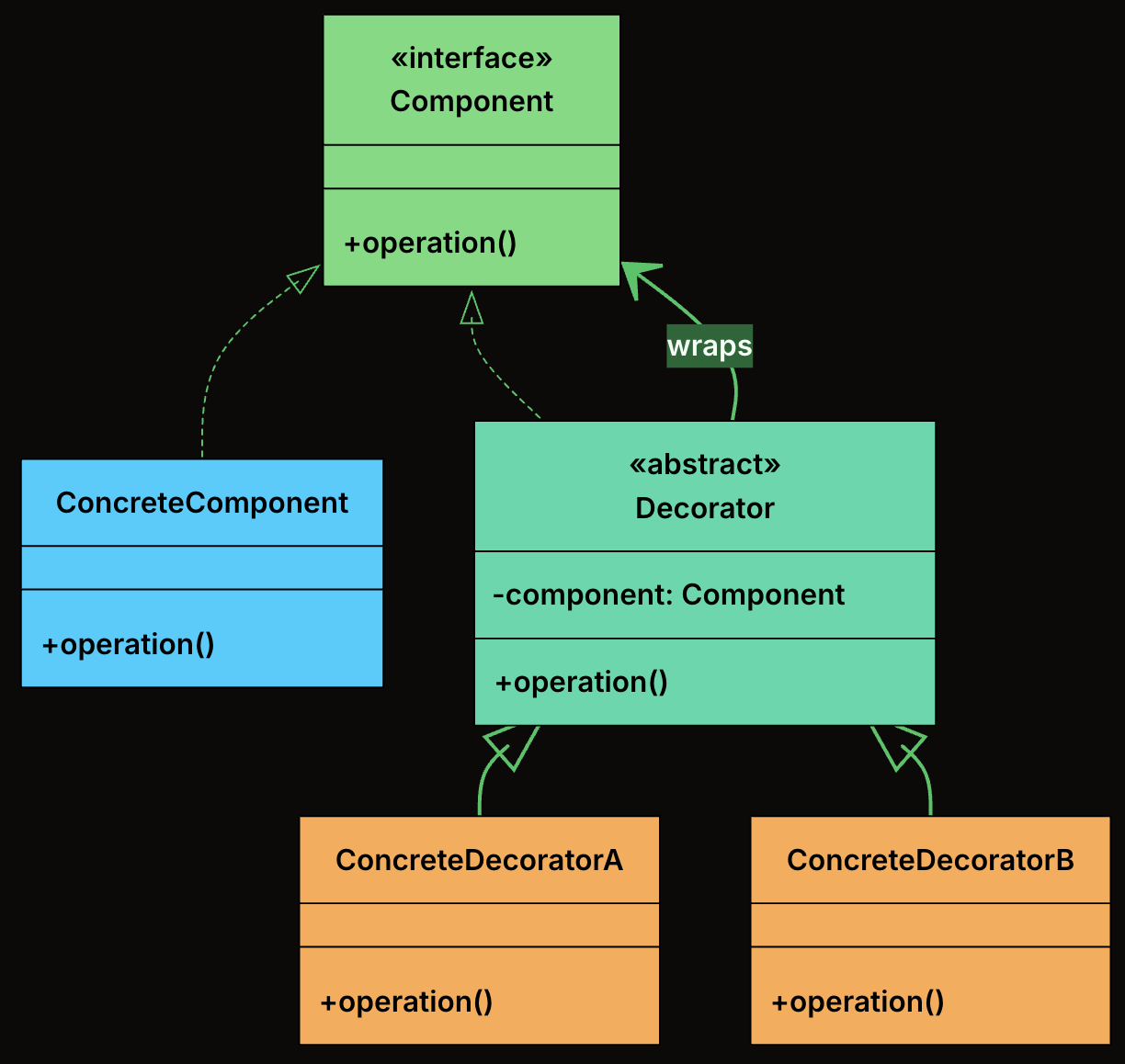
-
Component: Declares the common interface that both the core object and all decorators implement.
-
ConcreteComponent: The base object that can be wrapped with decorators. It provides the default behavior.
-
Decorator: An abstract class that implements the Component interface and holds a reference to another Component. It forwards calls to the wrapped object.
-
ConcreteDecorator: Extend the base decorator to add new functionality before/after calling the wrapped component’s method.
🛠 Implementation
- Define the Component Interface
interface TextView {
    void render();
}
- Implement the Concrete Component
class PlainTextView implements TextView {
    private final String text;

    public PlainTextView(String text) {
        this.text = text;
    }

    @Override
    public void render() {
        System.out.print(text);
    }
}
- Create the Abstract Decorator
abstract class TextDecorator implements TextView {
    protected final TextView inner;

    public TextDecorator(TextView inner) {
        this.inner = inner;
    }
}
- Implement Concrete Decorators
- Bold Decorator
class BoldDecorator extends TextDecorator {
    public BoldDecorator(TextView inner) {
        super(inner);
    }

    @Override
    public void render() {
        System.out.print("<b>");
        inner.render();
        System.out.print("</b>");
    }
}
- Italic Decorator
class ItalicDecorator extends TextDecorator {
    public ItalicDecorator(TextView inner) {
        super(inner);
    }

    @Override
    public void render() {
        System.out.print("<i>");
        inner.render();
        System.out.print("</i>");
    }
}
- Underline Decorator
class UnderlineDecorator extends TextDecorator {
    public UnderlineDecorator(TextView inner) {
        super(inner);
    }

    @Override
    public void render() {
        System.out.print("<u>");
        inner.render();
        System.out.print("</u>");
    }
}
- Client Code
public class TextRendererApp {
    public static void main(String[] args) {
        TextView text = new PlainTextView("Hello, World!");

        // Plain text
        System.out.print("Plain:                   ");
        text.render();
        System.out.println();

        // Single decorator: Bold
        System.out.print("Bold:                    ");
        TextView boldText = new BoldDecorator(text);
        boldText.render();
        System.out.println();

        // Two decorators: Italic + Underline
        System.out.print("Italic + Underline:      ");
        TextView italicUnderline = new UnderlineDecorator(new ItalicDecorator(text));
        italicUnderline.render();
        System.out.println();

        // Three decorators: Bold + Italic + Underline
        System.out.print("Bold + Italic + Underline: ");
        TextView allStyles = new UnderlineDecorator(
            new ItalicDecorator(new BoldDecorator(text)));
        allStyles.render();
        System.out.println();
    }
}
- Output
Plain:                   Hello, World!
Bold:                    <b>Hello, World!</b>
Italic + Underline:      <u><i>Hello, World!</i></u>
Bold + Italic + Underline: <u><i><b>Hello, World!</b></i></u>
Composite
📖 Definition
The Composite Design Pattern is a structural pattern that lets you treat individual objects and compositions of objects uniformly.
It allows you to build tree-like structures (e.g., file systems, UI hierarchies, organizational charts) where clients can work with both single elements and groups of elements using the same interface.
It’s particularly useful in situations where:
- You need to represent part-whole hierarchies.
- You want to perform operations on both leaf nodes and composite nodes in a consistent way.
- You want to avoid writing special-case logic to distinguish between “single” and “grouped” objects.
🧩 Class Diagram
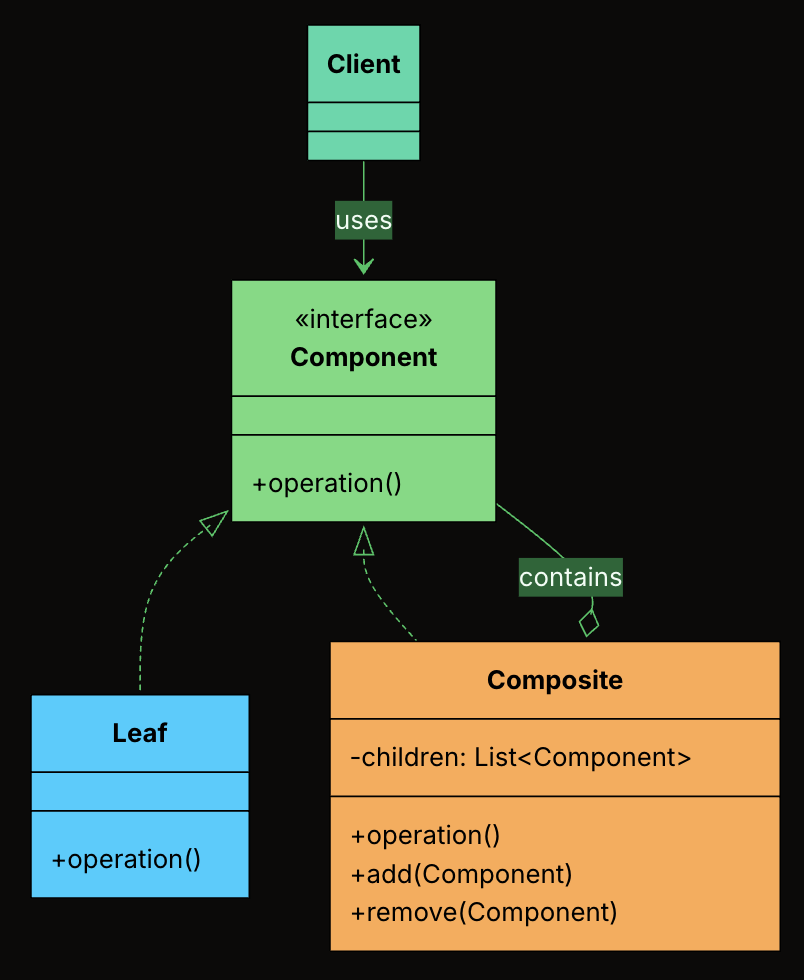
-
Component Interface: The shared interface that declares operations common to both leaves and composites.
-
Leaf: An end object in the tree that has no children. It implements the Component interface directly.
-
Composite: A container that holds child Components and implements the Component interface by delegating to its children.
-
Client: Works with the tree through the Component interface, without knowing whether it holds a leaf or a composite.
🛠 Implementation
- Define the Component Interface
interface FileSystemItem {
    int getSize();
    void printStructure(String indent);
    void delete();
}
- Create the Leaf Class
class File implements FileSystemItem {
    private final String name;
    private final int size;

    public File(String name, int size) {
        this.name = name;
        this.size = size;
    }

    @Override
    public int getSize() {
        return size;
    }

    @Override
    public void printStructure(String indent) {
        System.out.println(indent + "- " + name + " (" + size + " KB)");
    }

    @Override
    public void delete() {
        System.out.println("Deleting file: " + name);
    }
}
- Create the Composite Class
class Folder implements FileSystemItem {
    private final String name;
    private final List<FileSystemItem> children = new ArrayList<>();

    public Folder(String name) {
        this.name = name;
    }

    public void addItem(FileSystemItem item) {
        children.add(item);
    }

    public void removeItem(FileSystemItem item) {
        children.remove(item);
    }

    @Override
    public int getSize() {
        int total = 0;
        for (FileSystemItem item : children) {
            total += item.getSize();
        }
        return total;
    }

    @Override
    public void printStructure(String indent) {
        System.out.println(indent + "+ " + name + "/");
        for (FileSystemItem item : children) {
            item.printStructure(indent + "  ");
        }
    }

    @Override
    public void delete() {
        for (FileSystemItem item : children) {
            item.delete();
        }
        System.out.println("Deleting folder: " + name);
    }
}
- Client Code
public class FileExplorerApp {
    public static void main(String[] args) {
        FileSystemItem file1 = new File("readme.txt", 5);
        FileSystemItem file2 = new File("photo.jpg", 1500);
        FileSystemItem file3 = new File("data.csv", 300);

        Folder documents = new Folder("Documents");
        documents.addItem(file1);
        documents.addItem(file3);

        Folder pictures = new Folder("Pictures");
        pictures.addItem(file2);

        Folder home = new Folder("Home");
        home.addItem(documents);
        home.addItem(pictures);

        System.out.println("---- File Structure ----");
        home.printStructure("");

        System.out.println("\nTotal Size: " + home.getSize() + " KB");

        System.out.println("\n---- Deleting All ----");
        home.delete();
    }
}
- Output
---- File Structure ----
+ Home/
  + Documents/
    - readme.txt (5 KB)
    - data.csv (300 KB)
  + Pictures/
    - photo.jpg (1500 KB)

Total Size: 1805 KB

---- Deleting All ----
Deleting file: readme.txt
Deleting file: data.csv
Deleting folder: Documents
Deleting file: photo.jpg
Deleting folder: Pictures
Deleting folder: Home
Facade
📖 Definition
The Facade Design Pattern is a structural design pattern that provides a single, simplified interface to a complex subsystem. Instead of forcing clients to coordinate many moving parts, a facade hides the internal complexity and exposes a clean, easy-to-use entry point.
It’s particularly useful in situations where:
- Your system contains many interdependent classes or low-level APIs.
- The client doesn’t need to know how those parts work internally.
- You want to reduce coupling and make the system easier to learn and use.
🧩 Class Diagram
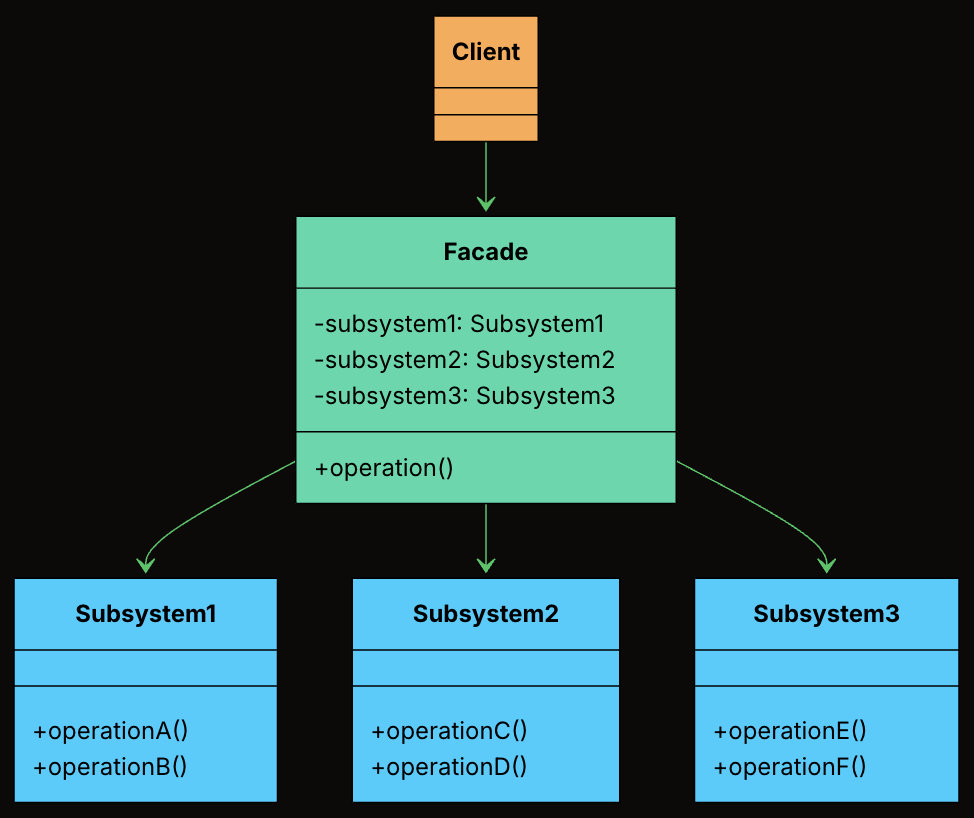
-
Facade: Knows which subsystem classes to use and in what order. Delegates requests to appropriate subsystem methods without exposing internal details to the client.
-
Subsystem Classes: Provides the actual business logic to handle a specific task. Do not know about the facade. Can still be used independently if needed.
-
Client: Uses the Facade to initiate a deployment, instead of interacting with the subsystem classes directly.
🛠 Implementation
- Define Facade Class
class DeploymentFacade {
private VersionControlSystem vcs = new VersionControlSystem();
private BuildSystem buildSystem = new BuildSystem();
private TestingFramework testingFramework = new TestingFramework();
private DeploymentTarget deploymentTarget = new DeploymentTarget();
public boolean deployApplication(String branch, String serverAddress) {
System.out.println("\nFACADE: --- Initiating FULL DEPLOYMENT for branch: " + branch + " to " + serverAddress + " ---");
boolean success = true;
try {
vcs.pullLatestChanges(branch);
if (!buildSystem.compileProject()) {
System.err.println("FACADE: DEPLOYMENT FAILED - Build compilation failed.");
return false;
}
String artifactPath = buildSystem.getArtifactPath();
if (!testingFramework.runUnitTests()) {
System.err.println("FACADE: DEPLOYMENT FAILED - Unit tests failed.");
return false;
}
if (!testingFramework.runIntegrationTests()) {
System.err.println("FACADE: DEPLOYMENT FAILED - Integration tests failed.");
return false;
}
deploymentTarget.transferArtifact(artifactPath, serverAddress);
deploymentTarget.activateNewVersion(serverAddress);
System.out.println("FACADE: APPLICATION DEPLOYED SUCCESSFULLY to " + serverAddress + "!");
} catch (Exception e) {
System.err.println("FACADE: DEPLOYMENT FAILED - An unexpected error occurred: " + e.getMessage());
e.printStackTrace();
success = false;
}
return success;
}
}
- Client Code
public class DeploymentAppFacade {
public static void main(String[] args) {
DeploymentFacade deploymentFacade = new DeploymentFacade();
// Deploy to production
deploymentFacade.deployApplication("main", "prod.server.example.com");
// Deploy a feature branch to staging
System.out.println("\n--- Deploying feature branch to staging ---");
deploymentFacade.deployApplication("feature/new-ui", "staging.server.example.com");
}
}
Behavioral Patterns
Table of Contents
Iterator
📖 Definition
The Iterator Design Pattern is a behavioral pattern that provides a standard way to access elements of a collection sequentially without exposing its internal structure.
At its core, the Iterator pattern is about separating the logic of how you move through a collection from the collection itself. Instead of letting clients directly access internal arrays, lists, or other data structures, the collection provides an iterator object that handles traversal.
It’s particularly useful in situations where:
- You need to traverse a collection (like a list, tree, or graph) in a consistent and flexible way.
- You want to support multiple ways to iterate (e.g., forward, backward, filtering, or skipping elements).
- You want to decouple traversal logic from collection structure, so the client doesn’t depend on the internal representation.
🧩 Class Diagram
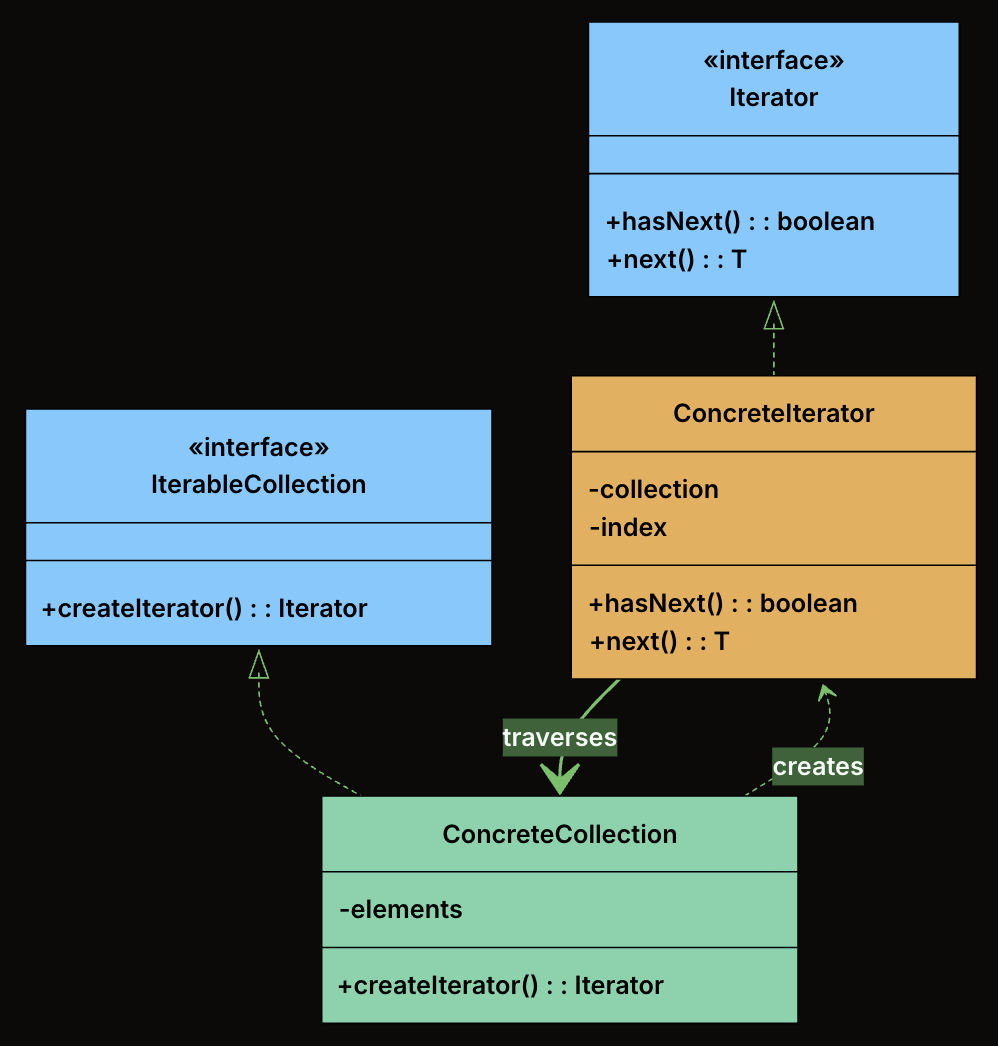
-
Iterator (interface): Declares the operations required to traverse a collection. At minimum, this includes hasNext() to check if more elements exist, and next() to retrieve the next element.
-
ConcreteIterator: Implements the Iterator interface for a specific collection. It maintains the current position within the collection and knows how to move to the next element.
-
IterableCollection (interface): Declares a method for creating an iterator. Any class implementing this interface promises it can be iterated.
-
ConcreteCollection: Implements the IterableCollection interface. It stores elements and returns an appropriate iterator when asked.
🛠 Implementation
- Define the Iterator Interface
interface Iterator<T> {
boolean hasNext();
T next();
}
- Define the IterableCollection Interface
interface IterableCollection<T> {
Iterator<T> createIterator();
}
- Implement the Concrete Collection
class Playlist implements IterableCollection<String> {
private final List<String> songs = new ArrayList<>();
public void addSong(String song) {
songs.add(song);
}
public String getSongAt(int index) {
return songs.get(index);
}
public int getSize() {
return songs.size();
}
@Override
public Iterator<String> createIterator() {
return new PlaylistIterator(this);
}
}
- Implement the Concrete Iterator
class PlaylistIterator implements Iterator<String> {
private final Playlist playlist;
private int index = 0;
public PlaylistIterator(Playlist playlist) {
this.playlist = playlist;
}
@Override
public boolean hasNext() {
return index < playlist.getSize();
}
@Override
public String next() {
return playlist.getSongAt(index++);
}
}
- Client Code
public class MusicPlayer {
public static void main(String[] args) {
Playlist playlist = new Playlist();
playlist.addSong("Shape of You");
playlist.addSong("Bohemian Rhapsody");
playlist.addSong("Blinding Lights");
Iterator<String> iterator = playlist.createIterator();
System.out.println("Now Playing:");
while (iterator.hasNext()) {
System.out.println(" 🎵 " + iterator.next());
}
}
}
- Output
Now Playing:
🎵 Shape of You
🎵 Bohemian Rhapsody
🎵 Blinding Lights
Strategy
📖 Definition
The Strategy Design Pattern is a behavioral pattern that lets you define a family of algorithms, encapsulate each one in its own class, and make them interchangeable at runtime.
This pattern becomes valuable when:
- You have multiple ways to perform the same operation, and the choice might change at runtime
- You want to avoid bloated conditional statements that select between different behaviors
- You need to isolate algorithm-specific data and logic from the code that uses it
- Different clients might need different algorithms for the same task
🧩 Class Diagram
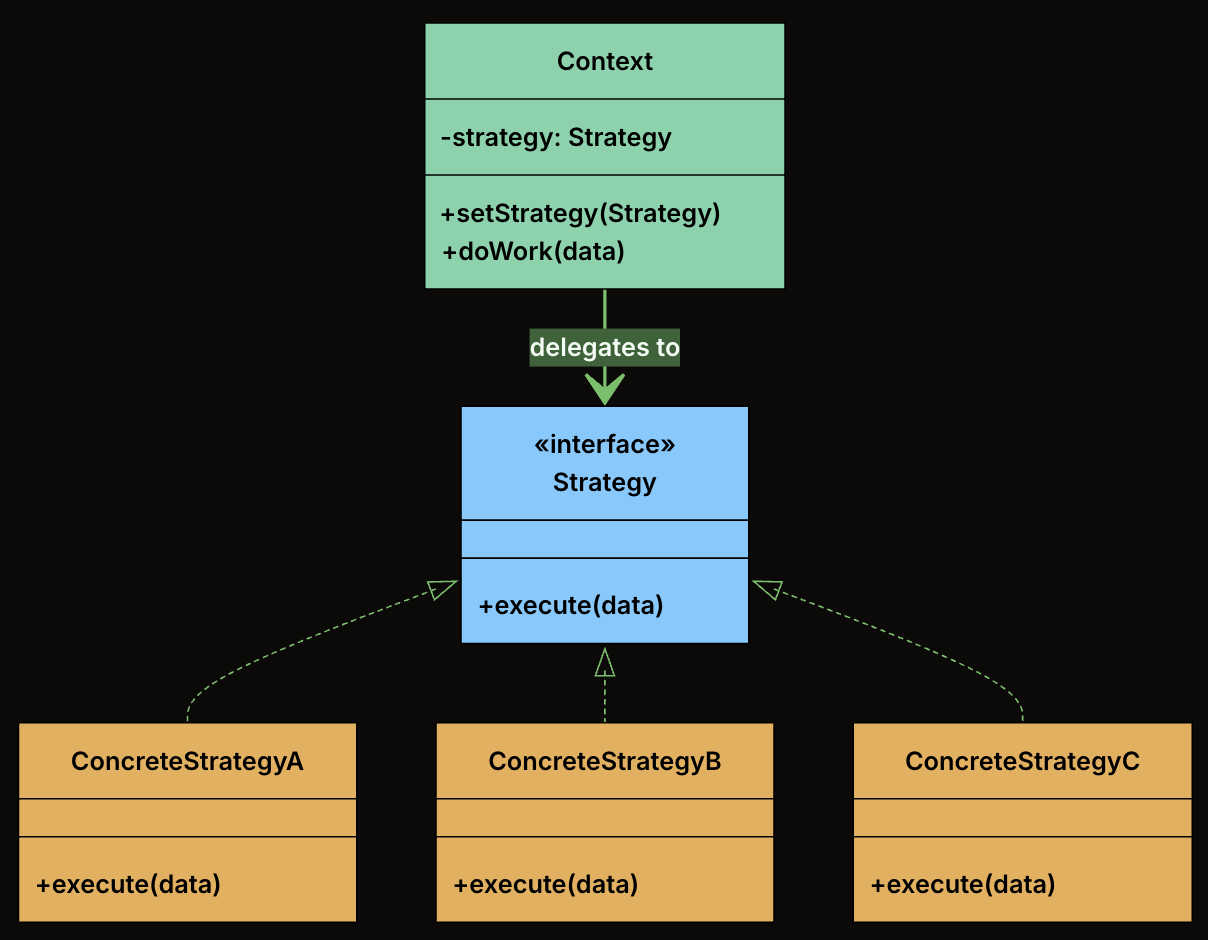
-
Strategy Interface: Declares the interface common to all supported algorithms. The Context uses this interface to call the algorithm defined by a ConcreteStrategy.
-
Concrete Strategies: Implements the algorithm using the Strategy interface. Each concrete strategy encapsulates a specific algorithm.
-
Context Class: This is the main class that uses a strategy to perform a task. It holds a reference to a Strategy object and delegates the calculation to it. The context doesn’t know or care which specific strategy is being used. It just knows that it has a strategy that can calculate a shipping cost.
🛠 Implementation
- Define the Strategy Interface
interface ShippingStrategy {
double calculateCost(Order order);
}
- Implement Concrete Strategies
- FlatRateShipping
class FlatRateShipping implements ShippingStrategy {
private double rate;
public FlatRateShipping(double rate) {
this.rate = rate;
}
@Override
public double calculateCost(Order order) {
System.out.println("Calculating with Flat Rate strategy ($" + rate + ")");
return rate;
}
}
- WeightBasedShipping
class WeightBasedShipping implements ShippingStrategy {
private final double ratePerKg;
public WeightBasedShipping(double ratePerKg) {
this.ratePerKg = ratePerKg;
}
@Override
public double calculateCost(Order order) {
System.out.println("Calculating with Weight-Based strategy ($" + ratePerKg + "/kg)");
return order.getTotalWeight() * ratePerKg;
}
}
- DistanceBasedShipping
class DistanceBasedShipping implements ShippingStrategy {
private double ratePerKm;
public DistanceBasedShipping(double ratePerKm) {
this.ratePerKm = ratePerKm;
}
@Override
public double calculateCost(Order order) {
System.out.println("Calculating with Distance-Based strategy for zone: " + order.getDestinationZone());
return switch (order.getDestinationZone()) {
case "ZoneA" -> ratePerKm * 5.0;
case "ZoneB" -> ratePerKm * 7.0;
default -> ratePerKm * 10.0;
};
}
}
- ThirdPartyApiShipping
class ThirdPartyApiShipping implements ShippingStrategy {
private final double baseFee;
private final double percentageFee;
public ThirdPartyApiShipping(double baseFee, double percentageFee) {
this.baseFee = baseFee;
this.percentageFee = percentageFee;
}
@Override
public double calculateCost(Order order) {
System.out.println("Calculating with Third-Party API strategy.");
// Simulate API call
return baseFee + (order.getOrderValue() * percentageFee);
}
}
- Create the Context Class
class ShippingCostService {
private ShippingStrategy strategy;
// Constructor to set initial strategy
public ShippingCostService(ShippingStrategy strategy) {
this.strategy = strategy;
}
// Method to change strategy at runtime
public void setStrategy(ShippingStrategy strategy) {
System.out.println("ShippingCostService: Strategy changed to " + strategy.getClass().getSimpleName());
this.strategy = strategy;
}
public double calculateShippingCost(Order order) {
if (strategy == null) {
throw new IllegalStateException("Shipping strategy not set.");
}
double cost = strategy.calculateCost(order);
System.out.println("ShippingCostService: Final Calculated Shipping Cost: $" + cost +
" (using " + strategy.getClass().getSimpleName() + ")");
return cost;
}
}
- Client Code
public class ECommerceAppV2 {
public static void main(String[] args) {
Order order1 = new Order();
// Create different strategy instances
ShippingStrategy flatRate = new FlatRateShipping(10.0);
ShippingStrategy weightBased = new WeightBasedShipping(2.5);
ShippingStrategy distanceBased = new DistanceBasedShipping(5.0);
ShippingStrategy thirdParty = new ThirdPartyApiShipping(7.5, 0.02);
// Create context with an initial strategy
ShippingCostService shippingService = new ShippingCostService(flatRate);
System.out.println("--- Order 1: Using Flat Rate (initial) ---");
shippingService.calculateShippingCost(order1);
System.out.println("\n--- Order 1: Changing to Weight-Based ---");
shippingService.setStrategy(weightBased);
shippingService.calculateShippingCost(order1);
System.out.println("\n--- Order 1: Changing to Distance-Based ---");
shippingService.setStrategy(distanceBased);
shippingService.calculateShippingCost(order1);
System.out.println("\n--- Order 1: Changing to Third-Party API ---");
shippingService.setStrategy(thirdParty);
shippingService.calculateShippingCost(order1);
// Adding a NEW strategy is easy:
// 1. Create a new class implementing ShippingStrategy (e.g., FreeShippingStrategy)
// 2. Client can then instantiate and use it:
// ShippingStrategy freeShipping = new FreeShippingStrategy();
// shippingService.setStrategy(freeShipping);
// shippingService.calculateShippingCost(primeMemberOrder);
// No modification to ShippingCostService is needed!
}
}
Observer
📖 Definition
The Observer Design Pattern is a behavioral pattern that defines a one-to-many dependency between objects so that when one object (the subject) changes its state, all its dependents (observers) are automatically notified and updated.
This pattern shines in scenarios where:
- You have multiple parts of the system that need to react to a change in one central component.
- You want to decouple the publisher of data from the subscribers who react to it.
- You need a dynamic, event-driven communication model without hardcoding who is listening to whom.
🧩 Class Diagram
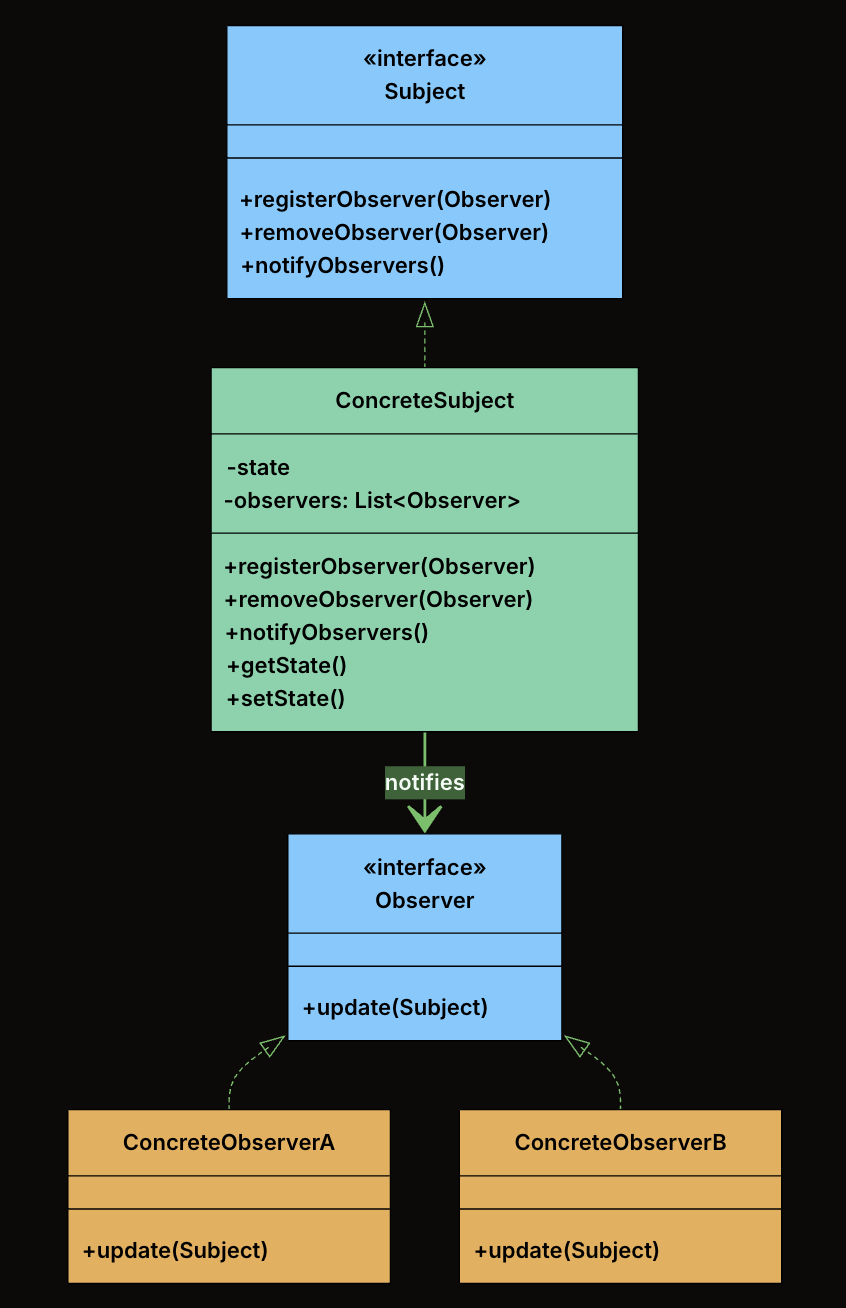
-
Subject Interface: Declares the interface for managing observers, registering, removing, and notifying them. Defines
registerObserver(),removeObserver(), andnotifyObservers()methods. The subject holds a list of observers typed to the Observer interface, not to concrete classes. This means any class that implements the Observer interface can register, and the subject never needs to know what it is. -
Observer Interface: Declares the
update()method that the subject calls when its state changes. All modules that want to listen to fitness data changes will implement this interface. -
ConcreteSubject: Implements the Subject interface. Holds the actual state and notifies observers when that state changes. Maintain a list of registered observers and calls
notifyObservers()whenever its state changes. -
ConcreteObservers: Implements the Observer interface. Defines what happens when the subject’s state changes. When
update()is called, each observer pulls relevant data from the subject and performs its own logic (e.g., update UI, log progress, send alerts).
🛠 Implementation
- Define the Observer Interface
interface FitnessDataObserver {
void update(FitnessData data);
}
- Define the Subject Interface
interface FitnessDataSubject {
void registerObserver(FitnessDataObserver observer);
void removeObserver(FitnessDataObserver observer);
void notifyObservers();
}
- Implement the ConcreteSubject
public class FitnessData implements FitnessDataSubject {
private int steps;
private int activeMinutes;
private int calories;
private final List<FitnessDataObserver> observers = new ArrayList<>();
@Override
public void registerObserver(FitnessDataObserver observer) {
observers.add(observer);
}
@Override
public void removeObserver(FitnessDataObserver observer) {
observers.remove(observer);
}
@Override
public void notifyObservers() {
for (FitnessDataObserver observer : observers) {
observer.update(this);
}
}
public void newFitnessDataPushed(int steps, int activeMinutes, int calories) {
this.steps = steps;
this.activeMinutes = activeMinutes;
this.calories = calories;
System.out.println("\nFitnessData: New data received – Steps: " + steps +
", Active Minutes: " + activeMinutes + ", Calories: " + calories);
notifyObservers();
}
public void dailyReset() {
this.steps = 0;
this.activeMinutes = 0;
this.calories = 0;
System.out.println("\nFitnessData: Daily reset performed.");
notifyObservers();
}
// Getters
public int getSteps() { return steps; }
public int getActiveMinutes() { return activeMinutes; }
public int getCalories() { return calories; }
}
- Implement Concrete Observers
- LiveActivityDisplay
class LiveActivityDisplay implements FitnessDataObserver {
@Override
public void update(FitnessData data) {
System.out.println("Live Display → Steps: " + data.getSteps() +
" | Active Minutes: " + data.getActiveMinutes() +
" | Calories: " + data.getCalories());
}
}
- ProgressLogger
class ProgressLogger implements FitnessDataObserver {
@Override
public void update(FitnessData data) {
System.out.println("Logger → Saving to DB: Steps=" + data.getSteps() +
", ActiveMinutes=" + data.getActiveMinutes() +
", Calories=" + data.getCalories());
// Simulated DB/file write...
}
}
- GoalNotifier
class GoalNotifier implements FitnessDataObserver {
private final int stepGoal = 10000;
private boolean goalReached = false;
@Override
public void update(FitnessData data) {
if (data.getSteps() >= stepGoal && !goalReached) {
System.out.println("Notifier → 🎉 Goal Reached! You've hit " + stepGoal + " steps!");
goalReached = true;
}
}
public void reset() {
goalReached = false;
}
}
- Client Code
public class FitnessAppObserverDemo {
public static void main(String[] args) {
FitnessData fitnessData = new FitnessData();
LiveActivityDisplay display = new LiveActivityDisplay();
ProgressLogger logger = new ProgressLogger();
GoalNotifier notifier = new GoalNotifier();
// Register observers
fitnessData.registerObserver(display);
fitnessData.registerObserver(logger);
fitnessData.registerObserver(notifier);
// Simulate updates
fitnessData.newFitnessDataPushed(500, 5, 20);
fitnessData.newFitnessDataPushed(9800, 85, 350);
fitnessData.newFitnessDataPushed(10100, 90, 380);
// Remove logger and reset notifier
fitnessData.removeObserver(logger);
notifier.reset();
fitnessData.dailyReset();
}
}
Design
Table of Contents
- 146. LRU Cache
- 155. Min Stack
- 173. Binary Search Tree Iterator
- 208. Implement Trie (Prefix Tree)
- 211. Design Add and Search Words Data Structure
- 225. Implement Stack using Queues
- 232. Implement Queue using Stacks
- 284. Peeking Iterator
- 303. Range Sum Query - Immutable
- 304. Range Sum Query 2D - Immutable
- 307. Range Sum Query - Mutable
- 341. Flatten Nested List Iterator
- 355. Design Twitter
- 703. Kth Largest Element in a Stream
- 705. Design HashSet
- 706. Design HashMap
- 933. Number of Recent Calls
- 1603. Design Parking System
- 1656. Design an Ordered Stream
- 3242. Design Neighbor Sum Service
146. LRU Cache
- LeetCode Link: LRU Cache
- Difficulty: Medium
- Topic(s): Design, Hash Table, Linked List
- Company: Twitch
🧠 Problem Statement
Design a data structure that follows the constraints of a Least Recently Used (LRU) cache.
Implement the LRUCache class:
LRUCache(int capacity)Initialize the LRU cache with positive sizecapacity.int get(int key)Return the value of thekeyif the key exists, otherwise return-1.void put(int key, int value)Update the value of thekeyif thekeyexists. Otherwise, add thekey-valuepair to the cache. If the number of keys exceeds thecapacityfrom this operation, evict the least recently used key.
The functions get and put must each run in O(1) average time complexity.
Example 1:
Input
["LRUCache", "put", "put", "get", "put", "get", "put", "get", "get", "get"]
[[2], [1, 1], [2, 2], [1], [3, 3], [2], [4, 4], [1], [3], [4]]
Output
[null, null, null, 1, null, -1, null, -1, 3, 4]
Explanation
LRUCache lRUCache = new LRUCache(2);
lRUCache.put(1, 1); // cache is {1=1}
lRUCache.put(2, 2); // cache is {1=1, 2=2}
lRUCache.get(1); // return 1
lRUCache.put(3, 3); // LRU key was 2, evicts key 2, cache is {1=1, 3=3}
lRUCache.get(2); // returns -1 (not found)
lRUCache.put(4, 4); // LRU key was 1, evicts key 1, cache is {4=4, 3=3}
lRUCache.get(1); // return -1 (not found)
lRUCache.get(3); // return 3
lRUCache.get(4); // return 4
🧩 Approach
To implement an LRU Cache, we can use a combination of a hash map and a doubly linked list. The hash map will allow us to access the cache items in O(1) time, while the doubly linked list will help us maintain the order of usage of the cache items. The most recently used item will be at the end of the list, and the least recently used item will be at the beginning of the list. When we access an item, we will move it to the end of the list to mark it as most recently used. When we need to evict an item due to capacity constraints, we will remove the item at the beginning of the list, which is the least recently used item.
💡 Solution
from typing import Optional, Dict
class Node:
def __init__(self, key: int, value: int):
"""Initializes a Node with the given key and value.
Args:
key (int): The key associated with the node.
value (int): The value associated with the node.
Returns:
None
"""
self.key: int = key
self.value: int = value
self.prev: Optional[Node] = None
self.next: Optional[Node] = None
class LRUCache:
def __init__(self, capacity: int):
"""Initializes the LRUCache object with the given capacity.
Args:
capacity (int): The maximum number of items that the cache can hold.
Returns:
None
"""
self.__capacity: int = capacity
self.__hashmap: Dict[int, Node] = {}
self.__left: Node = Node(0, 0)
self.__right: Node = Node(0, 0)
self.__left.next = self.__right
self.__right.prev = self.__left
def __insert(self, node: Node) -> None:
"""Inserts a node at the end of the doubly linked list (right before the right dummy node).
Args:
node (Node): The node to be inserted into the list.
Returns:
None
"""
prev: Node = self.__right.prev
nxt: Node = self.__right
prev.next = node
nxt.prev = node
node.prev = prev
node.next = nxt
def __remove(self, node: Node) -> None:
"""Removes a node from the doubly linked list.
Args:
node (Node): The node to be removed from the list.
Returns:
None
"""
prev: Node = node.prev
nxt: Node = node.next
prev.next = nxt
nxt.prev = prev
def get(self, key: int) -> int:
"""Returns the value of the key if the key exists, otherwise returns -1.
Args:
key (int): The key to be accessed in the cache.
Returns:
int: The value associated with the key if it exists, otherwise -1.
"""
if key in self.__hashmap:
self.__remove(self.__hashmap[key])
self.__insert(self.__hashmap[key])
return self.__hashmap[key].value
return -1
def put(self, key: int, value: int) -> None:
"""Updates the value of the key if the key exists. Otherwise, adds the key-value pair to the cache. If the number of keys exceeds the capacity from this operation, evicts the least recently used key.
Args:
key (int): The key to be added or updated in the cache.
value (int): The value to be associated with the key.
Returns:
None
"""
if key in self.__hashmap:
self.__remove(self.__hashmap[key])
self.__hashmap[key] = Node(key, value)
self.__insert(self.__hashmap[key])
if len(self.__hashmap) > self.__capacity:
lru: Node = self.__left.next
self.__remove(lru)
del self.__hashmap[lru.key]
🧮 Complexity Analysis
- Time Complexity:
get:O(1)put:O(1)
- Space Complexity:
O(n)wherenis the capacity of the cache.
155. Min Stack
- LeetCode Link: Min Stack
- Difficulty: Easy
- Topic(s): Design, Stack
- Company: Amazon
🧠 Problem Statement
Design a stack that supports push, pop, top, and retrieving the minimum element in constant time.
Implement the
MinStackclass:
MinStack()initializes the stack object.void push(int val)pushes the elementvalonto the stack.void pop()removes the element on the top of the stack.int top()gets the top element of the stack.int getMin()retrieves the minimum element in the stack.You must implement a solution with
O(1)time complexity for each function.Example 1:
Input ["MinStack","push","push","push","getMin","pop","top","getMin"] [[],[-2],[0],[-3],[],[],[],[]] Output [null,null,null,null,-3,null,0,-2] Explanation MinStack minStack = new MinStack(); minStack.push(-2); minStack.push(0); minStack.push(-3); minStack.getMin(); // return -3 minStack.pop(); minStack.top(); // return 0 minStack.getMin(); // return -2
🧩 Approach
To implement a stack that supports retrieving the minimum element in constant time, we can use two stacks. The first stack will be used to store all the elements of the stack, while the second stack will be used to keep track of the minimum elements. Whenever we push a new element onto the main stack, we compare it with the current minimum (the top of the minimum stack). If the new element is smaller than or equal to the current minimum, we also push it onto the minimum stack. When we pop an element from the main stack, if that element is the same as the current minimum, we also pop it from the minimum stack. This way, the top of the minimum stack will always represent the minimum element in the main stack.
💡 Solution
from typing import List
class MinStack:
def __init__(self):
self.__stack: List[int] = []
self.__minStack: List[int] = []
def push(self, val: int) -> None:
"""Pushes an element onto the stack and updates the minimum stack if necessary.
Args:
val (int): The value to be pushed onto the stack.
Returns:
None
"""
self.__stack.append(val)
val: int = min(val, self.__minStack[-1] if self.__minStack else val)
self.__minStack.append(val)
def pop(self) -> None:
"""Removes the element on the top of the stack and updates the minimum stack if necessary.
Args:
None
Returns:
None
"""
self.__stack.pop()
self.__minStack.pop()
def top(self) -> int:
"""Returns the top element of the stack.
Args:
None
Returns:
int: The element at the top of the stack.
"""
return self.__stack[-1]
def getMin(self) -> int:
"""Retrieves the minimum element in the stack.
Args:
None
Returns:
int: The minimum element in the stack.
"""
return self.__minStack[-1]
🧮 Complexity Analysis
- Time Complexity:
push:O(1)pop:O(1)top:O(1)getMin:O(1)
- Space Complexity:
O(n)wherenis the number of elements in the stack.
173. Binary Search Tree Iterator
- LeetCode Link: Binary Search Tree Iterator
- Difficulty: Medium
- Topic(s): Design, Tree, Stack
- Company: Meta
🧠 Problem Statement
Implement the
BSTIteratorclass that represents an iterator over the in-order traversal of a binary search tree (BST):
BSTIterator(TreeNode root)Initializes an object of theBSTIteratorclass. Therootof the BST is given as part of the constructor. The pointer should be initialized to a non-existent number smaller than any element in the BST.boolean hasNext()Returnstrueif there exists a number in the traversal to the right of the pointer, otherwise returnsfalse.int next()Moves the pointer to the right, then returns the number at the pointer.Notice that by initializing the pointer to a non-existent smallest number, the first call to
next()will return the smallest element in the BST.You may assume that
next()calls will always be valid. That is, there will be at least a next number in the in-order traversal whennext()is called.Example 1:
Input ["BSTIterator", "next", "next", "hasNext", "next", "hasNext", "next", "hasNext", "next", "hasNext"] [[[7, 3, 15, null, null, 9, 20]], [], [], [], [], [], [], [], [], []] Output [null, 3, 7, true, 9, true, 15, true, 20, false] Explanation BSTIterator bSTIterator = new BSTIterator([7, 3, 15, null, null, 9, 20]); bSTIterator.next(); // return 3 bSTIterator.next(); // return 7 bSTIterator.hasNext(); // return True bSTIterator.next(); // return 9 bSTIterator.hasNext(); // return True bSTIterator.next(); // return 15 bSTIterator.hasNext(); // return True bSTIterator.next(); // return 20 bSTIterator.hasNext(); // return False
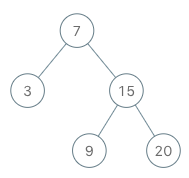
🧩 Approach
To implement the BSTIterator, we can use a stack to simulate the in-order traversal of the binary search tree. The idea is to push all the left children of the current node onto the stack until we reach a leaf node. When we call next(), we pop the top node from the stack, which will be the next smallest element in the BST. After popping a node, we need to consider its right child and push all of its left children onto the stack as well. This way, we maintain the invariant that the top of the stack always contains the next smallest element in the BST.
💡 Solution
from typing import Optional, List
class TreeNode:
def __init__(self, val=0, left=None, right=None):
"""Initializes a TreeNode with the given value and optional left and right children.
Args:
val (int): The value of the node. Default is 0.
left (Optional[TreeNode]): The left child of the node. Default is None.
right (Optional[TreeNode]): The right child of the node. Default is None.
Returns:
None
"""
self.val: int = val
self.left: Optional[TreeNode] = left
self.right: Optional[TreeNode] = right
class BSTIterator:
def __init__(self, root: Optional[TreeNode]):
"""Initializes the BSTIterator object with the given root of the binary search tree.
Args:
root (Optional[TreeNode]): The root of the binary search tree.
Returns:
None
"""
self.__stack: List[TreeNode] = []
while root:
self.__stack.append(root)
root = root.left
def next(self) -> int:
"""Moves the pointer to the right, then returns the number at the pointer.
Args:
None
Returns:
int: The next number in the in-order traversal of the BST.
"""
res: TreeNode = self.__stack.pop()
cur: TreeNode = res.right
while cur:
self.__stack.append(cur)
cur = cur.left
return res.val
def hasNext(self) -> bool:
"""Returns whether there exists a number in the traversal to the right of the pointer.
Args:
None
Returns:
bool: True if there exists a next number in the in-order traversal, False otherwise.
"""
return self.__stack != []
🧮 Complexity Analysis
-
Time Complexity:
next:O(1)amortizedhasNext:O(1)
-
Space Complexity:
O(h)wherehis the height of the binary search tree.
208. Implement Trie (Prefix Tree)
- LeetCode Link: Implement Trie (Prefix Tree)
- Difficulty: Medium
- Topic(s): Design, Trie
- Company: Microsoft
🧠 Problem Statement
A trie (pronounced as “try”) or prefix tree is a tree data structure used to efficiently store and retrieve keys in a dataset of strings. There are various applications of this data structure, such as autocomplete and spellchecker.
Implement the Trie class:
Trie()Initializes the trie object.void insert(String word)Inserts the stringwordinto the trie.boolean search(String word)Returnstrueif the stringwordis in the trie (i.e., was inserted before), andfalseotherwise.boolean startsWith(String prefix)Returnstrueif there is a previously inserted stringwordthat has the prefixprefix, andfalseotherwise.Example 1:
Input ["Trie", "insert", "search", "search", "startsWith", "insert", "search"] [[], ["apple"], ["apple"], ["app"], ["app"], ["app"], ["app"]] Output [null, null, true, false, true, null, true] Explanation Trie trie = new Trie(); trie.insert("apple"); trie.search("apple"); // return True trie.search("app"); // return False trie.startsWith("app"); // return True trie.insert("app"); trie.search("app"); // return True
🧩 Approach
To implement a Trie (Prefix Tree), we can define a TrieNode class that represents each node in the trie. Each TrieNode will contain a dictionary of its children nodes and a boolean flag to indicate whether it represents the end of a word. The Trie class will use the TrieNode to build the trie structure. The insert method will add words to the trie, the search method will check for the existence of a word, and the startsWith method will check for the existence of any word that starts with a given prefix.
💡 Solution
from typing import Dict
class TrieNode:
def __init__(self):
"""Initializes a TrieNode with an empty dictionary of children and a boolean flag to indicate the end of a word.
Args:
None
Returns:
None
"""
self.children: Dict[str, TrieNode] = {}
self.endOfWord: bool = False
class Trie:
def __init__(self):
"""Initializes the Trie object.
Args:
None
Returns:
None
"""
self.__root = TrieNode()
def insert(self, word: str) -> None:
"""Inserts the string word into the trie.
Args:
word (str): The string to be inserted into the trie.
Returns:
None
"""
cur: TrieNode = self.__root
for c in word:
if c not in cur.children:
cur.children[c] = TrieNode()
cur = cur.children[c]
cur.endOfWord = True
def search(self, word: str) -> bool:
"""Returns true if the string word is in the trie, and false otherwise.
Args:
word (str): The string to be searched in the trie.
Returns:
bool: True if the string is in the trie, False otherwise.
"""
cur: TrieNode = self.__root
for c in word:
if c not in cur.children:
return False
cur = cur.children[c]
return cur.endOfWord
def startsWith(self, prefix: str) -> bool:
"""Returns true if there is a previously inserted string word that has the prefix prefix, and false otherwise.
Args:
prefix (str): The prefix to be searched in the trie.
Returns:
bool: True if there is a string in the trie that starts with the prefix, False otherwise.
"""
cur: TrieNode = self.__root
for c in prefix:
if c not in cur.children:
return False
cur = cur.children[c]
return True
🧮 Complexity Analysis
- Time Complexity:
insert:O(m)wheremis the length of the word being inserted.search:O(m)wheremis the length of the word being searched.startsWith:O(m)wheremis the length of the prefix being searched.
- Space Complexity:
O(n * m)wherenis the number of words inserted into the trie andmis the average length of the words. In the worst case, if all words are unique and have no common prefixes, the space complexity can beO(n * m). However, if many words share common prefixes, the space complexity can be significantly reduced.
211. Design Add and Search Words Data Structure
- LeetCode Link: Design Add and Search Words Data Structure
- Difficulty: Medium
- Topic(s): Design, Trie, Backtracking
- Company: Google
🧠 Problem Statement
Design a data structure that supports adding new words and finding if a string matches any previously added string.
Implement the
WordDictionaryclass:
WordDictionary()Initializes the object.void addWord(word)Addswordto the data structure, it can be matched later.bool search(word)Returnstrueif there is any string in the data structure that matcheswordorfalseotherwise.wordmay contain dots'.'where dots can be matched with any letter.Example:
Input ["WordDictionary","addWord","addWord","addWord","search","search","search","search"] [[],["bad"],["dad"],["mad"],["pad"],["bad"],[".ad"],["b.."]] Output [null,null,null,null,false,true,true,true] Explanation WordDictionary wordDictionary = new WordDictionary(); wordDictionary.addWord("bad"); wordDictionary.addWord("dad"); wordDictionary.addWord("mad"); wordDictionary.search("pad"); // return False wordDictionary.search("bad"); // return True wordDictionary.search(".ad"); // return True wordDictionary.search("b.."); // return True
🧩 Approach
To implement the WordDictionary, we can use a Trie (Prefix Tree) data structure to store the added words. The addWord method will insert words into the trie, while the search method will perform a depth-first search (DFS) to handle the case where the search word may contain dots '.'. When we encounter a dot in the search word, we need to explore all possible child nodes at that position in the trie. If we reach the end of the search word and find a node that marks the end of a valid word, we return true. If we exhaust all possibilities without finding a match, we return false.
💡 Solution
from typing import Dict
class TrieNode:
def __init__(self):
"""Initializes a TrieNode with an empty dictionary of children and a boolean flag to indicate the end of a word.
Args:
None
Returns:
None
"""
self.children: Dict[str, TrieNode] = {}
self.endOfWord: bool = False
class WordDictionary:
def __init__(self):
"""Initializes the WordDictionary object.
Args:
None
Returns:
None
"""
self.__root = TrieNode()
def addWord(self, word: str) -> None:
"""Adds word to the data structure, it can be matched later.
Args:
word (str): The word to be added to the data structure.
Returns:
None
"""
cur: TrieNode = self.__root
for c in word:
if c not in cur.children:
cur.children[c] = TrieNode()
cur = cur.children[c]
cur.endOfWord = True
def search(self, word: str) -> bool:
"""Returns true if there is any string in the data structure that matches word or false otherwise. word may contain dots '.' where dots can be matched with any letter.
Args:
word (str): The word to be searched in the data structure. It may contain dots '.'.
Returns:
bool: True if there is a string in the data structure that matches the word, False otherwise.
"""
def dfs(j, root):
cur: TrieNode = root
for i in range(j, len(word)):
c: str = word[i]
if c == ".":
for child in cur.children.values():
if dfs(i + 1, child):
return True
return False
else:
if c not in cur.children:
return False
cur = cur.children[c]
return cur.endOfWord
return dfs(0, self.__root)
🧮 Complexity Analysis
- Time Complexity:
addWord:O(m)wheremis the length of the word being added.search: In the worst case, if the search word contains only dots, the time complexity can beO(n * m)wherenis the number of words in the data structure andmis the average length of the words. However, if there are fewer dots and more specific characters, the time complexity can be significantly reduced.
- Space Complexity:
O(n * m)wherenis the number of words added to the data structure andmis the average length of the words. In the worst case, if all words are unique and have no common prefixes, the space complexity can beO(n * m). However, if many words share common prefixes, the space complexity can be significantly reduced.
225. Implement Stack using Queues
- LeetCode Link: Implement Stack using Queues
- Difficulty: Easy
- Topic(s): Design, Queue, Stack
- Company: Google
🧠 Problem Statement
Implement a last-in-first-out (LIFO) stack using only two queues. The implemented stack should support all the functions of a normal stack (
push,top,pop, andempty).Implement the
MyStackclass:
void push(int x)Pushes element x to the top of the stack.int pop()Removes the element on the top of the stack and returns it.int top()Returns the element on the top of the stack.boolean empty()Returnstrueif the stack is empty,falseotherwise.Notes:
- You must use only standard operations of a queue, which means that only
push to back,peek/pop from front,sizeandis emptyoperations are valid.- Depending on your language, the queue may not be supported natively. You may simulate a queue using a list or deque (double-ended queue) as long as you use only a queue’s standard operations.
Example 1:
Input ["MyStack", "push", "push", "top", "pop", "empty"] [[], [1], [2], [], [], []] Output [null, null, null, 2, 2, false] Explanation MyStack myStack = new MyStack(); myStack.push(1); myStack.push(2); myStack.top(); // return 2 myStack.pop(); // return 2 myStack.empty(); // return False
🧩 Approach
To implement a stack using queues, we can use a single queue to store the elements of the stack. The main idea is to ensure that the most recently added element (the top of the stack) is always at the front of the queue. This way, we can perform pop and top operations in O(1) time. To achieve this, when we pop a new element onto the stack, we can enqueue it to the back of the queue and then rotate the queue by dequeuing all elements before it and enqueuing them back to the end of the queue. This way, the new element will be at the front of the queue, representing the top of the stack.
💡 Solution
from collections import deque
class MyStack:
def __init__(self):
"""Initializes an empty stack."""
self.__q: deque[int] = deque()
def push(self, x: int) -> None:
"""Pushes an element onto the top of the stack.
Args:
x (int): The value to be pushed onto the stack.
Returns:
None
"""
self.__q.append(x)
def pop(self) -> int:
"""Removes and returns the top element of the stack.
Args:
None
Returns:
int: The element removed from the top of the stack.
"""
for _ in range(len(self.__q) - 1):
self.__q.append(self.__q.popleft())
return self.__q.popleft()
def top(self) -> int:
"""Returns the top element of the stack without removing it.
Args:
None
Returns:
int: The element at the top of the stack.
"""
return self.__q[-1]
def empty(self) -> bool:
"""Checks whether the stack is empty.
Args:
None
Returns:
bool: True if the stack is empty, False otherwise.
"""
return not self.__q
🧮 Complexity Analysis
- Time Complexity:
push:O(1)pop:O(n)top:O(1)empty:O(1)
- Space Complexity:
O(n)
232. Implement Queue using Stacks
- LeetCode Link: Implement Queue using Stacks
- Difficulty: Easy
- Topic(s): Design, Queue, Stack
- Company: Microsoft
🧠 Problem Statement
Implement a first in first out (FIFO) queue using only two stacks. The implemented queue should support all the functions of a normal queue (
push,peek,pop, andempty).Implement the
MyQueueclass:
void push(int x)Pushes element x to the back of the queue.int pop()Removes the element from the front of the queue and returns it.int peek()Returns the element at the front of the queue.boolean empty()Returnstrueif the queue is empty,falseotherwise.Notes:
You must use only standard operations of a stack, which means only
push to top,peek/pop from top,size, andis emptyoperations are valid. Depending on your language, the stack may not be supported natively. You may simulate a stack using a list or deque (double-ended queue) as long as you use only a stack’s standard operations.Example 1:
Input ["MyQueue", "push", "push", "peek", "pop", "empty"] [[], [1], [2], [], [], []] Output [null, null, null, 1, 1, false] Explanation MyQueue myQueue = new MyQueue(); myQueue.push(1); // queue is: [1] myQueue.push(2); // queue is: [1, 2] (leftmost is front of the queue) myQueue.peek(); // return 1 myQueue.pop(); // return 1, queue is [2] myQueue.empty(); // return false
🧩 Approach
To implement a queue using stacks, we can use two stacks to manage the elements of the queue. The main idea is to use one stack (s1) for enqueueing elements and another stack (s2) for dequeueing elements. When we need to dequeue an element, if s2 is empty, we can pop all elements from s1 and push them onto s2, which will reverse the order of the elements and allow us to access the front of the queue. This way, we can perform push, pop, and peek operations efficiently.
💡 Solution
from typing import List
class MyQueue:
def __init__(self):
"""Initializes an empty queue using two stacks."""
self.__s1: List[int] = []
self.__s2: List[int] = []
def push(self, x: int) -> None:
"""Pushes an element to the back of the queue.
Args:
x (int): The value to be pushed onto the queue.
Returns:
None
"""
self.__s1.append(x)
def pop(self) -> int:
"""Removes and returns the front element of the queue.
Args:
None
Returns:
int: The element removed from the front of the queue.
"""
if not self.__s2:
while self.__s1:
self.__s2.append(self.__s1.pop())
return self.__s2.pop()
def peek(self) -> int:
"""Returns the front element of the queue without removing it.
Args:
None
Returns:
int: The element at the front of the queue.
"""
if not self.__s2:
while self.__s1:
self.__s2.append(self.__s1.pop())
return self.__s2[-1]
def empty(self) -> bool:
"""Checks whether the queue is empty.
Args:
None
Returns:
bool: True if the queue is empty, False otherwise.
"""
return max(len(self.__s1), len(self.__s2)) == 0
🧮 Complexity Analysis
- Time Complexity:
push:O(1)pop:O(1)amortizedpeek:O(1)amortizedempty:O(1)
- Space Complexity:
O(n)
284. Peeking Iterator
- LeetCode Link: Peeking Iterator
- Difficulty: Medium
- Topic(s): Design, Iterator
- Company: Google
🧠 Problem Statement
Design an iterator that supports the
peekoperation on an existing iterator in addition to thehasNextand thenextoperations.Implement the
PeekingIteratorclass:
PeekingIterator(Iterator<int> nums)Initializes the object with the given integer iteratoriterator.int next()Returns the next element in the array and moves the pointer to the next element.boolean hasNext()Returnstrueif there are still elements in the array.int peek()Returns the next element in the array without moving the pointer.Note: Each language may have a different implementation of the constructor and
Iterator, but they all support the intnext()andboolean hasNext()functions.Example 1:
Input ["PeekingIterator", "next", "peek", "next", "next", "hasNext"] [[[1, 2, 3]], [], [], [], [], []] Output [null, 1, 2, 2, 3, false] Explanation PeekingIterator peekingIterator = new PeekingIterator([1, 2, 3]); // [1,2,3] peekingIterator.next(); // return 1, the pointer moves to the next element [1,2,3]. peekingIterator.peek(); // return 2, the pointer does not move [1,2,3]. peekingIterator.next(); // return 2, the pointer moves to the next element [1,2,3] peekingIterator.next(); // return 3, the pointer moves to the next element [1,2,3] peekingIterator.hasNext(); // return False
🧩 Approach
To implement the PeekingIterator, we can maintain a cache to store the next element of the iterator. This way, we can return the next element in constant time when peek() is called without advancing the iterator. When next() is called, we can return the cached value and then update the cache with the next element from the iterator. The hasNext() method can simply check if there is a cached value available.
💡 Solution
# Below is the interface for Iterator, which is already defined for you.
#
# class Iterator:
# def __init__(self, nums):
# """Initializes an iterator object to the beginning of a list.
#
# Args:
# nums (List[int]): The list of integers to iterate over.
#
# Returns:
# None
# """
#
# def hasNext(self):
# """Returns true if the iteration has more elements.
#
# Args:
# None
#
# Returns:
# bool: True if there are more elements to iterate over, False otherwise.
# """
#
# def next(self):
# """Returns the next element in the iteration.
#
# Args:
# None
# Returns:
# int: The next element in the iteration.
# """
class PeekingIterator:
def __init__(self, iterator):
"""Initializes the PeekingIterator with the given iterator.
Args:
iterator (Iterator): The input iterator to be wrapped by the PeekingIterator.
Returns:
None
"""
self.__iterator: Iterator = iterator
self.__cache: int = None
self.__peekCache()
def __peekCache(self) -> None:
"""Updates the cache with the next element from the iterator if it exists, otherwise sets it to None.
Args:
None
Returns:
None
"""
if self.__iterator.hasNext():
self.__cache = self.__iterator.next()
else:
self.__cache = None
def peek(self):
"""Returns the next element in the array without moving the pointer.
Args:
None
Returns:
int: The next element in the array.
"""
return self.__cache
def next(self) -> int:
"""Returns the next element in the array and moves the pointer to the next element.
Args:
None
Returns:
int: The next element in the array.
"""
peek: int = self.__cache
self.__peekCache()
return peek
def hasNext(self) -> bool:
"""Returns true if there are still elements in the array.
Args:
None
Returns:
bool: True if there are still elements in the array, False otherwise.
"""
return self.__cache is not None
🧮 Complexity Analysis
- Time Complexity:
peek:O(1)next:O(1)hasNext:O(1)
- Space Complexity:
O(1)
303. Range Sum Query - Immutable
- LeetCode Link: Range Sum Query - Immutable
- Difficulty: Easy
- Topic(s): Design, Array, Prefix Sum
- Company: Amazon
🧠 Problem Statement
Given an integer array
nums, handle multiple queries of the following type:Calculate the sum of the elements of
numsbetween indicesleftandrightinclusive whereleft <= right.Implement the
NumArrayclass:
NumArray(int[] nums)Initializes the object with the integer arraynums.int sumRange(int left, int right)Returns the sum of the elements ofnumsbetween indicesleftandrightinclusive (i.e.nums[left] + nums[left + 1] + ... + nums[right]).Example 1:
Input ["NumArray", "sumRange", "sumRange", "sumRange"] [[[-2, 0, 3, -5, 2, -1]], [0, 2], [2, 5], [0, 5]] Output [null, 1, -1, -3] Explanation NumArray numArray = new NumArray([-2, 0, 3, -5, 2, -1]); numArray.sumRange(0, 2); // return (-2) + 0 + 3 = 1 numArray.sumRange(2, 5); // return 3 + (-5) + 2 + (-1) = -1 numArray.sumRange(0, 5); // return (-2) + 0 + 3 + (-5) + 2 + (-1) = -3
🧩 Approach
To efficiently calculate the sum of elements in a given range, we can use a prefix sum array. The prefix sum array allows us to compute the sum of any subarray in constant time after an initial preprocessing step. The idea is to create a prefix sum array where each element at index i contains the sum of all elements from the start of the original array up to index i. Then, to calculate the sum of elements between indices left and right, we can simply subtract the prefix sum at left - 1 from the prefix sum at right.
💡 Solution
from typing import List
class NumArray:
def __init__(self, nums: List[int]):
"""Initializes the NumArray object with the given integer array.
Args:
nums (List[int]): The input integer array.
Returns:
None
"""
self.__prefix: List[int] = []
cur: int = 0
for n in nums:
cur += n
self.__prefix.append(cur)
def sumRange(self, left: int, right: int) -> int:
"""Returns the sum of the elements of nums between indices left and right inclusive.
Args:
left (int): The starting index of the range.
right (int): The ending index of the range.
Returns:
int: The sum of the elements in the specified range.
"""
rightSum: int = self.__prefix[right]
leftSum: int = self.__prefix[left - 1] if left > 0 else 0
return rightSum - leftSum
🧮 Complexity Analysis
- Time Complexity:
__init__:O(n)for preprocessing the prefix sum array.sumRange:O(1)for each query after preprocessing.
- Space Complexity:
O(n)
304. Range Sum Query 2D - Immutable
- LeetCode Link: Range Sum Query 2D - Immutable
- Difficulty: Medium
- Topic(s): Design, Array, Prefix Sum
- Company: Amazon
🧠 Problem Statement
Given a 2D matrix
matrix, handle multiple queries of the following type:
- Calculate the sum of the elements of
matrixinside the rectangle defined by its upper left corner(row1, col1)and lower right corner(row2, col2).Implement the NumMatrix class:
NumMatrix(int[][] matrix)Initializes the object with the integer matrixmatrix.int sumRegion(int row1, int col1, int row2, int col2)Returns the sum of the elements ofmatrixinside the rectangle defined by its upper left corner(row1, col1)and lower right corner(row2, col2).You must design an algorithm where
sumRegionworks onO(1)time complexity.Example 1:
Input ["NumMatrix", "sumRegion", "sumRegion", "sumRegion"] [[[[3, 0, 1, 4, 2], [5, 6, 3, 2, 1], [1, 2, 0, 1, 5], [4, 1, 0, 1, 7], [1, 0, 3, 0, 5]]], [2, 1, 4, 3], [1, 1, 2, 2], [1, 2, 2, 4]] Output [null, 8, 11, 12] Explanation NumMatrix numMatrix = new NumMatrix([[3, 0, 1, 4, 2], [5, 6, 3, 2, 1], [1, 2, 0, 1, 5], [4, 1, 0, 1, 7], [1, 0, 3, 0, 5]]); numMatrix.sumRegion(2, 1, 4, 3); // return 8 (i.e sum of the red rectangle) numMatrix.sumRegion(1, 1, 2, 2); // return 11 (i.e sum of the green rectangle) numMatrix.sumRegion(1, 2, 2, 4); // return 12 (i.e sum of the blue rectangle)
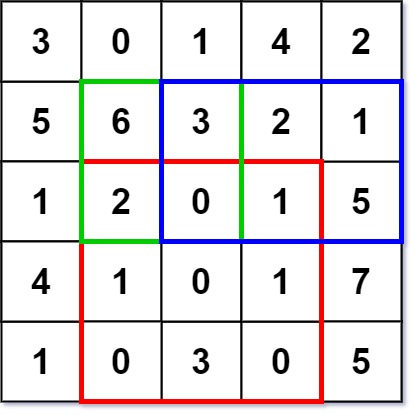
🧩 Approach
To efficiently calculate the sum of elements in a given rectangular region of a 2D matrix, we can use a 2D prefix sum matrix. The prefix sum matrix allows us to compute the sum of any submatrix in constant time after an initial preprocessing step. The idea is to create a prefix sum matrix where each element at index (i, j) contains the sum of all elements from the top-left corner of the original matrix up to index (i, j). Then, to calculate the sum of elements in the rectangle defined by (row1, col1) and (row2, col2), we can use the inclusion-exclusion principle to combine the relevant prefix sums.
💡 Solution
from typing import List
class NumMatrix:
def __init__(self, matrix: List[List[int]]):
"""Initializes the NumMatrix object with the given 2D integer matrix.
Args:
matrix (List[List[int]]): The input 2D integer matrix.
Returns:
None
"""
R, C = len(matrix), len(matrix[0])
self.__sumMat: List[List[int]] = [[0] * (C + 1) for _ in range(R + 1)]
for r in range(R):
prefix: int = 0
for c in range(C):
prefix += matrix[r][c]
above: int = self.__sumMat[r][c + 1]
self.__sumMat[r + 1][c + 1] = prefix + above
def sumRegion(self, row1: int, col1: int, row2: int, col2: int) -> int:
"""Returns the sum of the elements of matrix inside the rectangle defined by its upper left corner (row1, col1) and lower right corner (row2, col2).
Args:
row1 (int): The row index of the upper left corner of the rectangle.
col1 (int): The column index of the upper left corner of the rectangle.
row2 (int): The row index of the lower right corner of the rectangle.
col2 (int): The column index of the lower right corner of the rectangle.
Returns:
int: The sum of the elements in the specified rectangle.
"""
row1, col1, row2, col2 = row1 + 1, col1 + 1, row2 + 1, col2 + 1
bottomRight: int = self.__sumMat[row2][col2]
above: int = self.__sumMat[row1 - 1][col2]
left: int = self.__sumMat[row2][col1 - 1]
topLeft: int = self.__sumMat[row1 - 1][col1 - 1]
return bottomRight - above - left + topLeft
🧮 Complexity Analysis
- Time Complexity:
__init__:O(R * C)for preprocessing the prefix sum matrix.sumRegion:O(1)for each query after preprocessing.
- Space Complexity:
O(R * C)for storing the prefix sum matrix.
307. Range Sum Query - Mutable
- LeetCode Link: Range Sum Query - Mutable
- Difficulty: Medium
- Topic(s): Design, Array, Segment Tree, Binary Indexed Tree
- Company: Amazon
🧠 Problem Statement
Given an integer array
nums, handle multiple queries of the following types:
- Update the value of an element in
nums.- Calculate the sum of the elements of
numsbetween indicesleftandrightinclusive whereleft<=right.Implement the
NumArrayclass:
NumArray(int[] nums)Initializes the object with the integer arraynums.void update(int index, int val)Updates the value ofnums[index]to beval.int sumRange(int left, int right)Returns the sum of the elements ofnumsbetween indicesleftandrightinclusive (i.e.nums[left] + nums[left + 1] + ... + nums[right]).Example 1:
Input ["NumArray", "sumRange", "update", "sumRange"] [[[1, 3, 5]], [0, 2], [1, 2], [0, 2]] Output [null, 9, null, 8] Explanation NumArray numArray = new NumArray([1, 3, 5]); numArray.sumRange(0, 2); // return 1 + 3 + 5 = 9 numArray.update(1, 2); // nums = [1, 2, 5] numArray.sumRange(0, 2); // return 1 + 2 + 5 = 8
🧩 Approach
To efficiently handle updates and range sum queries on an array, we can use a Segment Tree data structure. A Segment Tree allows us to perform both update and query operations in logarithmic time. The idea is to build a binary tree where each node represents a segment of the array and stores the sum of that segment. When we need to update an element, we can update the corresponding leaf node and then propagate the changes up the tree. When we need to calculate the sum of a range, we can traverse the tree and combine the sums of the relevant segments.
💡 Solution
from typing import List
class Node:
def __init__(self, start, end):
"""Initializes a Node in the Segment Tree with the given start and end indices.
Args:
start (int): The starting index of the segment represented by this node.
end (int): The ending index of the segment represented by this node.
Returns:
None
"""
self.start: int = start
self.end: int = end
self.total: int = 0
self.left: Node = None
self.right: Node = None
class NumArray:
def __init__(self, nums: List[int]):
"""Initializes the NumArray object with the given integer array.
Args:
nums (List[int]): The input integer array.
Returns:
None
"""
def createTree(nums: List[int], l: int, r: int) -> Node:
"""Recursively builds a segment tree from the input array nums between indices l and r.
Args:
nums (List[int]): The input array of integers.
l (int): The left index of the current segment.
r (int): The right index of the current segment.
Returns:
Node: The root node of the segment tree for the current segment.
"""
if l > r:
return None
if l == r:
n: Node = Node(l, r)
n.total = nums[l]
return n
mid: int = (l + r) // 2
root: Node = Node(l, r)
root.left = createTree(nums, l, mid)
root.right = createTree(nums, mid + 1, r)
root.total = root.left.total + root.right.total
return root
self.root: Node = createTree(nums, 0, len(nums) - 1)
def update(self, index: int, val: int) -> None:
"""Updates the value at the specified index in the array and updates the segment tree accordingly.
Args:
index (int): The index of the element to be updated.
val (int): The new value to be set at the specified index.
Returns:
None
"""
def updateVal(root: Node, i: int, val: int) -> int:
"""Recursively updates the value at index i in the segment tree rooted at root and updates the total values of the affected nodes.
Args:
root (Node): The current node in the segment tree.
i (int): The index of the element to be updated.
val (int): The new value to be set at the specified index.
Returns:
int: The updated total value of the current node after the update.
"""
if root.left == root.right:
root.total = val
return val
mid: int = (root.start + root.end) // 2
if i <= mid:
updateVal(root.left, i, val)
else:
updateVal(root.right, i, val)
root.total = root.left.total + root.right.total
return root.total
updateVal(self.root, index, val)
def sumRange(self, left: int, right: int) -> int:
"""Returns the sum of the elements of the array between indices left and right inclusive.
Args:
left (int): The starting index of the range.
right (int): The ending index of the range.
Returns:
int: The sum of the elements in the specified range.
"""
def rangeSum(root: Node, i: int, j: int) -> int:
"""Recursively calculates the sum of the elements in the range [i, j] in the segment tree rooted at root.
Args:
root (Node): The current node in the segment tree.
i (int): The starting index of the range.
j (int): The ending index of the range.
Returns:
int: The sum of the elements in the specified range.
"""
if root.start == i and root.end == j:
return root.total
mid: int = (root.start + root.end) // 2
if j <= mid:
return rangeSum(root.left, i, j)
elif i >= mid + 1:
return rangeSum(root.right, i, j)
else:
return rangeSum(root.left, i, mid) + rangeSum(root.right, mid + 1, j)
return rangeSum(self.root, left, right)
🧮 Complexity Analysis
- Time Complexity:
__init__:O(n)for building the segment tree.update:O(log n)for updating an element in the segment tree.sumRange:O(log n)for querying the sum of a range in the segment tree.
- Space Complexity:
O(n)for storing the segment tree.
341. Flatten Nested List Iterator
- LeetCode Link: Flatten Nested List Iterator
- Difficulty: Medium
- Topic(s): Design, Stack, Iterator
- Company: Google
🧠 Problem Statement
You are given a nested list of integers
nestedList. Each element is either an integer or a list whose elements may also be integers or other lists. Implement an iterator to flatten it.Implement the
NestedIteratorclass:
NestedIterator(List<NestedInteger> nestedList): Initializes the iterator with the nested listnestedList.int next(): Returns the next integer in the nested list.boolean hasNext(): Returnstrueif there are still some integers in the nested list andfalseotherwise.Your code will be tested with the following pseudocode:
initialize iterator with nestedList res = [] while iterator.hasNext() append iterator.next() to the end of res return resIf
resmatches the expected flattened list, then your code will be judged as correct.Example 1:
Input: nestedList = [[1,1],2,[1,1]] Output: [1,1,2,1,1] Explanation: By calling next repeatedly until hasNext returns false, the order of elements returned by next should be: [1,1,2,1,1].Example 2:
Input: nestedList = [1,[4,[6]]] Output: [1,4,6] Explanation: By calling next repeatedly until hasNext returns false, the order of elements returned by next should be: [1,4,6].
🧩 Approach
To implement the NestedIterator, we can use a depth-first search (DFS) approach to flatten the nested list of integers. We can maintain a stack to store the integers in the order they should be returned. During the initialization, we can perform a DFS on the input nested list and push all the integers onto the stack. After the DFS is complete, we can reverse the stack to ensure that the integers are in the correct order for iteration. The next() method will simply pop an integer from the stack, and the hasNext() method will check if there are any integers left in the stack.
💡 Solution
from typing import List
# """
# This is the interface that allows for creating nested lists.
# You should not implement it, or speculate about its implementation
# """
#class NestedInteger:
# def isInteger(self) -> bool:
# """
# @return True if this NestedInteger holds a single integer, rather than a nested list.
# """
#
# def getInteger(self) -> int:
# """
# @return the single integer that this NestedInteger holds, if it holds a single integer
# Return None if this NestedInteger holds a nested list
# """
#
# def getList(self) -> [NestedInteger]:
# """
# @return the nested list that this NestedInteger holds, if it holds a nested list
# Return None if this NestedInteger holds a single integer
# """
class NestedIterator:
def __init__(self, nestedList: [NestedInteger]):
"""Initializes the NestedIterator with the given nested list.
Args:
nestedList (List[NestedInteger]): The input nested list of integers.
Returns:
None
"""
self.stack: List[int] = []
self.dfs(nestedList)
self.stack.reverse()
def next(self) -> int:
"""Returns the next integer in the nested list.
Args:
None
Returns:
int: The next integer in the nested list.
"""
return self.stack.pop()
def hasNext(self) -> bool:
"""Returns true if there are still some integers in the nested list and false otherwise.
Args:
None
Returns:
bool: True if there are still some integers in the nested list, False otherwise.
"""
return len(self.stack) > 0
def dfs(self, nested: NestedInteger):
"""Performs a depth-first search on the nested list to flatten it and store the integers in the stack.
Args:
nested (NestedInteger): The current nested list or integer to be processed.
Returns:
None
"""
for n in nested:
if n.isInteger():
self.stack.append(n.getInteger())
else:
self.dfs(n.getList())
🧮 Complexity Analysis
- Time Complexity:
__init__:O(n)for flattening the nested list, wherenis the total number of integers in the nested list.next:O(1)for returning the next integer.hasNext:O(1)for checking if there are more integers to return.
- Space Complexity:
O(n)for storing the flattened integers in the stack.
355. Design Twitter
- LeetCode Link: Design Twitter
- Difficulty: Medium
- Topic(s): Design, Hash Table, Heap, Priority Queue
🧠 Problem Statement
Design a simplified version of
10most recent tweets in the user’s news feed.Implement the
Twitter()Initializes your twitter object.void postTweet(int userId, int tweetId)Composes a new tweet with IDtweetIdby the user with IDuserId. Each call to this function will be made with a uniquetweetId.List<Integer> getNewsFeed(int userId)Retrieves the10most recent tweet IDs in the user’s news feed. Each item in the news feed must be posted by users who the user followed or by the user themself. Tweets must be ordered from most recent to least recent.void follow(int followerId, int followeeId)The user with IDfollowerIdstarted following the user with IDfolloweeId.void unfollow(int followerId, int followeeId)The user with IDfollowerIdstarted unfollowing the user with IDfolloweeId.Example 1:
Input ["Twitter", "postTweet", "getNewsFeed", "follow", "postTweet", "getNewsFeed", "unfollow", "getNewsFeed"] [[], [1, 5], [1], [1, 2], [2, 6], [1], [1, 2], [1]] Output [null, null, [5], null, null, [6, 5], null, [5]] Explanation Twitter twitter = new Twitter(); twitter.postTweet(1, 5); // User 1 posts a new tweet (id = 5). twitter.getNewsFeed(1); // User 1's news feed should return a list with 1 tweet id -> [5]. return [5] twitter.follow(1, 2); // User 1 follows user 2. twitter.postTweet(2, 6); // User 2 posts a new tweet (id = 6). twitter.getNewsFeed(1); // User 1's news feed should return a list with 2 tweet ids -> [6, 5]. Tweet id 6 should precede tweet id 5 because it is posted after tweet id 5. twitter.unfollow(1, 2); // User 1 unfollows user 2. twitter.getNewsFeed(1); // User 1's news feed should return a list with 1 tweet id -> [5], since user 1 is no longer following user 2.
🧩 Approach
To design the Twitter class, we can use a combination of hash maps and a min-heap (priority queue) to efficiently manage tweets and follow relationships. We will maintain a mapping of user IDs to their tweets, as well as a mapping of user IDs to the set of users they follow. When retrieving the news feed for a user, we can use a min-heap to merge the most recent tweets from the user and their followees, ensuring that we return the 10 most recent tweets in the correct order.
💡 Solution
import heapq
from collections import defaultdict
from typing import Dict, List, Set
class Twitter:
"""A simplified Twitter-like social media system.
Supports posting tweets, following/unfollowing users,
and retrieving a user's news feed of the 10 most recent tweets
from themselves and the users they follow.
Attributes:
count (int): A counter used to order tweets by recency (decrements on each post).
tweetMap (Dict[int, List[List[int]]]): Maps each userId to a list of [count, tweetId] pairs.
followMap (Dict[int, Set[int]]): Maps each userId to the set of followeeIds they follow.
"""
def __init__(self) -> None:
"""Initializes the Twitter system with empty tweet and follow maps."""
self.count: int = 0
self.tweetMap: Dict[int, List[List[int]]] = defaultdict(list)
self.followMap: Dict[int, Set[int]] = defaultdict(set)
def postTweet(self, userId: int, tweetId: int) -> None:
"""Posts a new tweet for the given user.
Args:
userId (int): The ID of the user posting the tweet.
tweetId (int): The ID of the tweet being posted.
"""
self.tweetMap[userId].append([self.count, tweetId])
self.count -= 1
def getNewsFeed(self, userId: int) -> List[int]:
"""Retrieves the 10 most recent tweet IDs from the user's news feed.
The feed includes tweets from the user themselves and all users they follow,
sorted in descending order of recency (most recent first).
Args:
userId (int): The ID of the user requesting the news feed.
Returns:
List[int]: A list of up to 10 tweet IDs, ordered from most recent to least recent.
"""
res: List[int] = []
# Min-heap entries are: [count, tweetId, followeeId, index]
# 'count' is negative so lower values = more recent tweets (min-heap acts as max-heap)
minHeap: List[List[int]] = []
# Ensure the user sees their own tweets by adding themselves to their follow set
self.followMap[userId].add(userId)
# Seed the heap with the most recent tweet from each followee
for followeeId in self.followMap[userId]:
if followeeId in self.tweetMap:
# Start from the last (most recent) tweet in the followee's list
index: int = len(self.tweetMap[followeeId]) - 1
count, tweetId = self.tweetMap[followeeId][index]
# Push [count, tweetId, followeeId, next_index] so we can walk backwards later
minHeap.append([count, tweetId, followeeId, index - 1])
# Transform the list into a valid heap in O(n)
heapq.heapify(minHeap)
# Pop the most recent tweet globally, then push the previous tweet from the same user
while minHeap and len(res) < 10:
count, tweetId, followeeId, index = heapq.heappop(minHeap)
# Add the popped tweet to results
res.append(tweetId)
# If this followee has older tweets remaining, push the next one onto the heap
if index >= 0:
count, tweetId = self.tweetMap[followeeId][index]
heapq.heappush(minHeap, [count, tweetId, followeeId, index - 1])
return res
def follow(self, followerId: int, followeeId: int) -> None:
"""Makes a user follow another user.
Args:
followerId (int): The ID of the user who wants to follow.
followeeId (int): The ID of the user to be followed.
"""
self.followMap[followerId].add(followeeId)
def unfollow(self, followerId: int, followeeId: int) -> None:
"""Makes a user unfollow another user.
Args:
followerId (int): The ID of the user who wants to unfollow.
followeeId (int): The ID of the user to be unfollowed.
"""
if followeeId in self.followMap[followerId]:
self.followMap[followerId].remove(followeeId)
🧮 Complexity Analysis
- Time Complexity:
postTweet:O(1)for appending a new tweet.getNewsFeed:O(k log n)where k is the number of followees (including self) and n is the average number of tweets per followee, due to heap operations.follow:O(1)for adding a followee.unfollow:O(1)for removing a followee.
- Space Complexity:
O(u + t)where u is the number of users and t is the total number of tweets, due to storing follow relationships and tweets.
703. Kth Largest Element in a Stream
- LeetCode Link: Kth Largest Element in a Stream
- Difficulty: Easy
- Topic(s): Design, Heap, Priority Queue
- Company: Amazon
🧠 Problem Statement
You are part of a university admissions office and need to keep track of the
kthhighest test score from applicants in real-time. This helps to determine cut-off marks for interviews and admissions dynamically as new applicants submit their scores.You are tasked to implement a class which, for a given integer
k, maintains a stream of test scores and continuously returns thekth highest test score after a new score has been submitted. More specifically, we are looking for thekth highest score in the sorted list of all scores.Implement the
KthLargestclass:
KthLargest(int k, int[] nums)Initializes the object with the integerkand the stream of test scoresnums.int add(int val)Adds a new test scorevalto the stream and returns the element representing thekthlargest element in the pool of test scores so far.Example 1:
Input: ["KthLargest", "add", "add", "add", "add", "add"] [[3, [4, 5, 8, 2]], [3], [5], [10], [9], [4]] Output: [null, 4, 5, 5, 8, 8] Explanation: KthLargest kthLargest = new KthLargest(3, [4, 5, 8, 2]); kthLargest.add(3); // return 4 kthLargest.add(5); // return 5 kthLargest.add(10); // return 5 kthLargest.add(9); // return 8 kthLargest.add(4); // return 8Example 2:
Input: ["KthLargest", "add", "add", "add", "add"] [[4, [7, 7, 7, 7, 8, 3]], [2], [10], [9], [9]] Output: [null, 7, 7, 7, 8] Explanation: KthLargest kthLargest = new KthLargest(4, [7, 7, 7, 7, 8, 3]); kthLargest.add(2); // return 7 kthLargest.add(10); // return 7 kthLargest.add(9); // return 7 kthLargest.add(9); // return 8
🧩 Approach
To maintain the kth largest element in a stream of test scores, we can use a min-heap (priority queue) to store the top k largest elements. The min-heap allows us to efficiently keep track of the smallest element among the top k elements, which will be the kth largest element in the stream. When a new score is added, we can compare it with the smallest element in the heap. If the new score is larger than the smallest element, we can remove the smallest element and add the new score to the heap. This way, we ensure that the heap always contains the k largest elements from the stream.
💡 Solution
from typing import List
import heapq
class KthLargest:
def __init__(self, k: int, nums: List[int]):
"""Initializes the KthLargest object with the given integer k and the stream of test scores nums.
Args:
k (int): The integer k representing the rank of the largest element to maintain.
nums (List[int]): The initial stream of test scores.
Returns:
None
"""
self.__minHeap: List[int] = nums
self.__k: int = k
heapq.heapify(self.__minHeap)
while len(self.__minHeap) > k:
heapq.heappop(self.__minHeap)
def add(self, val: int) -> int:
"""Adds a new test score val to the stream and returns the element representing the kth largest element in the pool of test scores so far.
Args:
val (int): The new test score to be added to the stream.
Returns:
int: The kth largest element in the stream after adding the new score.
"""
heapq.heappush(self.__minHeap, val)
if len(self.__minHeap) > self.__k:
heapq.heappop(self.__minHeap)
return self.__minHeap[0]
🧮 Complexity Analysis
- Time Complexity:
__init__:O(n log k)for building the heap and maintaining the topkelements.add:O(log k)for adding a new score and maintaining the heap.
- Space Complexity:
O(k)for storing the topkelements in the heap.
705. Design HashSet
- LeetCode Link: Design HashSet
- Difficulty: Easy
- Topic(s): Design, Hash Table
- Company: Meta
🧠 Problem Statement
Design a HashSet without using any built-in hash table libraries.
Implement
MyHashSetclass:
void add(key)Inserts the valuekeyinto the HashSet.bool contains(key)Returns whether the valuekeyexists in the HashSet or not.void remove(key)Removes the valuekeyin the HashSet. If key does not exist in the HashSet, do nothing.Example 1:
Input ["MyHashSet", "add", "add", "contains", "contains", "add", "contains", "remove", "contains"] [[], [1], [2], [1], [3], [2], [2], [2], [2]] Output [null, null, null, true, false, null, true, null, false] Explanation MyHashSet myHashSet = new MyHashSet(); myHashSet.add(1); // set = [1] myHashSet.add(2); // set = [1, 2] myHashSet.contains(1); // return True myHashSet.contains(3); // return False, (not found) myHashSet.add(2); // set = [1, 2] myHashSet.contains(2); // return True myHashSet.remove(2); // set = [1] myHashSet.contains(2); // return False, (already removed)
🧩 Approach
To design a HashSet, we can use an array of linked lists (chaining) to handle collisions. We can define a ListNode class to represent each node in the linked list, which will store the key and a reference to the next node. The MyHashSet class will contain an array of ListNode objects, where each index corresponds to a hash value derived from the key. When adding a key, we will compute its hash value and insert it into the corresponding linked list. For checking if a key exists or for removing a key, we will traverse the linked list at the computed hash index to find the key.
💡 Solution
from typing import Optional, List
class ListNode:
def __init__(self, key: int):
"""Initializes a ListNode with the given key.
Args:
key (int): The value to be stored in the ListNode.
Returns:
None
"""
self.key: int = key
self.next: Optional[ListNode] = None
class MyHashSet:
def __init__(self):
"""Initializes an empty HashSet."""
self.__set: List[ListNode] = [ListNode(0) for _ in range(10**4)]
def add(self, key: int) -> None:
"""Inserts the value key into the HashSet.
Args:
key (int): The value to be added to the HashSet.
Returns:
None
"""
cur: ListNode = self.__set[key % len(self.__set)]
while cur.next:
if cur.next.key == key:
return None
cur = cur.next
cur.next = ListNode(key)
def remove(self, key: int) -> None:
"""Removes the value key in the HashSet. If key does not exist in the HashSet, do nothing.
Args:
key (int): The value to be removed from the HashSet.
Returns:
None
"""
cur: ListNode = self.__set[key % len(self.__set)]
while cur.next:
if cur.next.key == key:
cur.next = cur.next.next
return None
cur = cur.next
def contains(self, key: int) -> bool:
"""Returns whether the value key exists in the HashSet or not.
Args:
key (int): The value to check for existence in the HashSet.
Returns:
bool: True if the value exists in the HashSet, False otherwise.
"""
cur: ListNode = self.__set[key % len(self.__set)]
while cur.next:
if cur.next.key == key:
return True
cur = cur.next
return False
🧮 Complexity Analysis
- Time Complexity:
add:O(1)on average, butO(n)in the worst case due to collision handling with chaining.remove:O(1)on average, butO(n)in the worst case due to collision handling with chaining.contains:O(1)on average, butO(n)in the worst case due to collision handling with chaining.
- Space Complexity:
O(n)
706. Design HashMap
- LeetCode Link: Design HashMap
- Difficulty: Easy
- Topic(s): Design, Hash Table
- Company: Google
🧠 Problem Statement
Design a HashMap without using any built-in hash table libraries.
Implement the
MyHashMapclass:
MyHashMap()initializes the object with an empty map.void put(int key, int value)inserts a(key, value)pair into the HashMap. If thekeyalready exists in the map, update the correspondingvalue.int get(int key)returns thevalueto which the specifiedkeyis mapped, or-1if this map contains no mapping for thekey.void remove(key)removes thekeyand its correspondingvalueif the map contains the mapping for thekey.Example 1:
Input ["MyHashMap", "put", "put", "get", "get", "put", "get", "remove", "get"] [[], [1, 1], [2, 2], [1], [3], [2, 1], [2], [2], [2]] Output [null, null, null, 1, -1, null, 1, null, -1] Explanation MyHashMap myHashMap = new MyHashMap(); myHashMap.put(1, 1); // The map is now [[1,1]] myHashMap.put(2, 2); // The map is now [[1,1], [2,2]] myHashMap.get(1); // return 1, The map is now [[1,1], [2,2]] myHashMap.get(3); // return -1 (i.e., not found), The map is now [[1,1], [2,2]] myHashMap.put(2, 1); // The map is now [[1,1], [2,1]] (i.e., update the existing value) myHashMap.get(2); // return 1, The map is now [[1,1], [2,1]] myHashMap.remove(2); // remove the mapping for 2, The map is now [[1,1]] myHashMap.get(2); // return -1 (i.e., not found), The map is now [[1,1]]
🧩 Approach
To design a HashMap, we can use an array of linked lists (chaining) to handle collisions, similar to the design of a HashSet. We can define a ListNode class to represent each node in the linked list, which will store the key, value, and a reference to the next node. The MyHashMap class will contain an array of ListNode objects, where each index corresponds to a hash value derived from the key. When adding a key-value pair, we will compute its hash value and insert it into the corresponding linked list. For checking if a key exists or for removing a key, we will traverse the linked list at the computed hash index to find the key and perform the necessary operations.
💡 Solution
from typing import Optional, List
class ListNode:
def __init__(self, key: int, value: int):
self.key: int = key
self.value: int = value
self.next: Optional[ListNode] = None
class MyHashMap:
def __init__(self):
self.__map: List[ListNode] = [ListNode(0, 0) for _ in range(10**4)]
def put(self, key: int, value: int) -> None:
cur: ListNode = self.__map[key % len(self.__map)]
while cur.next:
if cur.next.key == key:
cur.next.value = value
return None
cur = cur.next
cur.next = ListNode(key, value)
def get(self, key: int) -> int:
cur: ListNode = self.__map[key % len(self.__map)]
while cur.next:
if cur.next.key == key:
return cur.next.value
cur = cur.next
return -1
def remove(self, key: int) -> None:
cur: ListNode = self.__map[key % len(self.__map)]
while cur.next:
if cur.next.key == key:
cur.next = cur.next.next
return None
cur = cur.next
🧮 Complexity Analysis
- Time Complexity:
put:O(1)on average, butO(n)in the worst case due to collision handling with chaining.get:O(1)on average, butO(n)in the worst case due to collision handling with chaining.remove:O(1)on average, butO(n)in the worst case due to collision handling with chaining.
- Space Complexity:
O(n)for storing the key-value pairs in the hash map.
933. Number of Recent Calls
- LeetCode Link: Number of Recent Calls
- Difficulty: Easy
- Topic(s): Design, Queue
- Company: Amazon
🧠 Problem Statement
You have a
RecentCounterclass which counts the number of recent requests within a certain time frame.Implement the
RecentCounterclass:
RecentCounter()Initializes the counter with zero recent requests.int ping(int t)Adds a new request at timet, wheretrepresents some time in milliseconds, and returns the number of requests that has happened in the past3000milliseconds (including the new request). Specifically, return the number of requests that have happened in the inclusive range[t - 3000, t].It is guaranteed that every call to
pinguses a strictly larger value oftthan the previous call.Example 1:
Input ["RecentCounter", "ping", "ping", "ping", "ping"] [[], [1], [100], [3001], [3002]] Output [null, 1, 2, 3, 3] Explanation RecentCounter recentCounter = new RecentCounter(); recentCounter.ping(1); // requests = [1], range is [-2999,1], return 1 recentCounter.ping(100); // requests = [1, 100], range is [-2900,100], return 2 recentCounter.ping(3001); // requests = [1, 100, 3001], range is [1,3001], return 3 recentCounter.ping(3002); // requests = [1, 100, 3001, 3002], range is [2,3002], return 3
🧩 Approach
To count the number of recent requests within a certain time frame, we can use a queue (specifically, a deque) to store the timestamps of the requests. When a new request is added using the ping method, we will add its timestamp to the back of the queue. Then, we will remove any timestamps from the front of the queue that are outside the range of [t - 3000, t]. Finally, we can return the size of the queue, which will represent the number of requests that have happened in the past 3000 milliseconds.
💡 Solution
from collections import deque
class RecentCounter:
def __init__(self):
"""Initializes the RecentCounter object with zero recent requests."""
self.__requests: deque[int] = deque()
def ping(self, t: int) -> int:
"""Adds a new request at time t and returns the number of requests that has happened in the past 3000 milliseconds.
Args:
t (int): The time in milliseconds when the new request is added.
Returns:
int: The number of requests that have happened in the inclusive range [t - 3000, t].
"""
self.__requests.append(t)
while self.__requests and self.__requests[0] < t - 3000:
self.__requests.popleft()
return len(self.__requests)
🧮 Complexity Analysis
- Time Complexity:
ping:O(1)on average, butO(n)in the worst case when all requests are outside the 3000 milliseconds range and need to be removed.
- Space Complexity:
O(n)for storing the requests in the deque.
1603. Design Parking System
- LeetCode Link: Design Parking System
- Difficulty: Easy
- Topic(s): Design
- Company: Amazon
🧠 Problem Statement
Design a parking system for a parking lot. The parking lot has three kinds of parking spaces: big, medium, and small, with a fixed number of slots for each size.
Implement the
ParkingSystemclass:
ParkingSystem(int big, int medium, int small)Initializes object of theParkingSystemclass. The number of slots for each parking space are given as part of the constructor.bool addCar(int carType)Checks whether there is a parking space ofcarTypefor the car that wants to get into the parking lot.carTypecan be of three kinds: big, medium, or small, which are represented by1,2, and3respectively. A car can only park in a parking space of itscarType. If there is no space available, returnfalse, else park the car in that size space and returntrue.Example 1:
Input ["ParkingSystem", "addCar", "addCar", "addCar", "addCar"] [[1, 1, 0], [1], [2], [3], [1]] Output [null, true, true, false, false] Explanation ParkingSystem parkingSystem = new ParkingSystem(1, 1, 0); parkingSystem.addCar(1); // return true because there is 1 available slot for a big car parkingSystem.addCar(2); // return true because there is 1 available slot for a medium car parkingSystem.addCar(3); // return false because there is no available slot for a small car parkingSystem.addCar(1); // return false because there is no available slot for a big car. It is already occupied.
🧩 Approach
To design the parking system, we can use a simple list to keep track of the available parking spaces for each car type. The list will have three elements corresponding to the number of available slots for big, medium, and small cars. When a car tries to park, we can check if there is an available slot for that car type by checking the corresponding element in the list. If there is an available slot, we can decrement the count for that car type and return true. If there are no available slots, we return false.
💡 Solution
from typing import List
class ParkingSystem:
def __init__(self, big: int, medium: int, small: int):
self.__spaces: List[int] = [big, medium, small]
def addCar(self, carType: int) -> bool:
if self.__spaces[carType - 1] > 0:
self.__spaces[carType - 1] -= 1
return True
return False
🧮 Complexity Analysis
- Time Complexity:
addCar:O(1)for checking and updating the available slots.
- Space Complexity:
O(1)for storing the available slots for each car type.
1656. Design an Ordered Stream
- LeetCode Link: Design an Ordered Stream
- Difficulty: Easy
- Topic(s): Design
- Company: Google
🧠 Problem Statement
There is a stream of
n(idKey, value)pairs arriving in an arbitrary order, whereidKeyis an integer between1andnandvalueis a string. No two pairs have the sameid.Design a stream that returns the values in increasing order of their IDs by returning a chunk (list) of values after each insertion. The concatenation of all the chunks should result in a list of the sorted values.
Implement the
OrderedStreamclass:
OrderedStream(int n)Constructs the stream to takenvalues.String[] insert(int idKey, String value)Inserts the pair(idKey, value)into the stream, then returns the largest possible chunk of currently inserted values that appear next in the order.Example:
Input ["OrderedStream", "insert", "insert", "insert", "insert", "insert"] [[5], [3, "ccccc"], [1, "aaaaa"], [2, "bbbbb"], [5, "eeeee"], [4, "ddddd"]] Output [null, [], ["aaaaa"], ["bbbbb", "ccccc"], [], ["ddddd", "eeeee"]] Explanation // Note that the values ordered by ID is ["aaaaa", "bbbbb", "ccccc", "ddddd", "eeeee"]. OrderedStream os = new OrderedStream(5); os.insert(3, "ccccc"); // Inserts (3, "ccccc"), returns []. os.insert(1, "aaaaa"); // Inserts (1, "aaaaa"), returns ["aaaaa"]. os.insert(2, "bbbbb"); // Inserts (2, "bbbbb"), returns ["bbbbb", "ccccc"]. os.insert(5, "eeeee"); // Inserts (5, "eeeee"), returns []. os.insert(4, "ddddd"); // Inserts (4, "ddddd"), returns ["ddddd", "eeeee"]. // Concatenating all the chunks returned: // [] + ["aaaaa"] + ["bbbbb", "ccccc"] + [] + ["ddddd", "eeeee"] = ["aaaaa", "bbbbb", "ccccc", "ddddd", "eeeee"] // The resulting order is the same as the order above.
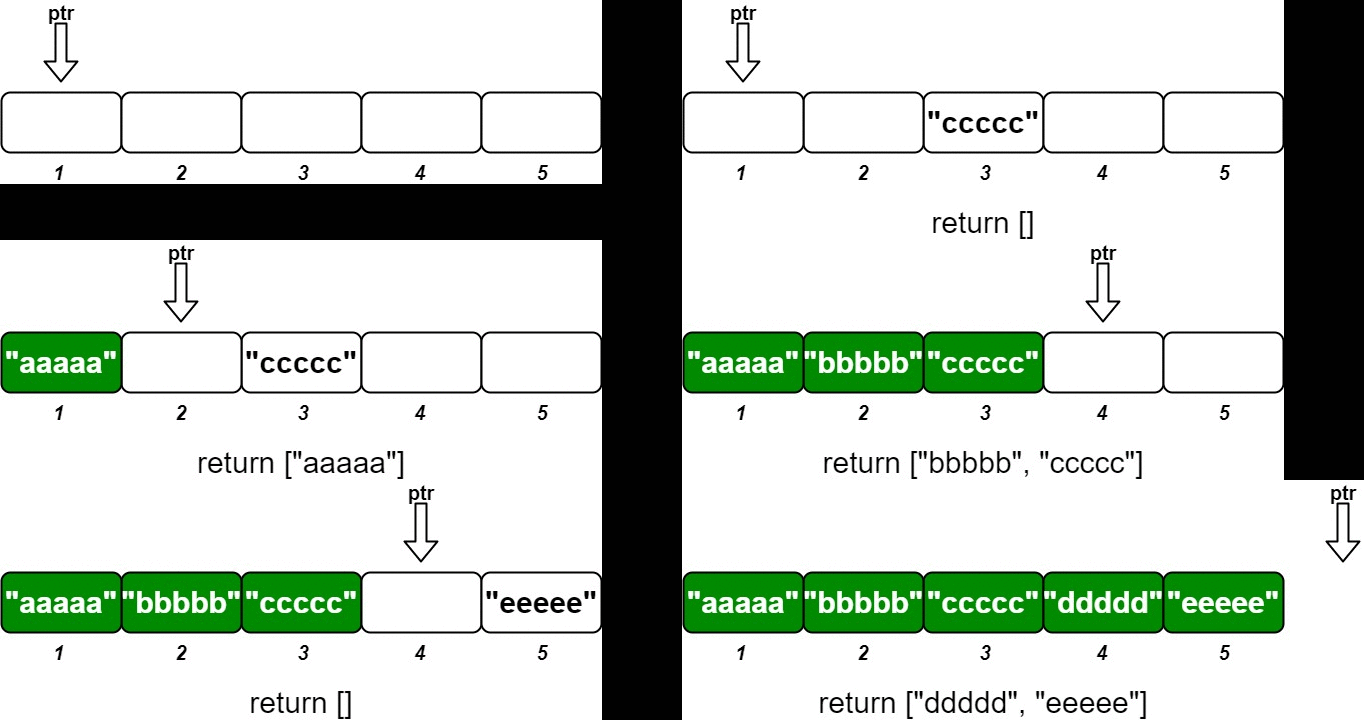
🧩 Approach
To design the ordered stream, we can use a list to store the values corresponding to their IDs. We will maintain a pointer that keeps track of the next ID that we need to return in order. When a new (idKey, value) pair is inserted, we will store the value at the index corresponding to idKey - 1 in the list. After inserting the new value, we will check if the value at the current pointer index is available (not None). If it is available, we will keep moving the pointer forward until we find a None value or reach the end of the list. We will then return the chunk of values from the original pointer position to the new pointer position.
💡 Solution
from typing import Optional, List
class OrderedStream:
def __init__(self, n: int):
"""Constructs the stream to take n values.
Args:
n (int): The number of values the stream can take.
Returns:
None
"""
self.__ptr: int = 0
self.__data: List[Optional[str]] = [None] * n
def insert(self, idKey: int, value: str) -> List[str]:
"""Inserts the pair (idKey, value) into the stream, then returns the largest possible chunk of currently inserted values that appear next in the order.
Args:
idKey (int): The ID key of the value to be inserted.
value (str): The value to be inserted.
Returns:
List[str]: The largest possible chunk of currently inserted values that appear next in the order.
"""
idx: int = idKey - 1
self.__data[idx] = value
if idx != self.__ptr:
return []
n = len(self.__data)
while self.__ptr < n and self.__data[self.__ptr] is not None:
self.__ptr += 1
return self.__data[idx:self.__ptr]
🧮 Complexity Analysis
- Time Complexity:
insert:O(1)for inserting a value, butO(n)in the worst case when all values are inserted in order and we need to return a chunk of sizen.
- Space Complexity:
O(n)for storing the values in the stream.
3242. Design Neighbor Sum Service
- LeetCode Link: Design Neighbor Sum Service
- Difficulty: Easy
- Topic(s): Design
- Company: Google
🧠 Problem Statement
You are given a
n x n2D arraygridcontaining distinct elements in the range[0, n^2 - 1].Implement the
NeighborSumclass:
NeighborSum(int [][]grid)initializes the object.int adjacentSum(int value)returns the sum of elements which are adjacent neighbors ofvalue, that is either to the top, left, right, or bottom ofvalueingrid.int diagonalSum(int value)returns the sum of elements which are diagonal neighbors ofvalue, that is either to the top-left, top-right, bottom-left, or bottom-right ofvalueingrid.
Example 1:
Input: ["NeighborSum", "adjacentSum", "adjacentSum", "diagonalSum", "diagonalSum"] [[[[0, 1, 2], [3, 4, 5], [6, 7, 8]]], [1], [4], [4], [8]] Output: [null, 6, 16, 16, 4] Explanation: - The adjacent neighbors of 1 are 0, 2, and 4. - The adjacent neighbors of 4 are 1, 3, 5, and 7. - The diagonal neighbors of 4 are 0, 2, 6, and 8. - The diagonal neighbor of 8 is 4.Example 2:
Input: ["NeighborSum", "adjacentSum", "diagonalSum"] [[[[1, 2, 0, 3], [4, 7, 15, 6], [8, 9, 10, 11], [12, 13, 14, 5]]], [15], [9]] Output: [null, 23, 45] Explanation: - The adjacent neighbors of 15 are 0, 10, 7, and 6. - The diagonal neighbors of 9 are 4, 12, 14, and 15.
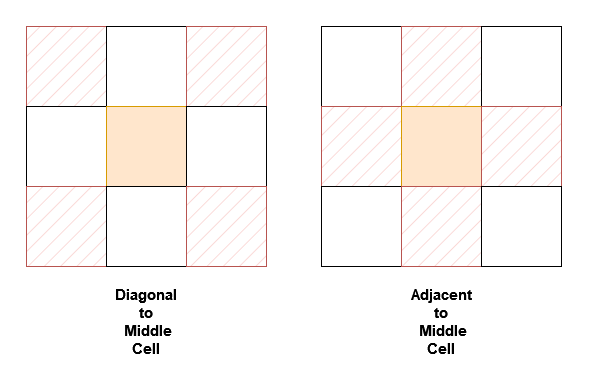
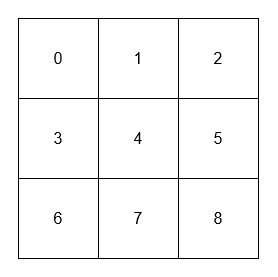
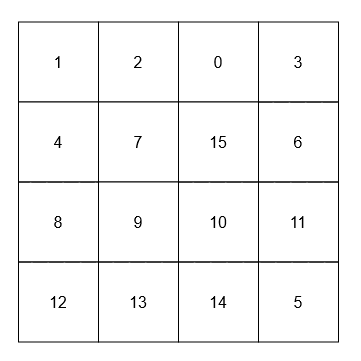
🧩 Approach
Use a lookup table (hash map) to store the coordinates of each value in the grid for O(1) access. For both adjacentSum and diagonalSum, we can define the relative positions of the neighbors and iterate through them to calculate the sum, while ensuring that we stay within the bounds of the grid.
💡 Solution
from typing import List, Tuple
class NeighborSum:
def __init__(self, grid: List[List[int]]):
"""Initializes the NeighborSum object with the given 2D array grid.
Args:
grid (List[List[int]]): The 2D array containing distinct elements.
Returns:
None
"""
self.__grid: List[List[int]] = grid
self.__R: int = len(grid)
self.__C: int = len(grid[0])
self.__lookup: dict[int, Tuple[int, int]] = {}
for x in range(self.__R):
for y in range(self.__C):
self.__lookup[grid[x][y]] = (x, y)
def adjacentSum(self, value: int) -> int:
"""Returns the sum of elements which are adjacent neighbors of value, that is either to the top, left, right, or bottom of value in grid.
Args:
value (int): The value for which to calculate the adjacent sum.
Returns:
int: The sum of adjacent neighbors of the given value.
"""
x, y = self.__lookup[value]
total: int = 0
for dx, dy in [(-1, 0), (1, 0), (0, -1), (0, 1)]:
nx: int = x + dx
ny: int = y + dy
if 0 <= nx < self.__R and 0 <= ny < self.__C:
total += self.__grid[nx][ny]
return total
def diagonalSum(self, value: int) -> int:
"""Returns the sum of elements which are diagonal neighbors of value, that is either to the top-left, top-right, bottom-left, or bottom-right of value in grid.
Args:
value (int): The value for which to calculate the diagonal sum.
Returns:
int: The sum of diagonal neighbors of the given value.
"""
x, y = self.__lookup[value]
total: int = 0
for dx, dy in [(-1, -1), (1, 1), (1, -1), (-1, 1)]:
nx: int = x + dx
ny: int = y + dy
if 0 <= nx < self.__R and 0 <= ny < self.__C:
total += self.__grid[nx][ny]
return total
🧮 Complexity Analysis
- Time Complexity:
adjacentSum:O(1)since we only check 4 adjacent neighbors.diagonalSum:O(1)since we only check 4 diagonal neighbors.
- Space Complexity:
O(n^2)for storing the grid and lookup table.
Array / String
Table of Contents
- 13. Roman to Integer
- 14. Longest Common Prefix
- 26. Remove Duplicates from Sorted Array
- 27. Remove Element
- 28. Find the Index of the First Occurrence in a String
- 58. Length of Last Word
- 88. Merge Sorted Array
- 121. Best Time to Buy and Sell Stock
- 169. Majority Element
- 2043. Simple Bank System
- 2672. Number of Adjacent Elements With the Same Color
13. Roman to Integer
- LeetCode Link: Roman to Integer
- Difficulty: Easy
- Topic(s): Hash Table, String, Math
- Company: Google
🧠 Problem Statement
Roman numerals are represented by seven different symbols:
I,V,X,L,C,DandM.Symbol Value I 1 V 5 X 10 L 50 C 100 D 500 M 1000For example,
2is written asIIin Roman numeral, just two ones added together.12is written asXII, which is simplyX + II. The number27is written asXXVII, which isXX + V + II.Roman numerals are usually written largest to smallest from left to right. However, the numeral for four is not
IIII. Instead, the number four is written asIV. Because the one is before the five we subtract it making four. The same principle applies to the number nine, which is written asIX. There are six instances where subtraction is used:
Ican be placed beforeV(5) andX(10) to make 4 and 9.Xcan be placed beforeL(50) andC(100) to make 40 and 90.Ccan be placed beforeD(500) andM(1000) to make 400 and 900.Given a roman numeral, convert it to an integer.
Example 1:
Input: s = "III" Output: 3 Explanation: III = 3.Example 2:
Input: s = "LVIII" Output: 58 Explanation: L = 50, V= 5, III = 3.Example 3:
Input: s = "MCMXCIV" Output: 1994 Explanation: M = 1000, CM = 900, XC = 90 and IV = 4.
🧩 Approach
- Create a mapping of Roman numeral symbols to their integer values.
- Initialize a result variable to
0. - Iterate through the string:
- If the current symbol is less than the next symbol, subtract its value from the result.
- Otherwise, add its value to the result.
- Return the result.
💡 Solution
from typing import Dict
class Solution:
def romanToInt(self, s: str) -> int:
"""
Convert a Roman numeral to an integer.
Args:
s (str): The Roman numeral string.
Returns:
int: The integer representation of the Roman numeral.
"""
romans: Dict[str, int] = {
"I": 1,
"V": 5,
"X": 10,
"L": 50,
"C": 100,
"D": 500,
"M": 1000
}
res: int = 0
for i in range(len(s)):
if i + 1 < len(s) and romans[s[i]] < romans[s[i + 1]]:
res -= romans[s[i]]
else:
res += romans[s[i]]
return res
🧮 Complexity Analysis
- Time Complexity:
O(n) - Space Complexity:
O(1)
14. Longest Common Prefix
- LeetCode Link: Longest Common Prefix
- Difficulty: Easy
- Topic(s): String, Trie
- Company: Meta
🧠 Problem Statement
Write a function to find the longest common prefix string amongst an array of strings.
If there is no common prefix, return an empty string
"".Example 1:
Input: strs = ["flower","flow","flight"] Output: "fl"Example 2:
Input: strs = ["dog","racecar","car"] Output: "" Explanation: There is no common prefix among the input strings.
🧩 Approach
- Initialize the result as an empty string.
- Iterate through the characters of the first string.
- For each character, check if it matches the corresponding character in all other strings.
- If a mismatch is found or if the end of any string is reached, return the result.
- If all characters match, append the character to the result.
- Return the result after checking all characters of the first string.
💡 Solution
from typing import List
class Solution:
def longestCommonPrefix(self, strs: List[str]) -> str:
"""
Find the longest common prefix among an array of strings.
Args:
strs (List[str]): The list of strings.
Returns:
str: The longest common prefix.
"""
res: str = ""
for i in range(len(strs[0])):
for s in strs:
if i == len(s) or s[i] != strs[0][i]:
return res
res += strs[0][i]
return res
🧮 Complexity Analysis
- Time Complexity:
O(n * m) - Space Complexity:
O(1)
26. Remove Duplicates from Sorted Array
- LeetCode Link: Remove Duplicates from Sorted Array
- Difficulty: Easy
- Topic(s): Array, Two Pointers
- Company: Microsoft
🧠 Problem Statement
Given an integer array
numssorted in non-decreasing order, remove the duplicates in-place such that each unique element appears only once. The relative order of the elements should be kept the same. Then return the number of unique elements innums.Consider the number of unique elements of
numsto bek, to get accepted, you need to do the following things:
- Change the array
numssuch that the first k elements ofnumscontain the unique elements in the order they were present innumsinitially. The remaining elements ofnumsare not important as well as the size ofnums.- Return
k.Example 1:
Input: nums = [1,1,2] Output: 2, nums = [1,2,_] Explanation: Your function should return k = 2, with the first two elements of nums being 1 and 2 respectively. It does not matter what you leave beyond the returned k (hence they are underscores).Example 2:
Input: nums = [0,0,1,1,1,2,2,3,3,4] Output: 5, nums = [0,1,2,3,4,_,_,_,_,_] Explanation: Your function should return k = 5, with the first five elements of nums being 0, 1, 2, 3, and 4 respectively. It does not matter what you leave beyond the returned k (hence they are underscores).
🧩 Approach
Use the two-pointer technique:
i: slow pointer, tracks the position of the last unique element.j: fast pointer, scans the array.
Steps:
- Initialize
i = 0. - Iterate
jfrom 1 to end of array. - If
nums[j] != nums[i], it’s a new unique element:- Increment
i - Copy
nums[j]tonums[i]
- Increment
- After the loop, the first
i + 1elements are the unique values.
💡 Solution
from typing import List
class Solution:
def removeDuplicates(self, nums: List[int]) -> int:
"""
Remove duplicates from a sorted array in-place and return the new length.
Args:
nums (List[int]): The input sorted array.
Returns:
int: The new length of the array after removing duplicates.
"""
i: int = 0
for j in range(1, len(nums)):
if nums[j] != nums[i]:
i += 1
nums[i] = nums[j]
return i + 1
🧮 Complexity Analysis
- Time Complexity:
O(n) - Space Complexity:
O(1)
27. Remove Element
- LeetCode Link: Remove Element
- Difficulty: Easy
- Topic(s): Array, Two Pointers
- Company: Apple
🧠 Problem Statement
Given an integer array
numsand an integerval, remove all occurrences ofvalinnumsin-place. The order of the elements may be changed. Then return the number of elements innumsthat are not equal toval.Consider the number of elements in
numswhich are not equal tovalbek, to get accepted, you need to do the following things:
- Change the array
numssuch that the firstkelements ofnumscontain the elements which are not equal toval. The remaining elements ofnumsare not important as well as the size of nums.- Return
k.Example 1:
Input: nums = [3,2,2,3], val = 3 Output: 2, nums = [2,2,_,_] Explanation: Your function should return k = 2, with the first two elements of nums being 2. It does not matter what you leave beyond the returned k (hence they are underscores).Example 2:
Input: nums = [0,1,2,2,3,0,4,2], val = 2 Output: 5, nums = [0,1,4,0,3,_,_,_] Explanation: Your function should return k = 5, with the first five elements of nums containing 0, 0, 1, 3, and 4. Note that the five elements can be returned in any order. It does not matter what you leave beyond the returned k (hence they are underscores).
🧩 Approach
Use the two-pointer technique:
- One pointer (
i) scans every element. - Another pointer (
k) keeps track of the position where the next valid (non-val) element should be placed.
Steps:
- Iterate through the array.
- If the current element is not equal to
val, place it at indexkand incrementk. - After the loop,
kwill represent the new length of the array withvalremoved.
💡 Solution
from typing import List
class Solution:
def removeElement(self, nums: List[int], val: int) -> int:
"""
Remove all occurrences of `val` in `nums` in-place and return the new length.
Args:
nums (List[int]): The input array.
val (int): The value to be removed.
Returns:
int: The new length of the array after removal.
"""
k: int = 0
for i in range(len(nums)):
if nums[i] != val:
nums[k] = nums[i]
k += 1
return k
🧮 Complexity Analysis
- Time Complexity:
O(n) - Space Complexity:
O(1)
28. Find the Index of the First Occurrence in a String
- LeetCode Link: Find the Index of the First Occurrence in a String
- Difficulty: Easy
- Topic(s): Two Pointers, String, String Matching
- Company: Google
🧠 Problem Statement
Given two strings
needleandhaystack, return the index of the first occurrence ofneedleinhaystack, or-1ifneedleis not part ofhaystack.Example 1:
Input: haystack = "sadbutsad", needle = "sad" Output: 0 Explanation: "sad" occurs at index 0 and 6. The first occurrence is at index 0, so we return 0.Example 2:
Input: haystack = "leetcode", needle = "leeto" Output: -1 Explanation: "leeto" did not occur in "leetcode", so we return -1.
🧩 Approach
Use a simple sliding window approach:
- Iterate through
haystackwith a window of size equal to the length ofneedle. - For each position, check if the substring matches
needle. - If a match is found, return the starting index.
- If no match is found after checking all possible positions, return
-1.
💡 Solution
class Solution:
def strStr(self, haystack: str, needle: str) -> int:
"""
Find the index of the first occurrence of `needle` in `haystack`.
Args:
haystack (str): The string to search in.
needle (str): The substring to search for.
Returns:
int: The index of the first occurrence of `needle` in `haystack`, or -1 if not found.
"""
for i in range(len(haystack) + 1 - len(needle)):
if haystack[i: i + len(needle)] == needle:
return i
return -1
🧮 Complexity Analysis
- Time Complexity:
O(n * m) - Space Complexity:
O(1)
58. Length of Last Word
- LeetCode Link: Length of Last Word
- Difficulty: Easy
- Topic(s): String, String Manipulation
- Company: Amazon
🧠 Problem Statement
Given a string
sconsisting of words and spaces, return the length of the last word in the string.A word is a maximal substring consisting of non-space characters only.
Example 1:
Input: s = "Hello World" Output: 5 Explanation: The last word is "World" with length 5.Example 2:
Input: s = " fly me to the moon " Output: 4 Explanation: The last word is "moon" with length 4.Example 3:
Input: s = "luffy is still joyboy" Output: 6 Explanation: The last word is "joyboy" with length 6.
🧩 Approach
- Split the string
sinto words using thesplit()method, which automatically handles multiple spaces. - Return the length of the last word in the list of words.
💡 Solution
from typing import List
class Solution:
def lengthOfLastWord(self, s: str) -> int:
"""
Calculate the length of the last word in a string.
Args:
s (str): The input string.
Returns:
int: The length of the last word.
"""
words: List[str] = s.split()
return len(words[-1])
🧮 Complexity Analysis
- Time Complexity:
O(n) - Space Complexity:
O(n)
88. Merge Sorted Array
- LeetCode Link: Merge Sorted Array
- Difficulty: Easy
- Topic(s): Array, Two Pointers, Sorting
- Company: Meta
🧠 Problem Statement
You are given two integer arrays
nums1andnums2, sorted in non-decreasing order, and two integersmandn, representing the number of elements innums1andnums2respectively.Merge
nums1andnums2into a single array sorted in non-decreasing order.The final sorted array should not be returned by the function, but instead be stored inside the array
nums1. To accommodate this,nums1has a length ofm + n, where the firstmelements denote the elements that should be merged, and the lastnelements are set to0and should be ignored.nums2has a length ofn.Example 1:
Input: nums1 = [1,2,3,0,0,0], m = 3, nums2 = [2,5,6], n = 3 Output: [1,2,2,3,5,6] Explanation: The arrays we are merging are [1,2,3] and [2,5,6]. The result of the merge is [1,2,2,3,5,6] with the underlined elements coming from nums1.Example 2:
Input: nums1 = [1], m = 1, nums2 = [], n = 0 Output: [1] Explanation: The arrays we are merging are [1] and []. The result of the merge is [1].Example 3:
Input: nums1 = [0], m = 0, nums2 = [1], n = 1 Output: [1] Explanation: The arrays we are merging are [] and [1]. The result of the merge is [1]. Note that because m = 0, there are no elements in nums1. The 0 is only there to ensure the merge result can fit in nums1.
🧩 Approach
Use three pointers:
midxpoints to the last valid element innums1(m - 1)nidxpoints to the last element innums2(n - 1)rightpoints to the last index innums1(m + n - 1)
Compare elements from the back and place the larger one at index right. Decrement pointers accordingly.
Repeat until nidx reaches 0 (no need to worry about midx, since the rest are already in place).
💡 Solution
from typing import List
class Solution:
def merge(self, nums1: List[int], m: int, nums2: List[int], n: int) -> None:
"""
Merge two sorted arrays `nums1` and `nums2` into `nums1` in-place.
Args:
nums1 (List[int]): The first sorted array with enough space to hold the elements of `nums2`.
m (int): The number of elements in `nums1`.
nums2 (List[int]): The second sorted array.
n (int): The number of elements in `nums2`.
Returns:
None: The result is stored in `nums1`.
"""
midx: int = m - 1
nidx: int = n - 1
right: int = m + n - 1
while nidx >= 0:
if midx >= 0 and nums1[midx] > nums2[nidx]:
nums1[right] = nums1[midx]
midx -= 1
else:
nums1[right] = nums2[nidx]
nidx -= 1
right -= 1
🧮 Complexity Analysis
- Time Complexity:
O(m + n) - Space Complexity:
O(1)
121. Best Time to Buy and Sell Stock
- LeetCode Link: Best Time to Buy and Sell Stock
- Difficulty: Easy
- Topic(s): Array, Dynamic Programming
- Company: Amazon
🧠 Problem Statement
You are given an array
priceswhereprices[i]is the price of a given stock on theithday.You want to maximize your profit by choosing a single day to buy one stock and choosing a different day in the future to sell that stock.
Return the maximum profit you can achieve from this transaction. If you cannot achieve any profit, return
0.Example 1:
Input: prices = [7,1,5,3,6,4] Output: 5 Explanation: Buy on day 2 (price = 1) and sell on day 5 (price = 6), profit = 6-1 = 5. Note that buying on day 2 and selling on day 1 is not allowed because you must buy before you sell.Example 2:
Input: prices = [7,6,4,3,1] Output: 0 Explanation: In this case, no transactions are done and the max profit = 0.
🧩 Approach
Dynamic programming approach:
-
Initialize
profitto0andlowestto the first price. -
Iterate through the prices:
- For each price, calculate the potential profit by subtracting
lowestfrom the current price. - Update
profitif the calculated profit is greater than the currentprofit. - Update
lowestto be the minimum of the current price andlowest.
- For each price, calculate the potential profit by subtracting
-
Return the
profit.
This approach ensures that we always consider the lowest price seen so far, allowing us to calculate the maximum profit efficiently.
💡 Solution
from typing import List
class Solution:
def maxProfit(self, prices: List[int]) -> int:
"""
Calculate the maximum profit from a single buy and sell transaction.
Args:
prices (List[int]): The list of stock prices.
Returns:
int: The maximum profit achievable, or 0 if no profit can be made.
"""
profit: int = 0
lowest: int = prices[0]
for price in prices:
profit = max(profit, price - lowest)
lowest = min(lowest, price)
return profit
🧮 Complexity Analysis
- Time Complexity:
O(n) - Space Complexity:
O(1)
169. Majority Element
- LeetCode Link: Majority Element
- Difficulty: Easy
- Topic(s): Array, Hash Table, Divide and Conquer, Counting
- Company: Apple
🧠 Problem Statement
Given an array
numsof sizen, return the majority element.The majority element is the element that appears more than
⌊n / 2⌋times. You may assume that the majority element always exists in the array.Example 1:
Input: nums = [3,2,3] Output: 3Example 2:
Input: nums = [2,2,1,1,1,2,2] Output: 2
🧩 Approach
Boyer-Moore Voting Algorithm:
- Initialize a
count = 0andcandidate = None. - Iterate through the array:
- If
count == 0, setcandidate = current element - If
current element == candidate, incrementcount - Else, decrement
count
- If
- At the end,
candidateis the majority element.
This works because the majority element appears more than all others combined.
💡 Solution
from typing import List
class Solution:
def majorityElement(self, nums: List[int]) -> int:
"""
Find the majority element in an array using Boyer-Moore Voting Algorithm.
Args:
nums (List[int]): The input array.
Returns:
int: The majority element.
"""
count: int = 0
candidate: int = 0
for num in nums:
if count == 0:
candidate = num
if num == candidate:
count += 1
else:
count -= 1
return candidate
🧮 Complexity Analysis
- Time Complexity:
O(n) - Space Complexity:
O(1)
2043. Simple Bank System
- LeetCode Link: Simple Bank System
- Difficulty: Medium
- Topic(s): Design, Array
- Company: Capital One
🧠 Problem Statement
You have been tasked with writing a program for a popular bank that will automate all its incoming transactions (transfer, deposit, and withdraw). The bank has n accounts numbered from 1 to n. The initial balance of each account is stored in a 0-indexed integer array balance, with the (i + 1)th account having an initial balance of balance[i].
Execute all the valid transactions. A transaction is valid if:
- The given account number(s) are between
1andn, and - The amount of money withdrawn or transferred from is less than or equal to the balance of the account.
Implement the Bank class:
Bank(long[] balance)Initializes the object with the 0-indexed integer array balance.boolean transfer(int account1, int account2, long money)Transfersmoneydollars from the account numberedaccount1to the account numberedaccount2. Returntrueif the transaction was successful,falseotherwise.boolean deposit(int account, long money)Depositmoneydollars into the account numberedaccount. Returntrueif the transaction was successful,falseotherwise.boolean withdraw(int account, long money)Withdrawmoneydollars from the account numberedaccount. Returntrueif the transaction was successful,falseotherwise.
Example 1:
Input
["Bank", "withdraw", "transfer", "deposit", "transfer", "withdraw"]
[[[10, 100, 20, 50, 30]], [3, 10], [5, 1, 20], [5, 20], [3, 4, 15], [10, 50]]
Output
[null, true, true, true, false, false]
Explanation
Bank bank = new Bank([10, 100, 20, 50, 30]);
bank.withdraw(3, 10); // return true, account 3 has a balance of $20, so it is valid to withdraw $10.
// Account 3 has $20 - $10 = $10.
bank.transfer(5, 1, 20); // return true, account 5 has a balance of $30, so it is valid to transfer $20.
// Account 5 has $30 - $20 = $10, and account 1 has $10 + $20 = $30.
bank.deposit(5, 20); // return true, it is valid to deposit $20 to account 5.
// Account 5 has $10 + $20 = $30.
bank.transfer(3, 4, 15); // return false, the current balance of account 3 is $10,
// so it is invalid to transfer $15 from it.
bank.withdraw(10, 50); // return false, it is invalid because account 10 does not exist.
🧩 Approach
- Initialize the
Bankclass with the given balances. - Implement the
transfermethod to check for valid accounts and sufficient balance before transferring money. - Implement the
depositmethod to add money to the specified account if valid. - Implement the
withdrawmethod to deduct money from the specified account if valid.
💡 Solution
from typing import List
class Bank:
def __init__(self, balance: List[int]):
"""
Initialize the Bank with the given balances.
Args:
balance (List[int]): The initial balances of the accounts.
"""
self.balance: List[int] = balance
def transfer(self, account1: int, account2: int, money: int) -> bool:
"""
Transfer money from account1 to account2 if valid.
Args:
account1 (int): The account number to transfer money from.
account2 (int): The account number to transfer money to.
money (int): The amount of money to transfer.
Returns:
bool: True if the transfer was successful, False otherwise.
"""
if (
account1 > len(self.balance)
or account2 > len(self.balance)
or self.balance[account1 - 1] < money
):
return False
self.balance[account1 - 1] -= money
self.balance[account2 - 1] += money
return True
def deposit(self, account: int, money: int) -> bool:
"""
Deposit money into the specified account if valid.
Args:
account (int): The account number to deposit money into.
money (int): The amount of money to deposit.
Returns:
bool: True if the deposit was successful, False otherwise.
"""
if account > len(self.balance):
return False
self.balance[account - 1] += money
return True
def withdraw(self, account: int, money: int) -> bool:
"""
Withdraw money from the specified account if valid.
Args:
account (int): The account number to withdraw money from.
money (int): The amount of money to withdraw.
Returns:
bool: True if the withdrawal was successful, False otherwise.
"""
if account > len(self.balance) or self.balance[account - 1] < money:
return False
self.balance[account - 1] -= money
return True
🧮 Complexity Analysis
- Time Complexity:
O(1) - Space Complexity:
O(1)
2672. Number of Adjacent Elements With the Same Color
- LeetCode Link: Number of Adjacent Elements With the Same Color
- Difficulty: Easy
- Topic(s): Array, Simulation
- Company: Capital One
🧠 Problem Statement
You are given an integer
nrepresenting anarraycolors of lengthnwhere all elements are set to 0’s meaning uncolored. You are also given a 2D integer arrayquerieswherequeries[i] = [indexi, colori]. For theithquery:Set
colors[indexi]tocolori. Count the number of adjacent pairs incolorswhich have the same color (regardless ofcolori). Return an arrayanswerof the same length asquerieswhereanswer[i]is the answer to theithquery.Example 1:
Input: n = 4, queries = [[0,2],[1,2],[3,1],[1,1],[2,1]] Output: [0,1,1,0,2] Explanation: Initially array colors = [0,0,0,0], where 0 denotes uncolored elements of the array. After the 1st query colors = [2,0,0,0]. The count of adjacent pairs with the same color is 0. After the 2nd query colors = [2,2,0,0]. The count of adjacent pairs with the same color is 1. After the 3rd query colors = [2,2,0,1]. The count of adjacent pairs with the same color is 1. After the 4th query colors = [2,1,0,1]. The count of adjacent pairs with the same color is 0. After the 5th query colors = [2,1,1,1]. The count of adjacent pairs with the same color is 2.Example 2:
Input: n = 1, queries = [[0,100000]] Output: [0] Explanation: After the 1st query colors = [100000]. The count of adjacent pairs with the same color is 0.
🧩 Approach
- Initialize a count variable to keep track of adjacent pairs with the same color.
- Create an array
numsof sizeninitialized to0to represent uncolored elements. - For each query:
- Check the previous and next elements of the index being colored.
- If the current element is already colored and matches the previous or next element, decrement the count.
- Update the color of the current index.
- If the new color matches the previous or next element, increment the count.
- Append the current count to the result list after each query.
💡 Solution
from typing import List
class Solution:
def colorTheArray(self, n: int, queries: List[List[int]]) -> List[int]:
count: int = 0
res: List[int] = []
nums: List[int] = [0 for _ in range(n)]
for idx, color in queries:
prev: int = nums[idx - 1] if idx > 0 else 0
nxt: int = nums[idx + 1] if idx < n - 1 else 0
if nums[idx] and nums[idx] == prev:
count -= 1
if nums[idx] and nums[idx] == nxt:
count -= 1
nums[idx] = color
if nums[idx] and nums[idx] == prev:
count += 1
if nums[idx] and nums[idx] == nxt:
count += 1
res.append(count)
return res
🧮 Complexity Analysis
- Time Complexity:
O(n) - Space Complexity:
O(n)
Two Pointers
Table of Contents
125. Valid Palindrome
- LeetCode Link: Valid Palindrome
- Difficulty: Easy
- Topics: String, Two Pointers
- Company: Meta
🧠 Problem Statement
A phrase is a palindrome if, after converting all uppercase letters into lowercase letters and removing all non-alphanumeric characters, it reads the same forward and backward. Alphanumeric characters include letters and numbers.
Given a string
s, returntrueif it is a palindrome, orfalseotherwise.Example 1:
Input: s = "A man, a plan, a canal: Panama" Output: true Explanation: "amanaplanacanalpanama" is a palindrome.Example 2:
Input: s = "race a car" Output: false Explanation: "raceacar" is not a palindrome.Example 3:
Input: s = " " Output: true Explanation: s is an empty string "" after removing non-alphanumeric characters.Since an empty string reads the same forward and backward, it is a palindrome.
🧩 Approach
Use the Two Pointers approach:
- Initialize two pointers,
lat the start andrat the end of the string. - Move the left pointer
lto the right until it points to an alphanumeric character. - Move the right pointer
rto the left until it points to an alphanumeric character. - Compare the characters at
landrafter converting them to lowercase. - If they are not equal, return
False. - Move both pointers inward (
lto the right andrto the left) and repeat steps 2-5 until the pointers meet or cross. - If all characters match, return
True.
💡 Solution
class Solution:
def isPalindrome(self, s: str) -> bool:
"""
Check if the given string is a palindrome after removing non-alphanumeric characters
and converting to lowercase.
Args:
s (str): The input string to check.
Returns:
bool: True if the string is a palindrome, False otherwise.
"""
l: int = 0
r: int = len(s) - 1
while l < r:
while l < r and not self.isalnum(s[l]):
l += 1
while r > l and not self.isalnum(s[r]):
r -= 1
if s[l].lower() != s[r].lower():
return False
l, r = l + 1, r - 1
return True
def isalnum(self, c: str):
"""
Check if the character is alphanumeric.
Args:
c (str): The character to check.
Returns:
bool: True if the character is alphanumeric, False otherwise.
"""
return (
ord("A") <= ord(c) <= ord("Z")
or ord("a") <= ord(c) <= ord("z")
or ord("0") <= ord(c) <= ord("9")
)
🧮 Complexity Analysis
- Time Complexity:
O(n) - Space Complexity:
O(1)
392. Is Subsequence
- LeetCode Link: Is Subsequence
- Difficulty: Easy
- Topics: String, Two Pointers
- Company: Uber
🧠 Problem Statement
Given two strings
sandt, returntrueifsis a subsequence oft, orfalseotherwise.A subsequence of a string is a new string that is formed from the original string by deleting some (can be none) of the characters without disturbing the relative positions of the remaining characters. (i.e.,
"ace"is a subsequence of"abcde"while"aec"is not).Example 1:
Input: s = "abc", t = "ahbgdc" Output: trueExample 2:
Input: s = "axc", t = "ahbgdc" Output: false
🧩 Approach
Use the Two Pointers approach:
- Initialize two pointers,
ifor stringsandjfor stringt. - Iterate through both strings:
- If the characters at
s[i]andt[j]match, move the pointerito the next character ins. - Always move the pointer
jto the next character int.
- If the characters at
- If the pointer
ireaches the end ofs, it means all characters ofswere found intin order, so returnTrue. - If the loop ends and
ihas not reached the end ofs, returnFalse.
💡 Solution
class Solution:
def isSubsequence(self, s: str, t: str) -> bool:
"""
Check if string `s` is a subsequence of string `t`.
Args:
s (str): The string to check as a subsequence.
t (str): The string in which to check for the subsequence.
Returns:
bool: True if `s` is a subsequence of `t`, False otherwise.
"""
i: int = 0
j: int = 0
while i < len(s) and j < len(t):
if s[i] == t[j]:
i += 1
j += 1
return True if i == len(s) else False
🧮 Complexity Analysis
- Time Complexity:
O(n) - Space Complexity:
O(1)
Hashmap
Table of Contents
- 1. Two Sum
- 202. Happy Number
- 205. Isomorphic Strings
- 219. Contains Duplicate II
- 242. Valid Anagram
- 290. Word Pattern
- 383 Ransom Note
1. Two Sum
- LeetCode Link: Two Sum
- Difficulty: Easy
- Topics: Array, Hash Table
- Company: Google
🧠 Problem Statement
Given an array of integers
numsand an integertarget, return indices of the two numbers such that they add up totarget.You may assume that each input would have exactly one solution, and you may not use the same element twice.
You can return the answer in any order.
Example 1:
Input: nums = [2,7,11,15], target = 9 Output: [0,1] Explanation: Because nums[0] + nums[1] == 9, we return [0, 1].Example 2:
Input: nums = [3,2,4], target = 6 Output: [1,2]Example 3:
Input: nums = [3,3], target = 6 Output: [0,1]
🧩 Approach
- Create a hashmap (dictionary) to store the indices of the numbers in
nums. - Iterate through the
numsarray:- For each number, calculate the complement (
target - nums[i]). - Check if the complement exists in the hashmap:
- If it does, return the current index and the index of the complement.
- If it doesn’t, add the current number and its index to the hashmap.
- For each number, calculate the complement (
- If no solution is found, return an empty list (though the problem guarantees a solution).
💡 Solution
from typing import List, Dict
class Solution:
def twoSum(self, nums: List[int], target: int) -> List[int]:
"""
Find indices of two numbers in nums that add up to target.
Args:
nums (List[int]): List of integers.
target (int): Target sum.
Returns:
List[int]: Indices of the two numbers that add up to target.
"""
h: Dict[int, int] = {}
for i in range(len(nums)):
h[nums[i]] = i
for i in range(len(nums)):
y: int = target - nums[i]
if y in h and h[y] != i:
return [i, h[y]]
🧮 Complexity Analysis
- Time Complexity:
O(n) - Space Complexity:
O(n)
202. Happy Number
- LeetCode Link: Happy Number
- Difficulty: Easy
- Topics: Hash Table, Math, Two Pointers
- Company: Google
🧠 Problem Statement
Write an algorithm to determine if a number
nis happy.A happy number is a number defined by the following process:
Starting with any positive integer, replace the number by the sum of the squares of its digits. Repeat the process until the number equals 1 (where it will stay), or it loops endlessly in a cycle which does not include 1. Those numbers for which this process ends in 1 are happy. Return
trueifnis a happy number, andfalseif not.Example 1:
Input: n = 19 Output: true Explanation: 12 + 92 = 82 82 + 22 = 68 62 + 82 = 100 12 + 02 + 02 = 1Example 2:
Input: n = 2 Output: false
🧩 Approach
Use a hashset to track seen numbers:
- Initialize an empty set to keep track of numbers that have been seen.
- Convert the number
nto a string to easily access its digits. - While the current number is not in the seen set:
- Add the current number to the seen set.
- Calculate the sum of the squares of its digits.
- If the sum equals 1, return
True. - Update the current number to this new sum.
- If the current number is already in the seen set, return
False(indicating a cycle).
💡 Solution
from typing import Set
class Solution:
def isHappy(self, n: int) -> bool:
"""
Determine if a number n is a happy number.
Args:
n (int): The number to check.
Returns:
bool: True if n is a happy number, False otherwise.
"""
seen: Set[str] = set()
cur: str = str(n)
while cur not in seen:
seen.add(cur)
total: int = 0
for digit in cur:
digit = int(digit)
total += digit**2
if total == 1:
return True
cur = str(total)
return False
🧮 Complexity Analysis
- Time Complexity:
O(log n) - Space Complexity:
O(log n)
205. Isomorphic Strings
- LeetCode Link: Isomorphic Strings
- Difficulty: Easy
- Topics: Hash Table, String
- Company: Meta
🧠 Problem Statement
Given two strings
sandt, determine if they are isomorphic.Two strings
sandtare isomorphic if the characters inscan be replaced to gett.All occurrences of a character must be replaced with another character while preserving the order of characters. No two characters may map to the same character, but a character may map to itself.
Example 1:
Input: s = "egg", t = "add" Output: true Explanation: The strings s and t can be made identical by: Mapping 'e' to 'a'. Mapping 'g' to 'd'.Example 2:
Input: s = "foo", t = "bar" Output: false Explanation: The strings s and t can not be made identical as 'o' needs to be mapped to both 'a' and 'r'.Example 3:
Input: s = "paper", t = "title" Output: true
🧩 Approach
Use hashmaps:
- Create two hashmaps (dictionaries) to map characters from
stotand fromttos. - Iterate through the characters of both strings simultaneously:
- For each character pair
(c1, c2)fromsandt:- Check if
c1is already mapped to a different character thanc2or ifc2is already mapped to a different character thanc1. - If either condition is true, return
False. - Otherwise, update the mappings for
c1toc2andc2toc1.
- Check if
- For each character pair
- If all character pairs are processed without conflicts, return
True.
💡 Solution
from typing import Dict
class Solution:
def isIsomorphic(self, s: str, t: str) -> bool:
"""
Check if two strings s and t are isomorphic.
Args:
s (str): First string.
t (str): Second string.
Returns:
bool: True if s and t are isomorphic, False otherwise.
"""
map_st: Dict[str, str] = {}
map_ts: Dict[str, str] = {}
for c1, c2 in zip(s, t):
if (c1 in map_st and map_st[c1] != c2) or (
c2 in map_ts and map_ts[c2] != c1
):
return False
map_st[c1] = c2
map_ts[c2] = c1
return True
🧮 Complexity Analysis
- Time Complexity:
O(n) - Space Complexity:
O(n)
219. Contains Duplicate II
- LeetCode Link: Contains Duplicate II
- Difficulty: Easy
- Topics: Array, Hash Table
- Company: Meta
🧠 Problem Statement
Given an integer array nums and an integer k, return true if there are two distinct indices i and j in the array such that nums[i] == nums[j] and abs(i - j) <= k.
Example 1:
Input: nums = [1,2,3,1], k = 3 Output: trueExample 2:
Input: nums = [1,0,1,1], k = 1 Output: trueExample 3:
Input: nums = [1,2,3,1,2,3], k = 2 Output: false
🧩 Approach
Use a hashmap to track the last seen index of each number:
- Create an empty hashmap (dictionary) to store the last seen index of each number.
- Iterate through the array with both index and value:
- For each number, check if it exists in the hashmap:
- If it does, check if the absolute difference between the current index and the last seen index is less than or equal to
k. If true, returnTrue.
- If it does, check if the absolute difference between the current index and the last seen index is less than or equal to
- Update the hashmap with the current index for the number.
- For each number, check if it exists in the hashmap:
- If no such pair is found, return
False.
💡 Solution
from typing import Dict
class Solution:
def containsNearbyDuplicate(self, nums: List[int], k: int) -> bool:
"""
Check if there are two distinct indices i and j such that nums[i] == nums[j] and abs(i - j) <= k.
Args:
nums (List[int]): List of integers.
k (int): Maximum allowed index difference.
Returns:
bool: True if such indices exist, False otherwise.
"""
hset: Dict[int, int] = {}
for i, num in enumerate(nums):
if num in hset and abs(i - hset[num]) <= k:
return True
hset[num] = i
return False
🧮 Complexity Analysis
- Time Complexity:
O(n) - Space Complexity:
O(n)
242. Valid Anagram
- LeetCode Link: Valid Anagram
- Difficulty: Easy
- Topics: Hash Table, String, Sorting
- Company: Google
🧠 Problem Statement
Given two strings
sandt, returntrueiftis an anagram ofs, andfalseotherwise.Example 1:
Input: s = "anagram", t = "nagaram" Output: trueExample 2:
Input: s = "rat", t = "car" Output: false
🧩 Approach
Use hashmaps:
- Check if the lengths of
sandtare equal. If not, returnFalse. - Create two hashmaps (dictionaries) to count the occurrences of each character in
sandt. - Iterate through the characters in both strings:
- For each character in
s, increment its count ins_counter. - For each character in
t, increment its count int_counter.
- For each character in
- Compare the two hashmaps:
- If they are equal, return
True. - If they differ, return
False.
- If they are equal, return
💡 Solution
from typing import Dict
class Solution:
def isAnagram(self, s: str, t: str) -> bool:
"""
Check if two strings s and t are anagrams of each other.
Args:
s (str): First string.
t (str): Second string.
Returns:
bool: True if s and t are anagrams, False otherwise.
"""
if len(s) != len(t):
return False
s_counter: Dict[str, int] = {}
t_counter: Dict[str, int] = {}
for i in range(len(s)):
s_counter[s[i]] = 1 + s_counter.get(s[i], 0)
t_counter[t[i]] = 1 + t_counter.get(t[i], 0)
for c in s_counter:
if s_counter[c] != t_counter.get(c, 0):
return False
return True
🧮 Complexity Analysis
- Time Complexity:
O(n) - Space Complexity:
O(n)
290. Word Pattern
- LeetCode Link: Word Pattern
- Difficulty: Easy
- Topics: Hash Table, String
- Company: Amazon
🧠 Problem Statement
Given a
patternand a strings, find ifsfollows the same pattern.Here follow means a full match, such that there is a bijection between a letter in
patternand a non-empty word ins. Specifically:Each letter in
patternmaps to exactly one unique word ins. Each unique word insmaps to exactly one letter inpattern. No two letters map to the same word, and no two words map to the same letter.Example 1:
Input: pattern = "abba", s = "dog cat cat dog" Output: true Explanation: The bijection can be established as: 'a' maps to "dog". 'b' maps to "cat".Example 2:
Input: pattern = "abba", s = "dog cat cat fish" Output: falseExample 3:
Input: pattern = "aaaa", s = "dog cat cat dog" Output: false
🧩 Approach
Use hashmaps:
- Split the string
sinto words. - Check if the length of
wordsmatches the length ofpattern. If not, returnFalse. - Create two hashmaps:
map_pw: Maps characters inpatternto words ins.map_wp: Maps words insto characters inpattern.
- Iterate through the characters in
patternand the corresponding words ins:- For each character
c1inpatternand wordc2- Check if
c1is already mapped to a different word thanc2or ifc2is already mapped to a different character thanc1. - If either condition is true, return
False. - Otherwise, update the mappings for
c1toc2andc2toc1.
- Check if
- For each character
- If all character-word pairs are processed without conflicts, return
True.
💡 Solution
from typing import List, Dict
class Solution:
def wordPattern(self, pattern: str, s: str) -> bool:
"""
Check if the string s follows the same pattern as the given pattern.
Args:
pattern (str): The pattern string.
s (str): The string to check against the pattern.
Returns:
bool: True if s follows the pattern, False otherwise.
"""
words: List[str] = s.split()
map_pw: Dict[str, str] = {}
map_wp: Dict[str, str] = {}
if len(words) != len(pattern):
return False
for c1, c2 in zip(pattern, words):
if (c1 in map_pw and map_pw[c1] != c2) or (
c2 in map_wp and map_wp[c2] != c1
):
return False
map_pw[c1] = c2
map_wp[c2] = c1
return True
🧮 Complexity Analysis
- Time Complexity:
O(n) - Space Complexity:
O(n)
383. Ransom Note
- LeetCode Link: Ransom Note
- Difficulty: Easy
- Topics: Hash Table, String, Counting
- Company: Adobe
🧠 Problem Statement
Given two strings
ransomNoteandmagazine, returntrueifransomNotecan be constructed by using the letters frommagazineandfalseotherwise.Each letter in
magazinecan only be used once inransomNote.Example 1:
Input: ransomNote = "a", magazine = "b" Output: falseExample 2:
Input: ransomNote = "aa", magazine = "ab" Output: falseExample 3:
Input: ransomNote = "aa", magazine = "aab" Output: true
🧩 Approach
- Use a hashmap (dictionary) to count the occurrences of each character in the
magazine. - Iterate through each character in the
ransomNote:- If the character is not in the hashmap, return
False. - If the character’s count is 1, remove it from the hashmap.
- If the character’s count is greater than 1, decrement its count in the hashmap.
- If the character is not in the hashmap, return
- If all characters in the
ransomNotecan be matched with those in themagazine, returnTrue.
💡 Solution
from typing import Dict
class Solution:
def canConstruct(self, ransomNote: str, magazine: str) -> bool:
"""
Check if ransomNote can be constructed from magazine using character counts.
Args:
ransomNote (str): The string to be constructed.
magazine (str): The string from which characters can be used.
Returns:
bool: True if ransomNote can be constructed from magazine, False otherwise.
"""
counter: Dict[str, int] = {}
for c in magazine:
if c in counter:
counter[c] += 1
else:
counter[c] = 1
for c in ransomNote:
if c not in counter:
return False
elif counter[c] == 1:
del counter[c]
else:
counter[c] -= 1
return True
🧮 Complexity Analysis
- Time Complexity:
O(n + m) - Space Complexity:
O(n)
Intervals
Table of Contents
228. Summary Ranges
- LeetCode Link: Summary Ranges
- Difficulty: Easy
- Topics: Array
- Company: Google
🧠 Problem Statement
You are given a sorted unique integer array nums.
A range [a,b] is the set of all integers from a to b (inclusive).
Return the smallest sorted list of ranges that cover all the numbers in the array exactly. That is, each element of nums is covered by exactly one of the ranges, and there is no integer x such that x is in one of the ranges but not in nums.
Each range [a,b] in the list should be output as:
“a->b” if a != b “a” if a == b
Example 1:
Input: nums = [0,1,2,4,5,7] Output: ["0->2","4->5","7"] Explanation: The ranges are: [0,2] --> "0->2" [4,5] --> "4->5" [7,7] --> "7"Example 2:
Input: nums = [0,2,3,4,6,8,9] Output: ["0","2->4","6","8->9"] Explanation: The ranges are: [0,0] --> "0" [2,4] --> "2->4" [6,6] --> "6" [8,9] --> "8->9"
🧩 Approach
To solve the problem of summarizing ranges in a sorted unique integer array, we can use a straightforward approach by iterating through the array and identifying consecutive sequences of numbers. Here’s a step-by-step breakdown of the approach:
- Initialization: Start by initializing an empty list to store the resulting ranges and a variable to keep track of the starting number of the current range.
- Iterate through the array: Loop through the array using an index. For each number, check if it is the start of a new range or part of an existing range.
- Identify ranges: If the current number is consecutive to the previous number (i.e.,
nums[i] == nums[i-1] + 1), continue to the next number. If not, it means the current range has ended. - Store the range: When a range ends, check if the start and end of the range are the same. If they are, add just the start number to the result list. If they are different, add the range in the format “start->end”.
- Handle the last range: After the loop, ensure to add the last identified range to the result list.
- Return the result: Finally, return the list of summarized ranges.
💡 Solution
class Solution:
def summaryRanges(self, nums: List[int]) -> List[str]:
"""
Summarize ranges in a sorted unique integer array.
Args:
nums (List[int]): A sorted unique integer array.
Returns:
List[str]: A list of summarized ranges.
"""
ans: List[str] = []
i: int = 0
while i < len(nums):
start: int = nums[i]
while i < len(nums) - 1 and nums[i] + 1 == nums[i + 1]:
i += 1
if start != nums[i]:
ans.append(str(start) + "->" + str(nums[i]))
else:
ans.append(str(nums[i]))
i += 1
return ans
🧮 Complexity Analysis
- Time Complexity:
O(n) - Space Complexity:
O(n)
Stack
Table of Contents
20. Valid Parentheses
- LeetCode Link: Valid Parentheses
- Difficulty: Easy
- Topics: String, Stack
- Company: Meta
🧠 Problem Statement
Given a string
scontaining just the characters'(',')','{','}','['and']', determine if the input string is valid.An input string is valid if:
- Open brackets must be closed by the same type of brackets.
- Open brackets must be closed in the correct order.
- Every close bracket has a corresponding open bracket of the same type.
Example 1:
Input: s = "()" Output: trueExample 2:
Input: s = "()[]{}" Output: trueExample 3:
Input: s = "(]" Output: falseExample 4:
Input: s = "([])" Output: trueExample 5:
Input: s = "([)]" Output: false
🧩 Approach
To solve the problem of validating parentheses, we can use a stack data structure. The idea is to iterate through each character in the string and perform the following steps:
- Push Open Brackets: If the character is an opening bracket (
'(','{','['), we push it onto the stack. - Check Close Brackets: If the character is a closing bracket (
')','}',']'), we check if the stack is empty. If it is empty, it means there is no corresponding opening bracket, and we returnFalse. If the stack is not empty, we pop the top element from the stack and check if it matches the corresponding opening bracket. If it does not match, we returnFalse. - Final Check: After processing all characters, if the stack is empty, it means all opening brackets had matching closing brackets in the correct order, and we return
True. If the stack is not empty, we returnFalse.
💡 Solution
from typing import Dict
class Solution:
def isValid(self, s: str) -> bool:
"""
Determine if the input string of parentheses is valid.
Args:
s (str): The input string containing parentheses.
Returns:
bool: True if the string is valid, False otherwise.
"""
hashmap: Dict[str, str] = {")": "(", "]": "[", "}": "{"}
stack: List[str] = []
for c in s:
if c not in hashmap:
stack.append(c)
else:
if not stack:
return False
else:
popped = stack.pop()
if popped != hashmap[c]:
return False
return not stack
🧮 Complexity Analysis
- Time Complexity:
O(n) - Space Complexity:
O(n)
Linked List
Table of Contents
21. Merge Two Sorted Lists
- LeetCode Link: Merge Two Sorted Lists
- Difficulty: Easy
- Topics: Linked List, Recursion
- Company: Microsoft
🧠 Problem Statement
You are given the heads of two sorted linked lists
list1andlist2.Merge the two lists into one sorted list. The list should be made by splicing together the nodes of the first two lists.
Return the head of the merged linked list.
Example 1:
Input: list1 = [1,2,4], list2 = [1,3,4] Output: [1,1,2,3,4,4]Example 2:
Input: list1 = [], list2 = [] Output: []Example 3:
Input: list1 = [], list2 = [0] Output: [0]
🧩 Approach
To merge two sorted linked lists, we can use a two-pointer technique to traverse both lists and build a new sorted list. Here are the steps:
- Initialization: Create a dummy node to serve as the starting point of the merged list. This helps simplify edge cases. Also, create a pointer
curthat will point to the current node in the merged list. - Traversal: Use a while loop to traverse both linked lists until we reach the end of one of them. In each iteration, compare the values of the current nodes of both lists:
- If the value of the current node in
list1is less than that inlist2, append the node fromlist1to the merged list and move the pointer inlist1to the next node. - Otherwise, append the node from
list2to the merged list and move the pointer inlist2to the next node.
- If the value of the current node in
- Appending Remaining Nodes: After the loop, one of the lists may still have remaining nodes. Since both lists are sorted, we can simply append the remaining nodes to the end of the merged list.
- Return Result: Finally, return the merged list starting from the node next to the dummy node.
💡 Solution
from typing import Optional
# Definition for singly-linked list.
# class ListNode:
# def __init__(self, val=0, next=None):
# self.val = val
# self.next = next
class Solution:
def mergeTwoLists(self, list1: Optional[ListNode], list2: Optional[ListNode]) -> Optional[ListNode]:
"""
Merge two sorted linked lists into one sorted linked list.
Args:
list1 (Optional[ListNode]): The head of the first sorted linked list.
list2 (Optional[ListNode]): The head of the second sorted linked list.
Returns:
Optional[ListNode]: The head of the merged sorted linked list.
"""
dummy: ListNode = ListNode()
cur: ListNode = dummy
while list1 and list2:
if list1.val < list2.val:
cur.next = list1
cur = list1
list1 = list1.next
else:
cur.next = list2
cur = list2
list2 = list2.next
cur.next = list1 if list1 else list2
return dummy.next
🧮 Complexity Analysis
- Time Complexity:
O(n) - Space Complexity:
O(1)
141. Linked List Cycle
- LeetCode Link: Linked List Cycle
- Difficulty: Easy
- Topics: Linked List, Two Pointers
- Company: Microsoft
🧠 Problem Statement
Given head, the head of a linked list, determine if the linked list has a cycle in it.
There is a cycle in a linked list if there is some node in the list that can be reached again by continuously following the next pointer. Internally, pos is used to denote the index of the node that tail’s next pointer is connected to. Note that pos is not passed as a parameter.
Return true if there is a cycle in the linked list. Otherwise, return false.
Example 1:
Input: head = [3,2,0,-4], pos = 1 Output: true Explanation: There is a cycle in the linked list, where the tail connects to the 1st node (0-indexed).Example 2:
Input: head = [1,2], pos = 0 Output: true Explanation: There is a cycle in the linked list, where the tail connects to the 0th node.Example 3:
Input: head = [1], pos = -1 Output: false Explanation: There is no cycle in the linked list.
🧩 Approach
To determine if a linked list has a cycle, we can use the Floyd’s Cycle-Finding Algorithm, also known as the Tortoise and Hare algorithm. This approach uses two pointers that traverse the linked list at different speeds.
- Initialization: We start by creating two pointers,
slowandfast. Both pointers are initialized to the head of the linked list. - Traversal: We move the
slowpointer one step at a time (i.e.,slow = slow.next), while thefastpointer moves two steps at a time (i.e.,fast = fast.next.next). - Cycle Detection: If there is a cycle in the linked list, the
fastpointer will eventually meet theslowpointer. If thefastpointer reaches the end of the list (i.e.,fastorfast.nextbecomesNone), then there is no cycle in the list. - Return Result: If the
slowpointer meets thefastpointer, we returnTrue, indicating that there is a cycle. If thefastpointer reaches the end of the list, we returnFalse.
💡 Solution
from typing import Optional
# Definition for singly-linked list.
# class ListNode:
# def __init__(self, x):
# self.val = x
# self.next = None
class Solution:
def hasCycle(self, head: Optional[ListNode]) -> bool:
"""
Determine if the linked list has a cycle.
Args:
head (Optional[ListNode]): The head of the linked list.
Returns:
bool: True if there is a cycle, False otherwise.
"""
dummy: ListNode = ListNode()
dummy.next = head
slow: ListNode = dummy
fast: ListNode = dummy
while fast and fast.next:
fast = fast.next.next
slow = slow.next
if slow is fast:
return True
return False
🧮 Complexity Analysis
- Time Complexity:
O(n) - Space Complexity:
O(1)
Binary Tree
Table of Contents
- 100. Same Tree
- 101. Symmetric Tree
- 104. Maximum Depth of Binary Tree
- 112. Path Sum
- 222. Count Complete Tree Nodes
- 226. Invert Binary Tree
- 257. Binary Tree Paths
- 530. Minimum Absolute Difference in BST
- 637. Average of Levels in Binary Tree
100. Same Tree
- LeetCode Link: Same Tree
- Difficulty: Easy
- Topic(s): Binary Tree, Depth-First Search, Breadth-First Search
- Company: Apple
🧠 Problem Statement
Given the roots of two binary trees
pandq, write a function to check if they are the same or not.Two binary trees are considered the same if they are structurally identical, and the nodes have the same value.
Example 1:
Input: p = [1,2,3], q = [1,2,3] Output: trueExample 2:
Input: p = [1,2], q = [1,null,2] Output: falseExample 3:
Input: p = [1,2,1], q = [1,1,2] Output: false
🧩 Approach
- DFS (Depth-First Search):
- Recursively compare the nodes of both trees.
- If both nodes are
None, they are the same. - If one node is
Noneand the other is not, they are different. - If the values of the nodes are different, they are different.
- Recursively check the left and right subtrees.
💡 Solution
from typing import Optional
# Definition for a binary tree node.
# class TreeNode:
# def __init__(self, val=0, left=None, right=None):
# self.val = val
# self.left = left
# self.right = right
class Solution:
def isSameTree(self, p: Optional[TreeNode], q: Optional[TreeNode]) -> bool:
"""
Determine if two binary trees are the same.
Args:
p (Optional[TreeNode]): The root node of the first binary tree.
q (Optional[TreeNode]): The root node of the second binary tree.
Returns:
bool: True if the two binary trees are the same, False otherwise.
"""
def balanced(p: Optional[TreeNode], q: Optional[TreeNode]):
"""
Helper function to determine if two binary trees are the same.
Args:
p (Optional[TreeNode]): The root node of the first binary tree.
q (Optional[TreeNode]): The root node of the second binary tree.
Returns:
bool: True if the two binary trees are the same, False otherwise.
"""
if not p and not q:
return True
if (p and not q) or (q and not p):
return False
if p.val != q.val:
return False
return balanced(p.left, q.left) and balanced(p.right, q.right)
return balanced(p, q)
🧮 Complexity Analysis
- Time Complexity:
O(n + m) - Space Complexity:
O(h_p + h_q)
101. Symmetric Tree
- LeetCode Link: Symmetric Tree
- Difficulty: Easy
- Topic(s): Binary Tree, Depth-First Search, Breadth-First Search
- Company: Apple
🧠 Problem Statement
Given the
rootof a binary tree, check whether it is a mirror of itself (i.e., symmetric around its center).Example 1:
Input: root = [1,2,2,3,4,4,3] Output: trueExample 2:
Input: root = [1,2,2,null,3,null,3] Output: false
🧩 Approach
- DFS (Depth-First Search):
- Recursively compare the left and right subtrees.
- If both nodes are
None, they are symmetric. - If one node is
Noneand the other is not, they are not symmetric. - If the values of the nodes are different, they are not symmetric.
- Recursively check the left subtree of one tree with the right subtree of the other tree and vice versa.
💡 Solution
from typing import Optional
# Definition for a binary tree node.
# class TreeNode:
# def __init__(self, val=0, left=None, right=None):
# self.val = val
# self.left = left
# self.right = right
class Solution:
def isSymmetric(self, root: Optional[TreeNode]) -> bool:
"""
Determine if a binary tree is symmetric.
Args:
root (Optional[TreeNode]): The root node of the binary tree.
Returns:
bool: True if the binary tree is symmetric, False otherwise.
"""
def same(root1: Optional[TreeNode], root2: Optional[TreeNode]):
"""
Helper function to determine if a binary tree is symmetric.
Args:
root1 (Optional[TreeNode]): The root node of the first subtree.
root2 (Optional[TreeNode]): The root node of the second subtree.
Returns:
bool: True if the binary tree is symmetric, False otherwise.
"""
if not root1 and not root2:
return True
if not root1 or not root2:
return False
if root1.val != root2.val:
return False
return same(root1.left, root2.right) and same(root1.right, root2.left)
return same(root, root)
🧮 Complexity Analysis
- Time Complexity:
O(n + m) - Space Complexity:
O(h_p + h_q)
104. Maximum Depth of Binary Tree
- LeetCode Link: Maximum Depth of Binary Tree
- Difficulty: Easy
- Topic(s): Binary Tree, Depth-First Search, Breadth-First Search
- Company: Microsoft
🧠 Problem Statement
Given the
rootof a binary tree, return its maximum depth.A binary tree’s maximum depth is the number of nodes along the longest path from the root node down to the farthest leaf node.
Example 1:
Input: root = [3,9,20,null,null,15,7] Output: 3Example 2:
Input: root = [1,null,2] Output: 2
🧩 Approach
- DFS (Depth-First Search):
- Recursively calculate the depth of the left and right subtrees.
- The maximum depth is
1 + max(depth of left subtree, depth of right subtree).
💡 Solution
from typing import Optional
# Definition for a binary tree node.
# class TreeNode:
# def __init__(self, val=0, left=None, right=None):
# self.val = val
# self.left = left
# self.right = right
class Solution:
def maxDepth(self, root: Optional[TreeNode]) -> int:
"""
Calculate the maximum depth of a binary tree.
Args:
root (Optional[TreeNode]): The root node of the binary tree.
Returns:
int: The maximum depth of the binary tree.
"""
if not root:
return 0
return 1 + max(self.maxDepth(root.left), self.maxDepth(root.right))
🧮 Complexity Analysis
- Time Complexity:
O(n) - Space Complexity:
O(h)
112. Path Sum
- LeetCode Link: Path Sum
- Difficulty: Easy
- Topic(s): Binary Tree, Depth-First Search, Breadth-First Search
- Company: Google
🧠 Problem Statement
Given the
rootof a binary tree and an integertargetSum, returntrueif the tree has a root-to-leaf path such that adding up all the values along the path equalstargetSum.A leaf is a node with no children.
Example 1:
Input: root = [5,4,8,11,null,13,4,7,2,null,null,null,1], targetSum = 22 Output: true Explanation: The root-to-leaf path with the target sum is shown.Example 2:
Input: root = [1,2,3], targetSum = 5 Output: false Explanation: There are two root-to-leaf paths in the tree: (1 --> 2): The sum is 3. (1 --> 3): The sum is 4. There is no root-to-leaf path with sum = 5.Example 3:
Input: root = [], targetSum = 0 Output: false Explanation: Since the tree is empty, there are no root-to-leaf paths.
🧩 Approach
- DFS (Depth-First Search):
- Recursively traverse the tree, keeping track of the current sum.
- If a leaf node is reached, check if the current sum equals the target sum.
- Return
trueif a valid path is found, otherwise returnfalse.
💡 Solution
from typing import Optional
# Definition for a binary tree node.
# class TreeNode:
# def __init__(self, val=0, left=None, right=None):
# self.val = val
# self.left = left
# self.right = right
class Solution:
def hasPathSum(self, root: Optional[TreeNode], targetSum: int) -> bool:
"""
Determine if the binary tree has a root-to-leaf path with the given sum.
Args:
root (Optional[TreeNode]): The root node of the binary tree.
targetSum (int): The target sum to check for.
Returns:
bool: True if the binary tree has a root-to-leaf path with the given sum, False otherwise.
"""
def hasSum(root: Optional[TreeNode], cur_sum: int) -> bool:
"""
Helper function to determine if the binary tree has a root-to-leaf path with the given sum.
Args:
root (Optional[TreeNode]): The current node of the binary tree.
cur_sum (int): The current sum of the path.
Returns:
bool: True if the binary tree has a root-to-leaf path with the given sum, False otherwise.
"""
if not root:
return False
cur_sum += root.val
if not root.left and not root.right:
return cur_sum == targetSum
return hasSum(root.left, cur_sum) or hasSum(root.right, cur_sum)
return hasSum(root, 0)
🧮 Complexity Analysis
- Time Complexity:
O(n) - Space Complexity:
O(h)
222. Count Complete Tree Nodes
- LeetCode Link: Count Complete Tree Nodes
- Difficulty: Medium
- Topic(s): Binary Tree, Depth-First Search, Breadth-First Search
- Company: Amazon
🧠 Problem Statement
Given the
rootof a complete binary tree, return the number of the nodes in the tree.According to Wikipedia, every level, except possibly the last, is completely filled in a complete binary tree, and all nodes in the last level are as far left as possible. It can have between
1and2^hnodes inclusive at the last levelh.Design an algorithm that runs in less than
O(n)time complexity.Example 1:
Input: root = [1,2,3,4,5,6] Output: 6Example 2:
Input: root = [] Output: 0Example 3:
Input: root = [1] Output: 1
🧩 Approach
- DFS (Depth-First Search):
- Recursively count the nodes in the left and right subtrees.
- The total number of nodes is
1 + count of left subtree + count of right subtree.
💡 Solution
from typing import Optional
# Definition for a binary tree node.
# class TreeNode:
# def __init__(self, val=0, left=None, right=None):
# self.val = val
# self.left = left
# self.right = right
class Solution:
def countNodes(self, root: Optional[TreeNode]) -> int:
"""
Count the number of nodes in a complete binary tree.
Args:
root (Optional[TreeNode]): The root node of the complete binary tree.
Returns:
int: The number of nodes in the complete binary tree.
"""
if not root:
return 0
return 1 + self.countNodes(root.left) + self.countNodes(root.right)
🧮 Complexity Analysis
- Time Complexity:
O(n) - Space Complexity:
O(h)
226. Invert Binary Tree
- LeetCode Link: Invert Binary Tree
- Difficulty: Easy
- Topic(s): Binary Tree, Depth-First Search, Breadth-First Search
- Company: Microsoft
🧠 Problem Statement
Given the
rootof a binary tree, invert the tree, and return its root.Example 1:
Input: root = [4,2,7,1,3,6,9] Output: [4,7,2,9,6,3,1]Example 2:
Input: root = [2,1,3] Output: [2,3,1]Example 3:
Input: root = [] Output: []
🧩 Approach
- DFS (Depth-First Search):
- Recursively swap the left and right children of each node.
- Return the root of the inverted tree.
💡 Solution
from typing import Optional
# Definition for a binary tree node.
# class TreeNode:
# def __init__(self, val=0, left=None, right=None):
# self.val = val
# self.left = left
# self.right = right
class Solution:
def invertTree(self, root: Optional[TreeNode]) -> Optional[TreeNode]:
"""
Invert a binary tree.
Args:
root (Optional[TreeNode]): The root node of the binary tree.
Returns:
Optional[TreeNode]: The root node of the inverted binary tree.
"""
if not root:
return None
root.left, root.right = root.right, root.left
self.invertTree(root.left)
self.invertTree(root.right)
return root
🧮 Complexity Analysis
- Time Complexity:
O(n) - Space Complexity:
O(h)
257. Binary Tree Paths
- LeetCode Link: Binary Tree Paths
- Difficulty: Easy
- Topic(s): Binary Tree, Depth-First Search, Backtracking
- Company: Capital One
🧠 Problem Statement
Given the
rootof a binary tree, return all root-to-leaf paths in any order.A leaf is a node with no children.
Example 1:
Input: root = [1,2,3,null,5] Output: ["1->2->5","1->3"]Example 2:
Input: root = [1] Output: ["1"]
🧩 Approach
- Use Depth-First Search (DFS) to traverse the tree.
- Maintain the current path as a string.
- When a leaf node is reached, add the current path to the result list.
- Call the DFS function recursively for left and right children.
💡 Solution
from typing import Optional, List
# Definition for a binary tree node.
# class TreeNode:
# def __init__(self, val=0, left=None, right=None):
# self.val = val
# self.left = left
# self.right = right
class Solution:
def binaryTreePaths(self, root: Optional[TreeNode]) -> List[str]:
"""
Find all root-to-leaf paths in a binary tree.
Args:
root (Optional[TreeNode]): The root node of the binary tree.
Returns:
List[str]: A list of strings representing all root-to-leaf paths.
"""
def dfs(root: Optional[TreeNode], path: str) -> None:
"""
Helper function to perform DFS and find all root-to-leaf paths.
Args:
root (Optional[TreeNode]): The current node of the binary tree.
path (str): The current path from the root to the current node.
"""
if root:
path += str(root.val)
if not root.left and not root.right:
paths.append(path)
else:
path += "->"
dfs(root.left, path)
dfs(root.right, path)
paths: List[str] = []
dfs(root, "")
return paths
🧮 Complexity Analysis
- Time Complexity:
O(n) - Space Complexity:
O(h)
530. Minimum Absolute Difference in BST
- LeetCode Link: Minimum Absolute Difference in BST
- Difficulty: Easy
- Topic(s): Binary Search Tree, Depth-First Search, Inorder Traversal
- Company: Meta
🧠 Problem Statement
Given the
rootof a Binary Search Tree (BST), return the minimum absolute difference between the values of any two different nodes in the tree.Example 1:
Input: root = [4,2,6,1,3] Output: 1Example 2:
Input: root = [1,0,48,null,null,12,49] Output: 1
🧩 Approach
- Inorder Traversal:
- Perform an inorder traversal of the BST to get the node values in sorted order.
- Keep track of the previous node value and calculate the minimum difference between the current and previous node values.
💡 Solution
from typing import Optional, List
# Definition for a binary tree node.
# class TreeNode:
# def __init__(self, val=0, left=None, right=None):
# self.val = val
# self.left = left
# self.right = right
class Solution:
def getMinimumDifference(self, root: Optional[TreeNode]) -> int:
"""
Find the minimum absolute difference between values of any two different nodes in a BST.
Args:
root (Optional[TreeNode]): The root node of the binary search tree.
Returns:
int: The minimum absolute difference between values of any two different nodes in the BST.
"""
min_distance: List[int] = [float("inf")]
prev: List[int] = [None]
def dfs(node: Optional[TreeNode]):
if not node:
return None
dfs(node.left)
if prev[0] is not None:
min_distance[0] = min(min_distance[0], node.val - prev[0])
prev[0] = node.val
dfs(node.right)
dfs(root)
return min_distance[0]
🧮 Complexity Analysis
- Time Complexity:
O(n) - Space Complexity:
O(h)
637. Average of Levels in Binary Tree
- LeetCode Link: Average of Levels in Binary Tree
- Difficulty: Easy
- Topic(s): Binary Tree, Breadth-First Search
- Company: Amazon
🧠 Problem Statement
Given the
rootof a binary tree, return the average value of the nodes on each level in the form of an array. Answers within10^-5of the actual answer will be accepted.Example 1:
Input: root = [3,9,20,null,null,15,7] Output: [3.00000,14.50000,11.00000] Explanation: The average value of nodes on level 0 is 3, on level 1 is 14.5, and on level 2 is 11. Hence return [3, 14.5, 11].Example 2:
Input: root = [3,9,20,15,7] Output: [3.00000,14.50000,11.00000]
🧩 Approach
- BFS (Breadth-First Search):
- Use a queue to traverse the tree level by level.
- For each level, calculate the sum of the node values and the number of nodes.
- Compute the average for each level and store it in a result list.
💡 Solution
from typing import Optional, Deque, List
from collections import deque
# Definition for a binary tree node.
# class TreeNode:
# def __init__(self, val=0, left=None, right=None):
# self.val = val
# self.left = left
# self.right = right
class Solution:
def averageOfLevels(self, root: Optional[TreeNode]) -> List[float]:
"""
Calculate the average value of nodes on each level of a binary tree.
Args:
root (Optional[TreeNode]): The root node of the binary tree.
Returns:
List[float]: A list of average values for each level of the binary tree.
"""
avgs: List[float] = []
q: Deque[TreeNode] = deque()
q.append(root)
while q:
avg = 0
n: int = len(q)
for _ in range(n):
node: Optional[TreeNode] = q.popleft()
avg += node.val
if node.left:
q.append(node.left)
if node.right:
q.append(node.right)
avg /= n
avgs.append(avg)
return avgs
🧮 Complexity Analysis
- Time Complexity:
O(n) - Space Complexity:
O(n)
Divide and Conquer
Table of Contents
108. Convert Sorted Array to Binary Search Tree
- LeetCode Link: Convert Sorted Array to Binary Search Tree
- Difficulty: Easy
- Topic(s): Divide and Conquer, Tree, Binary Search Tree, Binary Tree
- Company: Meta
🧠 Problem Statement
Given an integer array
numswhere the elements are sorted in ascending order, convert it to a height-balanced binary search tree.Example 1:
Input: nums = [-10,-3,0,5,9] Output: [0,-3,9,-10,null,5] Explanation: [0,-10,5,null,-3,null,9] is also accepted:Example 2:
Input: nums = [1,3] Output: [3,1] Explanation: [1,null,3] and [3,1] are both height-balanced BSTs.
🧩 Approach
- Understanding Height-Balanced BST: A height-balanced binary search tree (BST) is defined as a binary tree in which the depth of the two subtrees of every node never differs by more than one. This ensures that the tree remains balanced, leading to efficient operations.
- Choosing the Root: To maintain balance, we can choose the middle element of the sorted array as the root of the BST. This divides the array into two halves, which will form the left and right subtrees.
- Recursive Construction: We can recursively apply the same logic to the left and right halves of the array to construct the left and right subtrees. The base case for the recursion will be when the left index exceeds the right index, at which point we return
None. - Implementation: We will implement a helper function that takes the left and right indices of the current subarray and constructs the BST recursively.
💡 Solution
from typing import Optional, List
# Definition for a binary tree node.
# class TreeNode:
# def __init__(self, val=0, left=None, right=None):
# self.val = val
# self.left = left
# self.right = right
class Solution:
def sortedArrayToBST(self, nums: List[int]) -> Optional[TreeNode]:
"""
Convert a sorted array to a height-balanced binary search tree.
Args:
nums (List[int]): A list of integers sorted in ascending order.
Returns:
Optional[TreeNode]: The root of the height-balanced binary search tree.
"""
def helper(l: int, r: int):
"""
Recursively build the BST from the sorted array.
Args:
l (int): Left index of the current subarray.
r (int): Right index of the current subarray.
Returns:
Optional[TreeNode]: The root of the subtree.
"""
if l > r:
return None
m: int = (l + r) // 2
root: TreeNode = TreeNode(nums[m])
root.left = helper(l, m - 1)
root.right = helper(m + 1, r)
return root
return helper(0, len(nums) - 1)
🧮 Complexity Analysis
- Time Complexity:
O(n) - Space Complexity:
O(h)
Binary Search
Table of Contents
35. Search Insert Position
- LeetCode Link: Search Insert Position
- Difficulty: Easy
- Topic(s): Binary Search, Array
- Company: Amazon
🧠 Problem Statement
Given a sorted array of distinct integers and a target value, return the index if the target is found. If not, return the index where it would be if it were inserted in order.
You must write an algorithm with
O(log n)runtime complexity.Example 1:
Input: nums = [1,3,5,6], target = 5 Output: 2Example 2:
Input: nums = [1,3,5,6], target = 2 Output: 1Example 3:
Input: nums = [1,3,5,6], target = 7 Output: 4
🧩 Approach
- Understanding the Problem: We need to find the position of a target value in a sorted array. If the target is not present, we should determine where it can be inserted while maintaining the sorted order. The requirement for
O(log n)time complexity suggests that we should use a binary search approach. - Binary Search Algorithm: We will use two pointers,
l(left) andr(right), to represent the current search range. We will calculate the middle indexmand compare the middle element with the target:- If
nums[m]is equal to the target, we returnm. - If the target is greater than
nums[m], we move the left pointer tom + 1. - If the target is less than
nums[m], we move the right pointer tom - 1.
- If
- Insertion Point: If the target is not found after the loop, the left pointer
lwill indicate the position where the target can be inserted to maintain the sorted order.
💡 Solution
from typing import List
class Solution:
def searchInsert(self, nums: List[int], target: int) -> int:
"""
Given a sorted array of distinct integers and a target value, return the index if the target is found. If not, return the index where it would be if it were inserted in order.
Args:
nums (List[int]): A list of distinct integers sorted in ascending order.
target (int): The target integer to search for.
Returns:
int: The index of the target if found; otherwise, the index where it would be inserted to maintain sorted order.
"""
l: int = 0
r: int = len(nums) - 1
while l <= r:
m: int = (l + r) // 2
if nums[m] == target:
return m
elif target > nums[m]:
l = m + 1
else:
r = m - 1
return l
🧮 Complexity Analysis
- Time Complexity:
O(log n) - Space Complexity:
O(1)
Bit Manipulation
Table of Contents
67. Add Binary
- LeetCode Link: Add Binary
- Difficulty: Easy
- Topic(s): String Manipulation, Bit Manipulation
- Company: Google
🧠 Problem Statement
Given two binary strings
aandb, return their sum as a binary string.Example 1:
Input: a = "11", b = "1" Output: "100"Example 2:
Input: a = "1010", b = "1011" Output: "10101"
🧩 Approach
To add two binary strings using bit manipulation, we can follow these steps:
- Convert the binary strings to integers.
- Use a while loop to perform the addition using bitwise operations until there are no carries left.
- Calculate the sum without carry using the XOR operation.
- Calculate the carry using the AND operation followed by a left shift.
- Update the values of
aandbwith the new sum and carry. - Repeat until
bbecomes zero.
- Convert the final result back to a binary string and return it.
💡 Solution
class Solution:
def addBinary(self, a: str, b: str) -> str:
"""
Adds two binary strings using bit manipulation.
Args:
a (str): First binary string.
b (str): Second binary string.
Returns:
str: The sum of the two binary strings as a binary string.
"""
a, b = int(a, 2), int(b, 2)
while b:
without_carry: int = a ^ b
carry: int = (a & b) << 1
a, b = without_carry, carry
return bin(a)[2:]
🧮 Complexity Analysis
- Time Complexity:
O(a + b) - Space Complexity:
O(1)
136. Single Number
- LeetCode Link: Single Number
- Difficulty: Easy
- Topic(s): Bit Manipulation
- Company: Adobe
🧠 Problem Statement
Given a non-empty array of integers
nums, every element appears twice except for one. Find that single one.You must implement a solution with a linear runtime complexity and use only constant extra space.
Example 1:
Input: nums = [2,2,1] Output: 1Example 2:
Input: nums = [4,1,2,1,2] Output: 4Example 3:
Input: nums = [1] Output: 1
🧩 Approach
- Initialize a result variable to 0.
- Iterate through each number in the array and perform a bitwise XOR operation between the result variable and the current number.
- Since XORing a number with itself results in 0 and XORing a number with 0 results in the number itself, all the numbers that appear twice will cancel each other out, leaving only the single number.
- Return the result variable.
💡 Solution
class Solution:
def singleNumber(self, nums: List[int]) -> int:
res: int = 0
for x in nums:
res ^= x
return res
🧮 Complexity Analysis
- Time Complexity:
O(n) - Space Complexity:
O(1)
190. Reverse Bits
- LeetCode Link: Reverse Bits
- Difficulty: Easy
- Topic(s): Bit Manipulation
- Company: Amazon
🧠 Problem Statement
Reverse bits of a given 32 bits signed integer.
Example 1:
Input: n = 43261596 Output: 964176192Explanation:
Integer Binary 43261596 00000010100101000001111010011100 964176192 00111001011110000010100101000000 Example 2:
Input: n = 2147483644 Output: 1073741822Explanation:
Integer Binary 2147483644 01111111111111111111111111111100 1073741822 00111111111111111111111111111110
🧩 Approach
To reverse the bits of a 32-bit unsigned integer, we can use the following approach:
- Initialize a result variable to 0.
- Iterate through each bit position from 0 to 31.
- For each bit position, extract the bit from the original number using a right shift and bitwise AND operation.
- Set the corresponding bit in the result variable using a left shift and bitwise OR operation.
- Return the result variable.
💡 Solution
class Solution:
def reverseBits(self, n: int) -> int:
"""
Reverses the bits of a given 32-bit unsigned integer.
Args:
n (int): A 32-bit unsigned integer.
Returns:
int: The integer resulting from reversing the bits of n.
"""
res: int = 0
for i in range(32):
bit: int = (n >> i) & 1
res = res | (bit << (31 - i))
return res
🧮 Complexity Analysis
- Time Complexity:
O(1) - Space Complexity:
O(1)
191. Number of 1 Bits
- LeetCode Link: Number of 1 Bits
- Difficulty: Easy
- Topic(s): Bit Manipulation
- Company: Meta
🧠 Problem Statement
Given a positive integer
n, write a function that returns the number of set bits in its binary representation (also known as the Hamming weight).Example 1:
Input: n = 11 Output: 3 Explanation: The input binary string 1011 has a total of three set bits.Example 2:
Input: n = 128 Output: 1 Explanation: The input binary string 10000000 has a total of one set bit.Example 3:
Input: n = 2147483645 Output: 30 Explanation: The input binary string 1111111111111111111111111111101 has a total of thirty set bits.
🧩 Approach
- Initialize a counter to zero.
- Use a while loop to iterate until
nbecomes zero. - In each iteration, increment the counter and update
nby performing the operationn = n & (n - 1), which removes the lowest set bit fromn. - Return the counter as the result.
💡 Solution
class Solution:
def hammingWeight(self, n: int) -> int:
"""
Counts the number of set bits (1-bits) in the binary representation of a given integer.
Args:
n (int): A positive integer.
Returns:
int: The number of set bits in the binary representation of n.
"""
ans: int = 0
while n != 0:
ans += 1
n = n & (n - 1)
return ans
🧮 Complexity Analysis
- Time Complexity:
O(k), wherekis the number of set bits inn. - Space Complexity:
O(1)
Math
Table of Contents
9. Palindrome Number
- LeetCode Link: Palindrome Number
- Difficulty: Easy
- Topic(s): Math, String Manipulation
- Company: Meta
🧠 Problem Statement
Given an integer
x, returntrueifxis a palindrome, andfalseotherwise.Example 1:
Input: x = 121 Output: true Explanation: 121 reads as 121 from left to right and from right to left.Example 2:
Input: x = -121 Output: false Explanation: From left to right, it reads -121. From right to left, it becomes 121-. Therefore it is not a palindrome.Example 3:
Input: x = 10 Output: false Explanation: Reads 01 from right to left. Therefore it is not a palindrome.
🧩 Approach
- Convert the integer to a string.
- Compare the string with its reverse.
💡 Solution
class Solution:
def isPalindrome(self, x: int) -> bool:
"""
Check if an integer is a palindrome.
Args:
x (int): The integer to check.
Returns:
bool: True if x is a palindrome, False otherwise.
"""
if x < 0:
return False
s: str = str(x)
return s == s[::-1]
🧮 Complexity Analysis
- Time Complexity:
O(n) - Space Complexity:
O(n)
66. Plus One
- LeetCode Link: Plus One
- Difficulty: Easy
- Topic(s): Math, Array
- Company: Microsoft
🧠 Problem Statement
You are given a large integer represented as an integer array
digits, where eachdigits[i]is theithdigit of the integer. The digits are ordered from most significant to least significant in left-to-right order. The large integer does not contain any leading0’s.Increment the large integer by one and return the resulting array of digits.
Example 1:
Input: digits = [1,2,3] Output: [1,2,4] Explanation: The array represents the integer 123. Incrementing by one gives 123 + 1 = 124. Thus, the result should be [1,2,4].Example 2:
Input: digits = [4,3,2,1] Output: [4,3,2,2] Explanation: The array represents the integer 4321. Incrementing by one gives 4321 + 1 = 4322. Thus, the result should be [4,3,2,2].Example 3:
Input: digits = [9] Output: [1,0] Explanation: The array represents the integer 9. Incrementing by one gives 9 + 1 = 10. Thus, the result should be [1,0].
🧩 Approach
- Reverse the digits array.
- Initialize a carry variable to 1 (to represent the increment).
- Iterate through the reversed digits:
- If the current digit is 9, set it to 0 (carry the 1).
- Otherwise, increment the current digit and set carry to 0.
- If there’s still a carry after the loop, append 1 to the result.
- Reverse the result back to the original order.
💡 Solution
from typing import List
class Solution:
def plusOne(self, digits: List[int]) -> List[int]:
"""
Increment the large integer represented as an array of digits by one.
Args:
digits (List[int]): The array of digits representing the integer.
Returns:
List[int]: The resulting array of digits after incrementing by one.
"""
digits = digits[::-1]
carry: int = 1
index: int = 0
while carry:
if index < len(digits):
if digits[index] == 9:
digits[index] = 0
else:
digits[index] += 1
carry = 0
else:
digits.append(1)
carry = 0
index += 1
return digits[::-1]
🧮 Complexity Analysis
- Time Complexity:
O(n) - Space Complexity:
O(1)
69. Sqrt(x)
- LeetCode Link: Sqrt(x)
- Difficulty: Easy
- Topic(s): Math, Binary Search
- Company: Amazon
🧠 Problem Statement
Given a non-negative integer
x, return the square root ofxrounded down to the nearest integer. The returned integer should be non-negative as well.You must not use any built-in exponent function or operator.
For example, do not use
pow(x, 0.5)in c++ orx ** 0.5in python.Example 1:
Input: x = 4 Output: 2 Explanation: The square root of 4 is 2, so we return 2.Example 2:
Input: x = 8 Output: 2 Explanation: The square root of 8 is 2.82842..., and since we round it down to the nearest integer, 2 is returned.
🧩 Approach
- Initialize two pointers:
Lset to 0 andRset tox. - While
Lis less than or equal toR:- Calculate the midpoint
Mas the average ofLandR. - If
M * Mis equal tox, returnM. - If
M * Mis less thanx, updateLtoM + 1. - If
M * Mis greater thanx, updateRtoM - 1.
- Calculate the midpoint
- If no exact square root is found, return
R.
💡 Solution
class Solution:
def mySqrt(self, x: int) -> int:
"""
Compute the integer square root of a non-negative integer x.
Args:
x (int): The non-negative integer.
Returns:
int: The integer square root of x.
"""
L: int = 0
R: int = x
while L <= R:
M = (L + R) // 2
M_squared = M * M
if M_squared == x:
return M
if M_squared < x:
L = M + 1
else:
R = M - 1
return R
🧮 Complexity Analysis
- Time Complexity:
O(log n) - Space Complexity:
O(1)
2169. Count Operations to Obtain Zero
- LeetCode Link: Count Operations to Obtain Zero
- Difficulty: Easy
- Topic(s): Math, Simulation, Weekly Contest 280
- Company: Capital One
🧠 Problem Statement
You are given two non-negative integers
num1andnum2.In one operation, if
num1 >= num2, you must subtractnum2fromnum1, otherwise subtractnum1fromnum2.
- For example, if
num1 = 5andnum2 = 4, subtractnum2fromnum1, thus obtainingnum1 = 1andnum2 = 4. However, ifnum1 = 4andnum2 = 5, after one operation,num1 = 4andnum2 = 1.Return the number of operations required to make either
num1 = 0ornum2 = 0.Example 1:
Input: num1 = 2, num2 = 3 Output: 3 Explanation: - Operation 1: num1 = 2, num2 = 3. Since num1 < num2, we subtract num1 from num2 and get num1 = 2, num2 = 3 - 2 = 1. - Operation 2: num1 = 2, num2 = 1. Since num1 > num2, we subtract num2 from num1. - Operation 3: num1 = 1, num2 = 1. Since num1 == num2, we subtract num2 from num1. Now num1 = 0 and num2 = 1. Since num1 == 0, we do not need to perform any further operations. So the total number of operations required is 3.Example 2:
Input: num1 = 10, num2 = 10 Output: 1 Explanation: - Operation 1: num1 = 10, num2 = 10. Since num1 == num2, we subtract num2 from num1 and get num1 = 10 - 10 = 0. Now num1 = 0 and num2 = 10. Since num1 == 0, we are done. So the total number of operations required is 1.
🧩 Approach
- Initialize a result counter
resto 0. - While both
num1andnum2are greater than 0:- Add the integer division of
num1bynum2tores. - Update
num1to be the remainder ofnum1divided bynum2. - Swap
num1andnum2.
- Add the integer division of
- Return the result counter
res.
💡 Solution
class Solution:
def countOperations(self, num1: int, num2: int) -> int:
"""
Count the number of operations to reduce either num1 or num2 to zero.
Args:
num1 (int): The first integer.
num2 (int): The second integer.
Returns:
int: The number of operations performed.
"""
res: int = 0
while num1 and num2:
res += num1 // num2
num1 = num1 % num2
num1, num2 = num2, num1
return res
🧮 Complexity Analysis
- Time Complexity:
O(log min(num1, num2)) - Space Complexity:
O(1)
Standard I/O
Table of Contents
I/O Stream
- Header
<iostream>: This header provides basic I/O functionality using streams. - Standard Streams:
std::cinfor standard inputstd::coutfor standard outputstd::cerrfor standard error
- Operators:
- Extraction (
>>): Reads data from an input stream. - Insertion (
<<): Writes data to an output stream.
- Extraction (
Code Example:
#include <iostream>
int main() {
std::cout << "Enter a number: ";
int x;
std::cin >> x;
std::cout << "You entered: " << x << std::endl;
return 0;
}
Namespace
namespace: Used to group related classes, functions, variables.stdnamespace: Contains the standard library (e.g.,std::cout,std::cin,std::string).- Usage:
using namespace std;brings all symbols in thestdnamespace into the current scope (not always recommended for large projects due to naming conflicts).std::prefix to explicitly qualify names.
Code Example:
#include <iostream>
namespace myNamespace {
void printMessage() {
std::cout << "Hello from myNamespace!" << std::endl;
}
}
int main() {
myNamespace::printMessage();
return 0;
}
String
- Header
<string>: Provides thestd::stringclass. - Basic Operations:
- Construction, concatenation, length check, indexing.
- Member functions like
size(),length(),substr(),find(), etc.
Code Example:
#include <iostream>
#include <string>
int main() {
std::string greeting = "Hello";
std::string name;
std::cout << "Enter your name: ";
std::cin >> name;
std::string message = greeting + ", " + name + "!";
std::cout << message << std::endl;
std::cout << "Message length: " << message.length() << std::endl;
return 0;
}
Buffer
- Buffer: A temporary storage area for data transfers.
- I/O Streams are typically buffered to optimize reading/writing.
- Flushing:
std::endlflushes the buffer after printing a newline.std::flushcan be used explicitly to flush the output buffer without a newline.
Code Example:
#include <iostream>
int main() {
std::cout << "This will be printed immediately" << std::flush;
// Some computation...
std::cout << "\nNow we printed a newline and flushed the stream." << std::endl;
return 0;
}
Object-Oriented Programming
Table of Contents
- Principles of OOP
- Class Implementation
- Pointer to Objects
- Constructors
thisPointer- Array of Objects
- Dynamic Allocation and De-allocation of Memory
- Destructor
- Default Argument
- Member Functions with Reference Return Type
- Member Functions with
constReturn Type - Inline Member Functions
Principles of OOP
-
Encapsulation
- Wrapping data and methods into a single unit (class).
- Implementation details hidden from the outside world.
-
Inheritance
- One class (derived class) acquires the properties and behaviors of another class (base class).
- Promotes code reuse and hierarchical relationships.
-
Polymorphism
- Ability to take many forms.
- Typically achieved via function overloading, operator overloading, and virtual functions.
-
Abstraction
- Exposing only essential features and hiding internal details.
- Simplifies complexity by providing high-level interfaces.
Class Implementation
- Class Declaration: Defined using class keyword.
- Access Specifiers:
public: Accessible from anywhere.private: Accessible only within the class.protected: Accessible within the class and derived classes.
Code Example:
File: point.h
#ifndef POINT
#define POINT
#define SIZE 3
class Point {
private:
double x;
double y;
char label[SIZE];
public:
Point();
Point(double a, double b);
void setX(double value);
void setY(double value);
void setLabel(const char* s);
double getX() const;
double getY() const;
void display();
};
#endif
File: point.cpp
#include <iostream>
#include <cstring>
#include "point.h"
Point::Point() : x(0), y(0) {}
Point::Point(double a, double b) : x(a), y(b) {}
void Point::setX(double value) {
x = value;
}
void Point::setY(double value) {
y = value;
}
void Point::setLabel(const char* s) {
std::strcpy(label, s);
}
double Point::getX() const {
return x;
}
double Point::getY() const {
return y;
}
void Point::display() {
std::cout << "Point label is: " << label;
std::cout << "x coordinate is: " << x;
std::cout << "y coordinate is: " << y << std::endl;
}
Pointer to Objects
- Syntax:
ClassName *ptr = &object; - Usage:
- Access members using the arrow operator (
->). - Dynamic allocation with
new.
- Access members using the arrow operator (
Code Example:
File: point.h
#ifndef POINT
#define POINT
#define SIZE 3
class Point {
private:
double x;
double y;
char label[SIZE];
public:
Point();
Point(double a, double b);
void setX(double value);
void setY(double value);
void set_label(const char* s);
double getX() const;
double getY() const;
void display();
};
#endif
File: point.cpp
#include <iostream>
#include "point.h"
Point::Point() : x(0), y(0) {}
Point::Point(double a, double b) : x(a), y(b) {}
void Point::setX(double value) {
x = value;
}
void Point::setY(double value) {
y = value;
}
void Point::setLabel(const char* s) {
std::strcpy(label, s);
}
double Point::getX() const {
return x;
}
double Point::getY() const {
return y;
}
void Point::display() {
std::cout << "Point label is: " << label;
std::cout << "x coordinate is: " << x;
std::cout << "y coordinate is: " << y << std::endl;
}
void print(const Point* p, const Point& r) {
std::cout << p->getX();
std::cout << p->getY();
std::cout << r.getX();
std::cout << r.getY();
}
int main() {
Point a;
a.setX(120);
a.setY(200);
print(&a, a);
}
Constructor
- Purpose: Initialize objects upon creation.
- Types of Constructors:
- Default Constructor: No parameters.
- Parameterized Constructor: One or more parameters.
- Copy Constructor: Initializes an object using another object of the same class.
Code Example:
File: point.h
#ifndef POINT
#define POINT
class Point {
private:
double x;
double y;
public:
Point();
Point(double a, double b);
};
#endif
File: point.cpp
#include "point.h"
Point::Point() : x(0), y(0) {}
// This is also possible. However the other method is preferred.
// Point::Point() {
// x = 0;
// y = 0;
// }
Point::Point(double a, double b) : x(a), y(b) {}
// This is also possible. However the other method is preferred.
// Point::Point(double a, double b) {
// x = a;
// y = b;
// }
int main() {
Point a;
Point b(6, 7);
}
this Pointer
- Definition: An implicit pointer to the current object.
- Usage: Commonly used when member variable names are shadowed by parameters, or to return the current object.
Code Example:
File: counter.h
#ifndef COUNTER
#define COUNTER
class Counter {
private:
int value;
public:
Counter();
void increment(int n);
};
#endif
File: counter.cpp
#include "counter.h"
Counter::Counter() : value(0) {}
void Counter::increment(int n) {
this->value += n;
}
int main() {
Counter x;
Counter y;
x.increment(5);
y.increment(6);
}
Array of Objects
- You can create arrays of class objects on the stack or heap.
- Access each element like a normal array element.
Code Example:
File: car.h
#ifndef CAR
#define CAR
#define SIZE 20
class Car {
private:
char make[SIZE];
int year;
double price;
public:
Car();
Car(const char* m, int y, double p);
const char* getMake() const;
void setMake(const char* m);
int getYear() const;
void setYear(int y);
double getPrice() const;
void setPrice(double p);
};
#endif
File: car.cpp
#include <cstring>
#include <iostream>
#include "car.h"
Car::Car() : year(0), price(0) {
for (int j = 0; j < SIZE; j++) {
this->make[j] = "\0";
}
}
Car::Car(const char* m, int y, double p) : year(y), price(p) {
assert(strlen(m) < SIZE);
strcpy(this->make, m);
}
const char* Car::getMake() const {
return this->make;
}
void Car::setMake(const char* m) {
assert(strlen(m) < SIZE);
strcpy(this->make, m);
}
int Car::getYear() const {
return this->year;
}
void Car::setYear(int y) {
this->year = y;
}
double Car::getPrice() const {
return this->price;
}
void Car::setPrice(double p) {
this->price = p;
}
void displayAll(Car x[], int n) {
for (int j = 0; j < n; j++) {
std::cout << x[j].getMake();
}
}
void swap(Car *x, Car *y) {
Car temp;
temp = *x;
*x = *y;
*y = temp;
}
int main() {
Car x[3];
x[0].setMake("Honda");
x[1].setMake("Ford");
displayAll(x, 2);
swap(&x[0], &x[1])
}
Dynamic Allocation and De-allocation of Memory
new: Allocates memory on the heap.delete: Frees memory previously allocated with new.new[]anddelete[]for arrays.
Code Example:
File: car.h
#ifndef CAR
#define CAR
#define SIZE 20
class Car {
private:
char make[SIZE];
int year;
double price;
public:
Car();
Car(const char* m, int y, double p);
const char* getMake() const;
void setMake(const char* m);
int getYear() const;
void setYear(int y);
double getPrice() const;
void setPrice(double p);
};
#endif
File: car.cpp
#include <cstring>
#include "car.h"
Car::Car() : year(0), price(0) {
for (int j = 0; j < SIZE; j++) {
this->make[j] = "\0";
}
}
Car::Car(const char* m, int y, double p) : year(y), price(p) {
assert(strlen(m) < SIZE);
strcpy(this->make, m);
}
const char* Car::getMake() const {
return this->make;
}
void Car::setMake(const char* m) {
assert(strlen(m) < SIZE);
strcpy(this->make, m);
}
int Car::getYear() const {
return this->year;
}
void Car::setYear(int y) {
this->year = y;
}
double Car::getPrice() const {
return this->price;
}
void Car::setPrice(double p) {
this->price = p;
}
int main() {
int *array;
array = new int[2];
array[0] = 79;
array[1] = 99;
delete[] array;
Car *x;
Car *y;
x = new Car;
y = new Car[3];
delete x;
delete[] y;
}
Destructor
- Definition: A special member function called when an object goes out of scope or is deleted.
- Syntax:
~ClassName() - Purpose: Clean up resources, close files, release memory.
Code Example:
File: person.h
#ifndef PERON
#define PERSON
class Person {
private:
int age;
char* name;
public:
Person(const char* n, int a);
~Person();
const char* getName() const;
void setName(const char* n);
int getAge() const;
void setAge(int a);
};
#endif
File: person.cpp
#include <string.h>
#include <iostream>
#include "person.h"
Person::Person(const char* n, int a) : age(a) {
this->name = new char[strlen(n) + 1];
assert(this->name != 0);
strcpy(this->name, m);
}
Person::~Person() {
delete[] this->name;
this->name = NULL;
}
const char* Person::getName() const {
return this->name;
}
void Person::setName(const char* n) {
assert(strlen(n) <= strlen(this->name));
strcpy(this->name, n);
}
int Person::getAge() const {
return this->age;
}
void Person::setAge(int a) {
this->age = y;
}
int main() {
Person x("Alice", 14);
std::cout << x.getName();
std::cout << x.getAge();
}
Default Argument
- Usage: Provide default values for parameters in function declarations.
- Placement: Typically declared in header or class definition.
Code Example:
File: person.h
#ifndef PERON
#define PERSON
class Person {
private:
int age;
char* name;
public:
Person(const char* n, int a);
~Person();
const char* getName() const;
void setName(const char* n);
int getAge() const;
void setAge(int a);
};
#endif
File person.cpp
#include <string.h>
#include <iostream>
#include "person.h"
Person::Person(const char* n = NULL, int a = 0) {
this->age = a;
this->name = new char[strlen(n) + 1];
assert(this->name != 0);
strcpy(this->name, m);
}
Person::~Person() {
delete[] this->name;
this->name = NULL;
}
const char* Person::getName() const {
return this->name;
}
void Person::setName(const char* n) {
assert(strlen(n) <= strlen(this->name));
strcpy(this->name, n);
}
int Person::getAge() const {
return this->age;
}
void Person::setAge(int a) {
this->age = a;
}
int main() {
Person x();
Person y("Alice");
std::cout << y.getName();
Person z("John", 18)
std::cout << z.getName();
std::cout << z.getAge();
}
Member Functions with Reference Return Type
- Reason: Allows direct manipulation of the class’s private members without copying.
- Example: Return a reference to a private member, so it can be changed outside the function.
Code Example:
File: mystring.h
#ifndef MYSTRING
#define MYSTRING
class MyString {
private:
int length;
char* storageM;
public:
MyString(const char* s);
~MyString();
const char& at(int i) const;
char& at(int i);
const char* getStorageM() const;
void setStorageM(const char* s);
int getLength() const;
void setLength(int l);
};
#endif
File: mystring.cpp
#include <string.h>
#include <iostream>
#include "mystring.h"
MyString::MyString(const char* s) {
this->length = (int) strlen(s);
this->storageM = new char[strlen(s) + 1];
assert(this->storageM != 0);
strcpy(this->storageM, s);
}
MyString::~MyString() {
delete[] this->storageM;
this->storageM = NULL;
}
const char* MyString::getStorageM() const {
return this->storageM;
}
void MyString::setStorageM(const char* s) {
assert(strlen(s) <= strlen(this->storageM));
strcpy(this->storageM, n);
}
int MyString::getLength() const {
return this->length;
}
void MyString::setLength(int l) {
this->length = l;
}
const char& MyString::at(int i) const {
assert(i >= 0 && i < this->length);
return storageM[i];
}
char& MyString::at(int i) {
assert(i > 0 && i < this->length);
return storageM[i];
}
int main() {
MyString x("Hello World!");
std::cout << x.at(0);
std::cout << x.at(6);
}
Member Functions with const Return Type
- Usage: Return a constant reference or constant value to prevent modification.
- Example: Returning a
constreference to ensure the caller cannot alter the internal data.
Code Example:
File: student.h
#ifndef STUDENT
#define STUDENT
class Student {
private:
int idM;
char nameM[50];
public:
Student();
Student(const char* name, const int id);
char* getNameMPointer() const;
const char* getNameMConstPointer() const;
void setNameM(const char* n);
};
#endif
File: student.cpp
#include <string.h>
#include "student.h"
Student::Student() {
strcpy(this->nameM, "None");
this->idM = 0;
}
Student::Student(const char* name, const int id) {
strcpy(this->nameM, name);
this->idM = id;
}
char* Student::getNameMPointer() const {
return this->nameM;
}
const char* Student::getNameMConstPointer() const {
return this->nameM;
}
void Student::setNameM(const char* n) {
assert(strlen(n) <= (int) strlen(this->nameM));
strcpy(this->name, n);
}
int main() {
char name[] = "Jane";
Student s(name, 123456);
char* bad = s.getNameMPointer();
bad[0] = "P"; // s.nameM is now "Pane"
const char* good = s.getNameMConstPointer();
good[0] = "P"; // invalid
}
Inline Member Function
- Definition: Inlining can be done implicitly or explicitly. A function declared with
inlinekeyword, suggesting the compiler to replace the function call with the function body (optimization hint). - Usage: Often used for small, frequently called functions.
Code Example:
File: counter.h
#ifndef COUNTER
#define COUNTER
class Counter {
private:
int value;
public:
Counter();
// implicit inline
void increment(int n) {
value += n;
}
// explicit inline
inline void decrement(int n) {
value -= n;
}
};
#endif
File: counter.cpp
#include "counter.h"
Counter::Counter() : value(0) {}
int main() {
Counter x;
x.increment(5);
x.decrement(6);
}
Copying Objects
Table of Contents
Copy Constructor
- Definition: A copy constructor is a special constructor used to create a new object as a copy of an existing object.
- Signature:
ClassName(const ClassName& other). - Purpose:
- Enables control over how objects are copied.
- Helps prevent unwanted shallow copying when the class manages resources (e.g., dynamic memory).
Code Example:
File: mystring.h
#ifndef MYSTRING
#define MYSTRING
class MyString {
private:
int lengthM;
char* storageM;
public:
MyString();
MyString(const char* s);
Mystring(const MyString& source);
~MyString();
const char* getStorageM() const;
void setStorageM(const char* s);
int getLength() const;
void setLength(int l);
};
#endif
File: mystring.cpp
#include <string.h>
#include <iostream>
#include "mystring.h"
MyString::MyString() : lengthM(0), storageM(new char[1]) {
this->storageM[0] = "\0";
std::cout << "default constructor called.";
}
MyString::MyString(const char* s): lengthM((int) strlen(s)) {
this->storageM = new char[this->lengthM+1];
assert(this->storageM != 0);
strcpy(this->storageM, s);
std::cout << "constructor called.";
}
MyString::MyString(const MyString& s) : lengthM(s.lengthM) {
this->storageM = new char[this->lengthM + 1];
assert(this->storageM != 0);
strcpy(this->storageM, s.storageM);
std::cout << "copy constructor called.";
}
MyString::~MyString() {
delete[] this->storageM;
this->storageM = NULL;
std::cout << "destructor called.";
}
const char* MyString::getStorageM() const {
return this->storageM;
}
void MyString::setStorageM(const char* s) {
assert(strlen(s) <= strlen(this->storageM));
strcpy(this->storageM, n);
}
int MyString::getLength() const {
return this->length;
}
void MyString::setLength(int l) {
this->length = l;
}
int main() {
MyString s1("World");
MyString s2 = s1;
}
Overloading Assignment Operator
- Definition: The assignment operator (operator=) is used to copy the value from one object to another already-existing object.
- Signature:
ClassName& operator=(const ClassName& other); - Return Type: It typically returns a reference to the current object (
*this) to allow chained assignments (e.g.,a = b = c;). - Key Considerations:
- Must handle self-assignment safely (i.e., when
this == &other). - Ensure correct handling of resources (e.g., deallocate existing memory before allocating new memory to avoid leaks).
- Must handle self-assignment safely (i.e., when
Code Example:
File: mystring.h
#ifndef MYSTRING
#define MYSTRING
class MyString {
private:
int lengthM;
char* storageM;
public:
MyString();
MyString(const char* s);
Mystring(const MyString& source);
MyString& operator=(MyString& rhs);
~MyString();
const char* getStorageM() const;
void setStorageM(const char* s);
int getLength() const;
void setLength(int l);
};
#endif
File: mystring.cpp
#include <string.h>
#include <iostream>
#include "mystring.h"
MyString::MyString() : lengthM(0), storageM(new char[1]) {
this->storageM[0] = "\0";
std::cout << "default constructor called.";
}
MyString::MyString(const char* s): lengthM((int) strlen(s)) {
this->storageM = new char[this->lengthM + 1];
assert(this->storageM != 0);
strcpy(this->storageM, s);
std::cout << "constructor called.";
}
MyString::MyString(const MyString& source) : lengthM(source.lengthM) {
this->storageM = new char[this->lengthM+1];
assert(this->storageM != 0);
strcpy(this->storageM, source.storageM);
std::cout << "copy constructor called.";
}
MyString& MyString::operator=(MyString& rhs) {
if (this != &s) {
delete[] this->storageM;
this->lengthM = rhs.lengthM;
this->storageM = new char[this->lengthM+1];
assert(this->storageM != NULL);
strcpy(this->storageM, rhs.storageM);
}
std::cout << "assignment operator called.";
return *this;
}
MyString::~MyString() {
delete[] this->storageM;
this->storageM = NULL;
std::cout << "destructor called.";
}
const char* MyString::getStorageM() const {
return this->storageM;
}
void MyString::setStorageM(const char* s) {
assert(strlen(s) <= strlen(this->storageM));
strcpy(this->storageM, n);
}
int MyString::getLength() const {
return this->length;
}
void MyString::setLength(int l) {
this->length = l;
}
int main() {
MyString s1("World");
MyString s3("ABC");
s1 = s3;
}
Linked List
Table of Contents
- Introduction
- Node Structure
- Create Operation
- Insert Operation
- Delete Operation
- Traverse Operation
- Search Operation
Introduction
A linked list is a dynamic data structure where each element (commonly called a node) contains data and a pointer (or reference) to the next node in the sequence. Unlike arrays, linked lists do not require contiguous memory space, and their size can grow or shrink at runtime with relative ease.
- Key Advantages:
- Dynamic size allocation.
- Easy insertion/deletion at the beginning or middle of the list.
- Key Disadvantages:
- Random access is not possible (traversal is sequential).
- Extra memory overhead for storing pointers.
Node Structure
A typical singly linked list node in C++ can be represented as a struct or class. Each node holds:
- A data field (the payload of the node).
- A pointer to the next node in the list.
Code Example:
File: node.cpp
struct Node {
int data;
Node* next;
Node(int value, Node* nextNode = nullptr) : data(value), next(nextNode) {}
};
Create Operation
- The create operation typically involves initializing a
headpointer tonullptrptr, indicating an empty list. - You may also create an initial node if you want the list to start with some data
Code Example:
File: linkedlist.h
#ifndef LINKEDLIST
#define LINKEDLIST
struct Node {
int data;
Node* next;
Node(int value, Node* nextNode = nullptr) : data(value), next(nextNode) {}
};
class LinkedList {
private:
Node* head;
public:
LinkedList();
~LinkedList();
};
#endif
File: linkedlist.cpp
#include <iostream>
#include "linkedlist.h"
LinkedList::LinkedList() : head(nullptr) {}
LinkedList::~LinkedList() {
Node* current = this->head;
while (current != nullptr) {
Node* nextNode = current->next;
delete current;
current = nextNode;
}
}
int main() {
LinkedList myList;
}
Insert Operation
Insertion in a linked list can occur in multiple places:
- At the head (beginning) of the list.
- At the tail (end) of the list.
- After a specified node.
Code Example:
File: linkedlist.h
#ifndef LINKEDLIST
#define LINKEDLIST
struct Node {
int data;
Node* next;
Node(int value, Node* nextNode = nullptr) : data(value), next(nextNode) {}
};
class LinkedList {
private:
Node* head;
public:
LinkedList();
~LinkedList();
void insertAtHead(int value);
void insertAtTail(int value);
Node* insertAfterValue(int key, int value);
};
#endif
File: linkedlist.cpp
#include <iostream>
#include "linkedlist.h"
LinkedList::LinkedList() : head(nullptr) {}
LinkedList::~LinkedList() {
Node* current = this->head;
while (current != nullptr) {
Node* nextNode = current->next;
delete current;
current = nextNode;
}
}
void LinkedList::insertAtHead(int value) {
Node* newNode = new Node(value, this->head);
newNode->next = this->head;
this->head = newNode;
}
void LinkedList::insertAtTail(int value) {
Node* newNode = new Node(value);
if (this->head == nullptr) {
this->head = newNode;
return;
}
Node* temp = this->head;
while (temp->next != nullptr) {
temp = temp->next;
}
temp->next = newNode;
}
Node* LinkedList::insertAfterValue(int key, int value) {
Node* temp = this->head;
while (temp != nullptr && temp->data != key) {
temp = temp->next;
}
if (temp == nullptr) {
return nullptr;
}
Node* newNode = new Node(value, temp->next);
temp->next = newNode;
return newNode;
}
int main() {
LinkedList myList;
myList.insertAtHead(5);
myList.insertAtTail(10);
myList.insertAfterValue(5, 7);
}
Delete Operation
Deletion can also occur in multiple scenarios:
- Deleting the first node.
- Deleting the last node.
- Deleting a node in the middle (given a specific value or position).
Code Example:
File: linkedlist.h
#ifndef LINKEDLIST
#define LINKEDLIST
struct Node {
int data;
Node* next;
Node(int value, Node* nextNode = nullptr) : data(value), next(nextNode) {}
};
class LinkedList {
private:
Node* head;
public:
LinkedList();
~LinkedList();
void insertAtHead(int value);
void insertAtTail(int value);
Node* insertAfterValue(int key, int value);
Node* deleteByValue(int value);
};
#endif
File: linkedlist.cpp
#include <iostream>
#include "linkedlist.h"
LinkedList::LinkedList() : head(nullptr) {}
LinkedList::~LinkedList() {
Node* current = this->head;
while (current != nullptr) {
Node* nextNode = current->next;
delete current;
current = nextNode;
}
}
void LinkedList::insertAtHead(int value) {
Node* newNode = new Node(value, this->head);
newNode->next = this->head;
this->head = newNode;
}
void LinkedList::insertAtTail(int value) {
Node* newNode = new Node(value);
if (this->head == nullptr) {
this->head = newNode;
return;
}
Node* temp = this->head;
while (temp->next != nullptr) {
temp = temp->next;
}
temp->next = newNode;
}
Node* LinkedList::insertAfterValue(int key, int value) {
Node* temp = this->head;
while (temp != nullptr && temp->data != key) {
temp = temp->next;
}
if (temp == nullptr) {
return nullptr;
}
Node* newNode = new Node(value, temp->next);
temp->next = newNode;
return newNode;
}
bool LinkedList::deleteByValue(int value) {
if (this->head == nullptr) {
return nullptr;
}
if (head->data == value) {
Node* nodeToRemove = head;
head = head->next;
nodeToRemove->next = nullptr;
return nodeToRemove;
}
Node* current = this->head;
while (current->next != nullptr && current->next->data != value) {
current = current->next;
}
if (current->next == nullptr) {
return nullptr;
}
Node* nodeToRemove = current->next;
current->next = nodeToRemove->next;
nodeToRemove->next = nullptr;
return nodeToRemove;
}
int main() {
LinkedList myList;
myList.insertAtHead(5);
myList.insertAtTail(10);
myList.insertAfterValue(5, 7);
Node* deleted = myList.deleteByValue(7);
if(deleted) {
std::cout << "Deleted: " << deleted->data << std::endl;
delete deleted; // Free memory for the deleted node.
} else {
std::cout << "Value not found for deletion." << std::endl;
}
}
Traverse Operation
Traversing a linked list means visiting each node from the head to the last node. During traversal, you can:
- Print node data.
- Perform checks or calculations on each node.
Code Example:
File: linkedlist.h
#ifndef LINKEDLIST
#define LINKEDLIST
struct Node {
int data;
Node* next;
Node(int value, Node* nextNode = nullptr) : data(value), next(nextNode) {}
};
class LinkedList {
private:
Node* head;
public:
LinkedList();
~LinkedList();
void insertAtHead(int value);
void insertAtTail(int value);
Node* insertAfterValue(int key, int value);
Node* deleteByValue(int value);
void traverse() const;
};
#endif
File: linkedlist.cpp
#include <iostream>
#include "linkedlist.h"
LinkedList::LinkedList() : head(nullptr) {}
LinkedList::~LinkedList() {
Node* current = this->head;
while (current != nullptr) {
Node* nextNode = current->next;
delete current;
current = nextNode;
}
}
void LinkedList::insertAtHead(int value) {
Node* newNode = new Node(value, this->head);
newNode->next = this->head;
this->head = newNode;
}
void LinkedList::insertAtTail(int value) {
Node* newNode = new Node(value);
if (this->head == nullptr) {
this->head = newNode;
return;
}
Node* temp = this->head;
while (temp->next != nullptr) {
temp = temp->next;
}
temp->next = newNode;
}
Node* LinkedList::insertAfterValue(int key, int value) {
Node* temp = this->head;
while (temp != nullptr && temp->data != key) {
temp = temp->next;
}
if (temp == nullptr) {
return nullptr;
}
Node* newNode = new Node(value, temp->next);
temp->next = newNode;
return newNode;
}
bool LinkedList::deleteByValue(int value) {
if (this->head == nullptr) {
return nullptr;
}
if (head->data == value) {
Node* nodeToRemove = head;
head = head->next;
nodeToRemove->next = nullptr;
return nodeToRemove;
}
Node* current = this->head;
while (current->next != nullptr && current->next->data != value) {
current = current->next;
}
if (current->next == nullptr) {
return nullptr;
}
Node* nodeToRemove = current->next;
current->next = nodeToRemove->next;
nodeToRemove->next = nullptr;
return nodeToRemove;
}
void LinkedList::traverse() const {
Node* temp = this->head;
while (temp != nullptr) {
std::cout << " " << temp->data;
temp = temp->next;
}
std::cout << std::endl;
}
int main() {
LinkedList myList;
myList.insertAtHead(5);
myList.insertAtTail(10);
myList.insertAfterValue(5, 7);
myList.traverse(); // Expected output: 5 7 10
Node* deleted = myList.deleteByValue(7);
if(deleted) {
std::cout << "Deleted: " << deleted->data << std::endl;
delete deleted; // Free memory for the deleted node.
} else {
std::cout << "Value not found for deletion." << std::endl;
}
myList.traverse(); // Expected output: 5 10
}
Search Operation
Searching involves traversing the list to find a node that matches a given value. If found, you can return a pointer to that node or a boolean indicating success.
Code Example:
File: linkedlist.h
#ifndef LINKEDLIST
#define LINKEDLIST
struct Node {
int data;
Node* next;
Node(int value, Node* nextNode = nullptr) : data(value), next(nextNode) {}
};
class LinkedList {
private:
Node* head;
public:
LinkedList();
~LinkedList();
void insertAtHead(int value);
void insertAtTail(int value);
Node* insertAfterValue(int key, int value);
Node* deleteByValue(int value);
void traverse() const;
Node* search(int key) const;
};
#endif
File: linkedlist.cpp
#include <iostream>
#include "linkedlist.h"
LinkedList::LinkedList() : head(nullptr) {}
LinkedList::~LinkedList() {
Node* current = this->head;
while (current != nullptr) {
Node* nextNode = current->next;
delete current;
current = nextNode;
}
}
void LinkedList::insertAtHead(int value) {
Node* newNode = new Node(value, this->head);
newNode->next = this->head;
this->head = newNode;
}
void LinkedList::insertAtTail(int value) {
Node* newNode = new Node(value);
if (this->head == nullptr) {
this->head = newNode;
return;
}
Node* temp = this->head;
while (temp->next != nullptr) {
temp = temp->next;
}
temp->next = newNode;
}
Node* LinkedList::insertAfterValue(int key, int value) {
Node* temp = this->head;
while (temp != nullptr && temp->data != key) {
temp = temp->next;
}
if (temp == nullptr) {
return nullptr;
}
Node* newNode = new Node(value, temp->next);
temp->next = newNode;
return newNode;
}
bool LinkedList::deleteByValue(int value) {
if (this->head == nullptr) {
return nullptr;
}
if (head->data == value) {
Node* nodeToRemove = head;
head = head->next;
nodeToRemove->next = nullptr;
return nodeToRemove;
}
Node* current = this->head;
while (current->next != nullptr && current->next->data != value) {
current = current->next;
}
if (current->next == nullptr) {
return nullptr;
}
Node* nodeToRemove = current->next;
current->next = nodeToRemove->next;
nodeToRemove->next = nullptr;
return nodeToRemove;
}
void LinkedList::traverse() const {
Node* temp = this->head;
while (temp != nullptr) {
std::cout << " " << temp->data;
temp = temp->next;
}
std::cout << std::endl;
}
Node* LinkedList::search(int key) const {
Node* temp = this->head;
while (temp != nullptr) {
if (temp->data == key) {
return temp;
}
temp = temp->next;
}
return nullptr;
}
int main() {
LinkedList myList;
myList.insertAtHead(5);
myList.insertAtTail(10);
myList.insertAfterValue(5, 7);
myList.traverse(); // Expected output: 5 7 10
Node* found = myList.search(7);
if(found) {
std::cout << "Found: " << found->data << std::endl;
} else {
std::cout << "Not found." << std::endl;
}
Node* deleted = myList.deleteByValue(7);
if(deleted) {
std::cout << "Deleted: " << deleted->data << std::endl;
delete deleted; // Free memory for the deleted node.
} else {
std::cout << "Value not found for deletion." << std::endl;
}
myList.traverse(); // Expected output: 5 10
}
Pointers
Table of Contents
Introduction
Pointers in C++ are variables that hold the memory addresses of other variables. They allow you to indirectly access and modify the value stored at those addresses.
- Pointer Declaration:
A pointer is declared by specifying the type of data it will point to, followed by an asterisk (*) and the pointer’s name.
Code Example:
File: main.cpp
int *ptr;
- Pointing:
When you assign the address of a variable to a pointer, you are “pointing” the pointer to that variable. You use the address-of operator (&) for this.
Code Example:
File: main.cpp
int x = 10;
int *ptr = &x;
- Dereferencing:
Dereferencing a pointer means accessing the value at the memory address stored in the pointer. You use the dereference operator (*) for this.
Code Example:
File: main.cpp
int y = *ptr;
Pointer to Pointer
- A pointer to pointer is a pointer that stores the address of another pointer rather than storing the address of a variable directly.
- Syntax:
type** ptrToPtr;
Code Example:
File: main.cpp
#include <iostream>
void swapPointers(int **x, int **y) {
int *temp;
temp = *x;
*x = *y;
*y = temp;
}
int main() {
int a = 23;
int b = 40;
int *p1 = &a;
int *p2 = &b;
swapPointers(&p1, &p2);
std::cout << "p1 points to: " << *p1 << "\n";
std::cout << "p2 points to: " << *p2 << "\n";
}
Array of Pointer
An array of pointers is simply an array whose elements are pointer variables. Useful when you want to store multiple addresses, e.g., addresses of different variables or the starting addresses of multiple strings.
Code Example:
File: main.cpp
#include <iostream>
int main(int argc, char **argv) {
const char *p[3];
p[0] = "XYZ";
p[1] = "KLM";
p[2] = "ABC";
std::cout << p[1] << std::endl; // p[1] is pointer to "KLM"
std::cout << *p[1] << std::endl; // *p1[1] is a pointer to "K"
std::cout << **p << std::endl; // **p is a pointer to "X"
std::cout << *(p+1) << std::endl; // *(p+1) is a pointer to "KLM"
}
Arguments of main Function
argc: The number of command-line arguments (argument count).argv: An array of C-style strings (argument vector). Each element in argv is a pointer to a character array representing a command-line argument.
Code Example:
File: main.cpp
#include <iostream>
int main(int argc, char **argv) {
for (int i = 0; i < argc; i++) {
std::cout << "Argument " << i << ": " << argv[i] << std::endl;
}
}
Command Line Interface:
./example.exe cat cow dog
Argument 0: ./example.exe
Argument 1: cat
Argument 2: cow
Argument 3: dog
Static Members and Friends
Table of Contents
Static Data Members
-
Single Instance: A static data member is allocated only once in memory, regardless of how many objects of that class are created.
-
Initialization: Must be defined and initialized outside the class definition to allocate storage.
-
Access:
- Through the class name:
ClassName::staticMember. - Through an instance (not recommended, but allowed):
objectName.staticMember.
- Through the class name:
Code Example:
File: counter.h
#ifndef COUNTER
#define COUNTER
class Counter {
private:
static int count;
public:
Counter();
};
#endif
File: counter.cpp
#include "counter.h"
Counter::Counter() {
count++;
}
int Counter::count = 0;
int main() {
Counter c1;
}
Static Member Functions
- No this Pointer: Static member functions cannot access non-static data members directly because they do not have an implicit
thispointer. - Class-Level Operations: Typically used for utility functions that affect the class as a whole (e.g., counting instances, maintaining global state).
- Access:
- Through the class name:
ClassName::staticFunction(). - Through an instance:
objectName.staticFunction()(though using the class name is clearer).
Code Example:
File: counter.h
#ifndef COUNTER
#define COUNTER
class Counter {
private:
static int count;
public:
Counter();
static void showCount();
};
#endif
File: counter.cpp
#include <iostream>
#include "counter.h"
Counter::Counter() {
count++;
}
void Counter::showCount() {
std::cout << "Number of Counter objects: " << count << std::endl;
}
int Counter::count = 0;
int main() {
Counter c1;
Counter c2;
Counter::showCount(); // Output: Number of Counter objects: 2
Counter c3;
Counter::showCount(); // Output: Number of Counter objects: 3
}
Friend Functions
- Definition: A friend function is a non-member function that has access to the private and protected members of a class.
- Declaration: Declared with the
friendkeyword inside the class. - Advantages: Allows certain external functions to have intimate knowledge of a class’s internals without making those internals public.
- Limitations: Does not violate encapsulation if used judiciously, but can reduce maintainability if overused.
Code Example:
File: box.h
#ifndef BOX
#define BOX
class Box {
private:
double length;
double width;
double height;
friend double getVolume(const Box&);
public:
Box(double l, double w, double h)
};
#endif
File: box.cpp
#include <iostream>
#include "box.h"
Box::Box(double l, double w, double h) : length(l), width(w), height(h) {}
double getVolume(const Box& b) {
return b.length * b.width * b.height;
}
int main() {
Box box(3.0, 4.0, 5.0);
std::cout << "Volume: " << getVolume(box) << std::endl;
}
Friend Classes
- Definition: One class can be declared as a friend of another, giving it access to the friend class’s private and protected members.
- Usage:
- Useful when two or more classes need to cooperate closely, sharing implementation details.
- Should be used sparingly to avoid excessive coupling.
Code Example:
File: alpha.h
#ifndef ALPHA
#define ALPHA
class Alpha;
class Alpha {
private:
int data;
friend class Beta;
public:
Alpha(int value);
};
#endif
File: beta.h
#ifndef BETA
#define BETA
class Beta {
private:
int data;
public:
Beta(int value);
void showAlphaData(const Alpha& a);
};
#endif
File: main.cpp
#include <iostream>
#include "alpha.h"
#include "beta.h"
Alpha::Alpha(int value) : data(value) {}
Beta::Beta(int value) : data(value) {}
void Beta::showAlphaData(const Alpha& a) {
std::cout << "Alpha's data = " << a.data << std::endl;
}
int main() {
Alpha alpha(42);
Beta beta;
beta.showAlphaData(alpha);
}
Overloading Operators
Table of Contents
- Overloading
+ - Overloading
+= - Overloading
<< - Overloading
>> - Overloading
[] - Overloading
++ - Overloading
--
Overloading +
Concatenate two String objects and return the result as a temporary.
The left-hand and right-hand operands remain unchanged.
File string.h:
class String {
public:
...
String operator +(const String& s);
private:
char* storage_;
int length_;
};
File string.cpp:
String String::operator +(const String& s) {
String tmp;
tmp.length_ = length_ + s.length_;
tmp.storage_ = new char[tmp.length_ + 1];
std::strcpy(tmp.storage_, storage_);
std::strcat(tmp.storage_, s.storage_);
return tmp;
}
File main.cpp:
int main() {
String s1("Hello, ");
String s2("World!");
String s3;
s3 = s1 + s2;
return 0;
}
Overloading +=
Modify the current object in place by appending another String.
File string.h:
class String {
public:
...
String& operator +=(const String& s);
private:
char* storage_;
int length_;
};
File string.cpp:
String& String::operator +=(const String& s) {
length_ += s.length_;
char* new_storage = new char[length_ + 1];
assert(new_storage != nullptr);
std::strcpy(new_storage, storage_);
std::strcat(new_storage, s.storage_);
delete[] storage_;
storage_ = new_storage;
return *this;
}
File main.cpp:
int main() {
String s1("Hello, ");
String s2("World!");
s1 += s2;
return 0;
}
Overloading <<
Stream the String to an output stream.
File string.h:
class String {
public:
...
// declare as friend to allow access to private members
friend std::ostream& operator<<(std::ostream& os, const String& s);
private:
char* storage_;
int length_;
};
File string.cpp:
std::ostream& operator<<(std::ostream& os, const String& s) {
return os << s.storage_;
}
File main.cpp:
int main() {
String s1("Hello, ");
String s2("World!");
cout << s1 << s2 << endl; // prints "Hello, World!"
return 0;
}
Overloading >>
Read characters from an input stream into a String.
File string.h:
class String {
public:
...
// declare as friend to allow access to private members
friend std::istream& operator>>(std::istream& is, String& s);
private:
char* storage_;
int length_;
};
File string.cpp:
std::istream& operator>>(std::istream& is, String& s) {
return is >> s.storage_;
}
File main.cpp:
int main() {
String s1;
cout << "Enter a string: ";
cin >> s1;
return 0;
}
Overloading []
Provide direct (bounds-checked) character access.
File string.h:
class String {
public:
...
char& operator[](int index);
private:
char* storage_;
int length_;
};
File string.cpp:
char& String::operator[](int index) {
assert(index >= 0 && index < length_);
return storage_[index];
}
File main.cpp:
int main() {
String s1("Hello, World!");
cout << s1[0] << endl; // prints 'H'
return 0;
}
Overloading ++
Increment the first character; prefix returns the new value, postfix the old.
File string.h:
class String {
public:
...
char operator++(); // prefix
char operator++(int); // postfix
private:
char* storage_;
int length_;
};
File string.cpp:
char String::operator++() {
return ++storage_[0]; // mutate then return
}
char String::operator++(int) {
char tmp = storage_[0];
storage_[0]++;
return tmp; // return original value
}
File main.cpp:
int main() {
String s1("Hello, World!");
cout << ++s1 << endl; // prefix increment
cout << s1++ << endl; // postfix increment
return 0;
}
Overloading --
Decrement the first character; mirrors the semantics of ++.
File string.h:
class String {
public:
...
char operator--(); // prefix
char operator--(int); // postfix
private:
char* storage_;
int length_;
};
File string.cpp:
char String::operator--() {
return --storage_[0];
}
char String::operator--(int) {
char tmp = storage_[0];
storage_[0]--;
return tmnp;
}
File main.cpp:
int main() {
String s1("Hello, World!");
cout << --s1 << endl; // prefix decrement
cout << s1-- << endl; // postfix decrement
return 0;
}
Credits
This project was developed by Axel Omar Sánchez Peralta.
- Role: Software Engineering Student at the University of Calgary
- Current Position: Undergraduate Researcher at the University of Calgary
Feel free to connect with me through the following channels:
Thank you for your interest in this project!
License
Apache License
Version 2.0, January 2004
http://www.apache.org/licenses/
TERMS AND CONDITIONS FOR USE, REPRODUCTION, AND DISTRIBUTION
-
Definitions.
“License” shall mean the terms and conditions for use, reproduction, and distribution as defined by Sections 1 through 9 of this document.
“Licensor” shall mean the copyright owner or entity authorized by the copyright owner that is granting the License.
“Legal Entity” shall mean the union of the acting entity and all other entities that control, are controlled by, or are under common control with that entity. For the purposes of this definition, “control” means (i) the power, direct or indirect, to cause the direction or management of such entity, whether by contract or otherwise, or (ii) ownership of fifty percent (50%) or more of the outstanding shares, or (iii) beneficial ownership of such entity.
“You” (or “Your”) shall mean an individual or Legal Entity exercising permissions granted by this License.
“Source” form shall mean the preferred form for making modifications, including but not limited to software source code, documentation source, and configuration files.
“Object” form shall mean any form resulting from mechanical transformation or translation of a Source form, including but not limited to compiled object code, generated documentation, and conversions to other media types.
“Work” shall mean the work of authorship, whether in Source or Object form, made available under the License, as indicated by a copyright notice that is included in or attached to the work (an example is provided in the Appendix below).
“Derivative Works” shall mean any work, whether in Source or Object form, that is based on (or derived from) the Work and for which the editorial revisions, annotations, elaborations, or other modifications represent, as a whole, an original work of authorship. For the purposes of this License, Derivative Works shall not include works that remain separable from, or merely link (or bind by name) to the interfaces of, the Work and Derivative Works thereof.
“Contribution” shall mean any work of authorship, including the original version of the Work and any modifications or additions to that Work or Derivative Works thereof, that is intentionally submitted to Licensor for inclusion in the Work by the copyright owner or by an individual or Legal Entity authorized to submit on behalf of the copyright owner. For the purposes of this definition, “submitted” means any form of electronic, verbal, or written communication sent to the Licensor or its representatives, including but not limited to communication on electronic mailing lists, source code control systems, and issue tracking systems that are managed by, or on behalf of, the Licensor for the purpose of discussing and improving the Work, but excluding communication that is conspicuously marked or otherwise designated in writing by the copyright owner as “Not a Contribution.”
“Contributor” shall mean Licensor and any individual or Legal Entity on behalf of whom a Contribution has been received by Licensor and subsequently incorporated within the Work.
-
Grant of Copyright License. Subject to the terms and conditions of this License, each Contributor hereby grants to You a perpetual, worldwide, non-exclusive, no-charge, royalty-free, irrevocable copyright license to reproduce, prepare Derivative Works of, publicly display, publicly perform, sublicense, and distribute the Work and such Derivative Works in Source or Object form.
-
Grant of Patent License. Subject to the terms and conditions of this License, each Contributor hereby grants to You a perpetual, worldwide, non-exclusive, no-charge, royalty-free, irrevocable (except as stated in this section) patent license to make, have made, use, offer to sell, sell, import, and otherwise transfer the Work, where such license applies only to those patent claims licensable by such Contributor that are necessarily infringed by their Contribution(s) alone or by combination of their Contribution(s) with the Work to which such Contribution(s) was submitted. If You institute patent litigation against any entity (including a cross-claim or counterclaim in a lawsuit) alleging that the Work or a Contribution incorporated within the Work constitutes direct or contributory patent infringement, then any patent licenses granted to You under this License for that Work shall terminate as of the date such litigation is filed.
-
Redistribution. You may reproduce and distribute copies of the Work or Derivative Works thereof in any medium, with or without modifications, and in Source or Object form, provided that You meet the following conditions:
(a) You must give any other recipients of the Work or Derivative Works a copy of this License; and
(b) You must cause any modified files to carry prominent notices stating that You changed the files; and
(c) You must retain, in the Source form of any Derivative Works that You distribute, all copyright, patent, trademark, and attribution notices from the Source form of the Work, excluding those notices that do not pertain to any part of the Derivative Works; and
(d) If the Work includes a “NOTICE” text file as part of its distribution, then any Derivative Works that You distribute must include a readable copy of the attribution notices contained within such NOTICE file, excluding those notices that do not pertain to any part of the Derivative Works, in at least one of the following places: within a NOTICE text file distributed as part of the Derivative Works; within the Source form or documentation, if provided along with the Derivative Works; or, within a display generated by the Derivative Works, if and wherever such third-party notices normally appear. The contents of the NOTICE file are for informational purposes only and do not modify the License. You may add Your own attribution notices within Derivative Works that You distribute, alongside or as an addendum to the NOTICE text from the Work, provided that such additional attribution notices cannot be construed as modifying the License.
You may add Your own copyright statement to Your modifications and may provide additional or different license terms and conditions for use, reproduction, or distribution of Your modifications, or for any such Derivative Works as a whole, provided Your use, reproduction, and distribution of the Work otherwise complies with the conditions stated in this License.
-
Submission of Contributions. Unless You explicitly state otherwise, any Contribution intentionally submitted for inclusion in the Work by You to the Licensor shall be under the terms and conditions of this License, without any additional terms or conditions. Notwithstanding the above, nothing herein shall supersede or modify the terms of any separate license agreement you may have executed with Licensor regarding such Contributions.
-
Trademarks. This License does not grant permission to use the trade names, trademarks, service marks, or product names of the Licensor, except as required for reasonable and customary use in describing the origin of the Work and reproducing the content of the NOTICE file.
-
Disclaimer of Warranty. Unless required by applicable law or agreed to in writing, Licensor provides the Work (and each Contributor provides its Contributions) on an “AS IS” BASIS, WITHOUT WARRANTIES OR CONDITIONS OF ANY KIND, either express or implied, including, without limitation, any warranties or conditions of TITLE, NON-INFRINGEMENT, MERCHANTABILITY, or FITNESS FOR A PARTICULAR PURPOSE. You are solely responsible for determining the appropriateness of using or redistributing the Work and assume any risks associated with Your exercise of permissions under this License.
-
Limitation of Liability. In no event and under no legal theory, whether in tort (including negligence), contract, or otherwise, unless required by applicable law (such as deliberate and grossly negligent acts) or agreed to in writing, shall any Contributor be liable to You for damages, including any direct, indirect, special, incidental, or consequential damages of any character arising as a result of this License or out of the use or inability to use the Work (including but not limited to damages for loss of goodwill, work stoppage, computer failure or malfunction, or any and all other commercial damages or losses), even if such Contributor has been advised of the possibility of such damages.
-
Accepting Warranty or Additional Liability. While redistributing the Work or Derivative Works thereof, You may choose to offer, and charge a fee for, acceptance of support, warranty, indemnity, or other liability obligations and/or rights consistent with this License. However, in accepting such obligations, You may act only on Your own behalf and on Your sole responsibility, not on behalf of any other Contributor, and only if You agree to indemnify, defend, and hold each Contributor harmless for any liability incurred by, or claims asserted against, such Contributor by reason of your accepting any such warranty or additional liability.
END OF TERMS AND CONDITIONS
APPENDIX: How to apply the Apache License to your work.
To apply the Apache License to your work, attach the following
boilerplate notice, with the fields enclosed by brackets "[]"
replaced with your own identifying information. (Don't include
the brackets!) The text should be enclosed in the appropriate
comment syntax for the file format. We also recommend that a
file or class name and description of purpose be included on the
same "printed page" as the copyright notice for easier
identification within third-party archives.
Copyright 2026 Axel Omar Sanchez Peralta
Licensed under the Apache License, Version 2.0 (the “License”); you may not use this file except in compliance with the License. You may obtain a copy of the License at
http://www.apache.org/licenses/LICENSE-2.0
Unless required by applicable law or agreed to in writing, software distributed under the License is distributed on an “AS IS” BASIS, WITHOUT WARRANTIES OR CONDITIONS OF ANY KIND, either express or implied. See the License for the specific language governing permissions and limitations under the License.