The Iterator Design Pattern is a behavioral pattern that provides a standard way to access elements of a collection sequentially without exposing its internal structure.
At its core, the Iterator pattern is about separating the logic of how you move through a collection from the collection itself. Instead of letting clients directly access internal arrays, lists, or other data structures, the collection provides an iterator object that handles traversal.
It’s particularly useful in situations where:
You need to traverse a collection (like a list, tree, or graph) in a consistent and flexible way.
You want to support multiple ways to iterate (e.g., forward, backward, filtering, or skipping elements).
You want to decouple traversal logic from collection structure, so the client doesn’t depend on the internal representation.
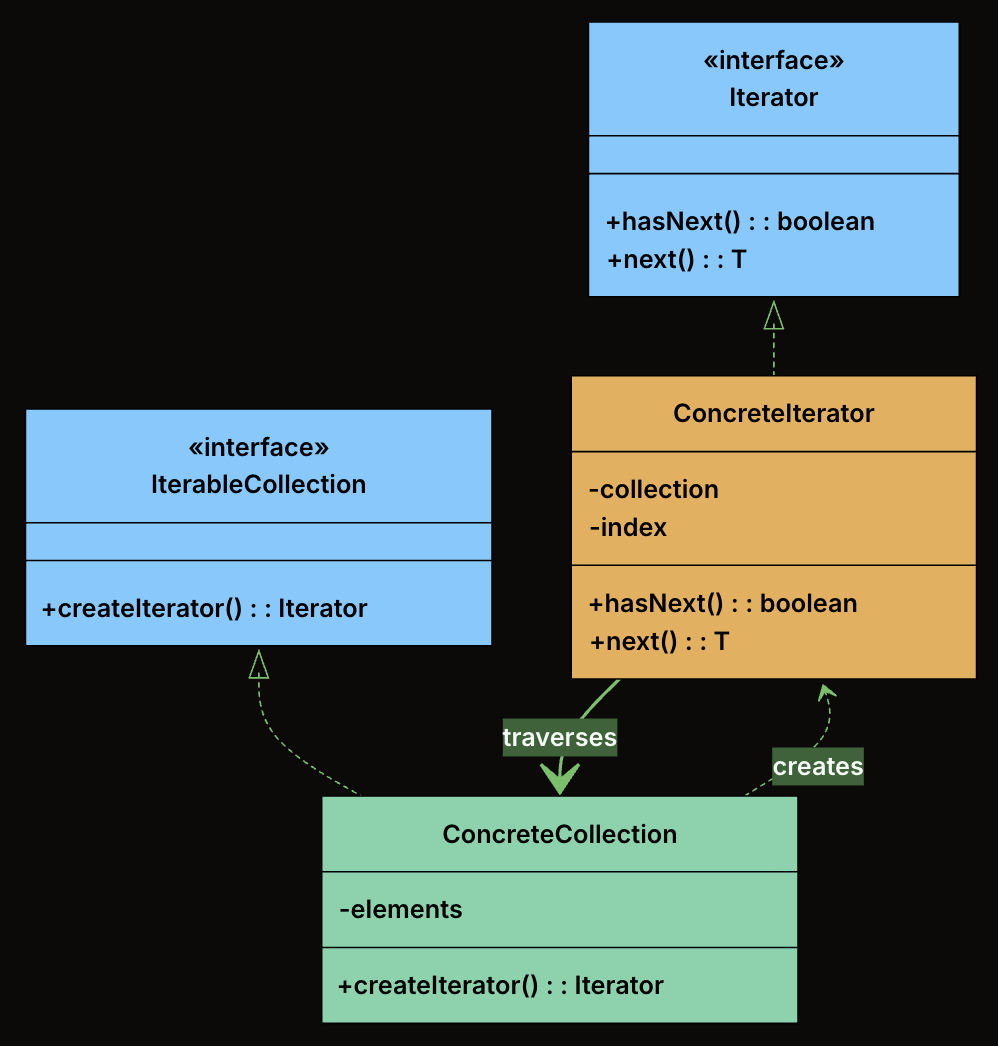
Iterator (interface): Declares the operations required to traverse a collection. At minimum, this includes hasNext() to check if more elements exist, and next() to retrieve the next element.
ConcreteIterator: Implements the Iterator interface for a specific collection. It maintains the current position within the collection and knows how to move to the next element.
IterableCollection (interface): Declares a method for creating an iterator. Any class implementing this interface promises it can be iterated.
ConcreteCollection: Implements the IterableCollection interface. It stores elements and returns an appropriate iterator when asked.
class Playlist implements IterableCollection<String> {
    private final List<String> songs = new ArrayList<>();

    public void addSong(String song) {
        songs.add(song);
    }

    public String getSongAt(int index) {
        return songs.get(index);
    }

    public int getSize() {
        return songs.size();
    }

    @Override
    public Iterator<String> createIterator() {
        return new PlaylistIterator(this);
    }
}
Implement the Concrete Iterator
class PlaylistIterator implements Iterator<String> {
    private final Playlist playlist;
    private int index = 0;

    public PlaylistIterator(Playlist playlist) {
        this.playlist = playlist;
    }

    @Override
    public boolean hasNext() {
        return index < playlist.getSize();
    }

    @Override
    public String next() {
        return playlist.getSongAt(index++);
    }
}
Client Code
public class MusicPlayer {
    public static void main(String[] args) {
        Playlist playlist = new Playlist();
        playlist.addSong("Shape of You");
        playlist.addSong("Bohemian Rhapsody");
        playlist.addSong("Blinding Lights");

        Iterator<String> iterator = playlist.createIterator();

        System.out.println("Now Playing:");
        while (iterator.hasNext()) {
            System.out.println(" 🎵 " + iterator.next());
        }
    }
}
Output
Now Playing:
🎵 Shape of You
🎵 Bohemian Rhapsody
🎵 Blinding Lights
Define the Iterator Interface
from abc import ABC, abstractmethod

class Iterator(ABC):
    @abstractmethod
    def has_next(self) -> bool:
        pass

    @abstractmethod
    def next(self):
        pass
Define the IterableCollection Interface
class IterableCollection(ABC):
    @abstractmethod
    def create_iterator(self):
        pass
The Strategy Design Pattern is a behavioral pattern that lets you define a family of algorithms, encapsulate each one in its own class, and make them interchangeable at runtime.
This pattern becomes valuable when:
You have multiple ways to perform the same operation, and the choice might change at runtime
You want to avoid bloated conditional statements that select between different behaviors
You need to isolate algorithm-specific data and logic from the code that uses it
Different clients might need different algorithms for the same task
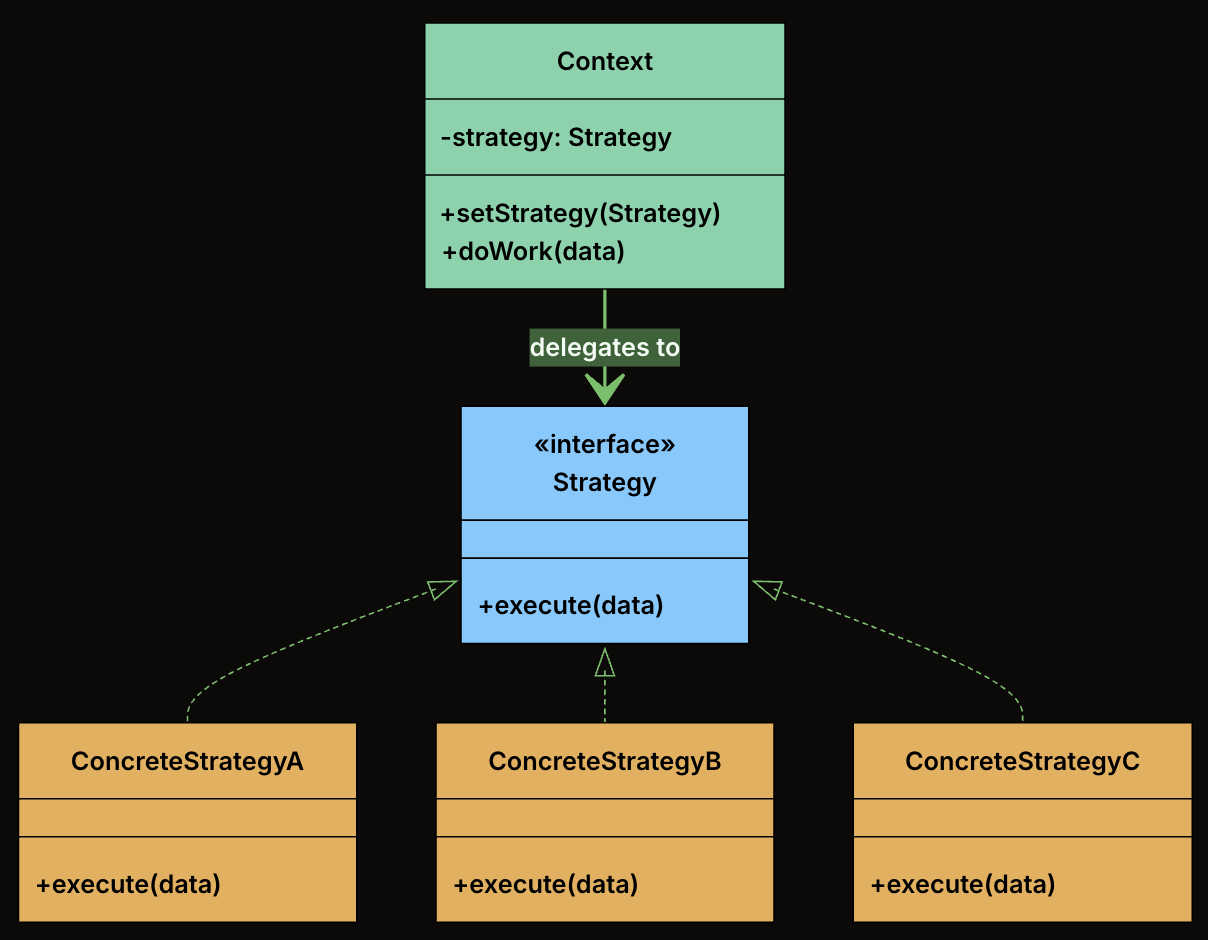
Strategy Interface: Declares the interface common to all supported algorithms. The Context uses this interface to call the algorithm defined by a ConcreteStrategy.
Concrete Strategies: Implements the algorithm using the Strategy interface. Each concrete strategy encapsulates a specific algorithm.
Context Class: This is the main class that uses a strategy to perform a task. It holds a reference to a Strategy object and delegates the calculation to it. The context doesn’t know or care which specific strategy is being used. It just knows that it has a strategy that can calculate a shipping cost.
class FlatRateShipping implements ShippingStrategy {
    private double rate;

    public FlatRateShipping(double rate) {
        this.rate = rate;
    }

    @Override
    public double calculateCost(Order order) {
        System.out.println("Calculating with Flat Rate strategy ($" + rate + ")");
        return rate;
    }
}
WeightBasedShipping
class WeightBasedShipping implements ShippingStrategy {
    private final double ratePerKg;

    public WeightBasedShipping(double ratePerKg) {
        this.ratePerKg = ratePerKg;
    }

    @Override
    public double calculateCost(Order order) {
        System.out.println("Calculating with Weight-Based strategy ($" + ratePerKg + "/kg)");
        return order.getTotalWeight() * ratePerKg;
    }
}
DistanceBasedShipping
class DistanceBasedShipping implements ShippingStrategy {
    private double ratePerKm;

    public DistanceBasedShipping(double ratePerKm) {
        this.ratePerKm = ratePerKm;
    }

    @Override
    public double calculateCost(Order order) {
        System.out.println("Calculating with Distance-Based strategy for zone: " + order.getDestinationZone());
        return switch (order.getDestinationZone()) {
            case "ZoneA" -> ratePerKm * 5.0;
            case "ZoneB" -> ratePerKm * 7.0;
            default -> ratePerKm * 10.0;
        };
    }
}
ThirdPartyApiShipping
class ThirdPartyApiShipping implements ShippingStrategy {
    private final double baseFee;
    private final double percentageFee;

    public ThirdPartyApiShipping(double baseFee, double percentageFee) {
        this.baseFee = baseFee;
        this.percentageFee = percentageFee;
    }

    @Override
    public double calculateCost(Order order) {
        System.out.println("Calculating with Third-Party API strategy.");
        // Simulate API call
        return baseFee + (order.getOrderValue() * percentageFee);
    }
}
Create the Context Class
class ShippingCostService {
    private ShippingStrategy strategy;

    // Constructor to set initial strategy
    public ShippingCostService(ShippingStrategy strategy) {
        this.strategy = strategy;
    }

    // Method to change strategy at runtime
    public void setStrategy(ShippingStrategy strategy) {
        System.out.println("ShippingCostService: Strategy changed to " + strategy.getClass().getSimpleName());
        this.strategy = strategy;
    }

    public double calculateShippingCost(Order order) {
        if (strategy == null) {
            throw new IllegalStateException("Shipping strategy not set.");
        }
        double cost = strategy.calculateCost(order);
        System.out.println("ShippingCostService: Final Calculated Shipping Cost: $" + cost +
                           " (using " + strategy.getClass().getSimpleName() + ")");
        return cost;
    }
}
Client Code
public class ECommerceAppV2 {
    public static void main(String[] args) {
        Order order1 = new Order();

        // Create different strategy instances
        ShippingStrategy flatRate = new FlatRateShipping(10.0);
        ShippingStrategy weightBased = new WeightBasedShipping(2.5);
        ShippingStrategy distanceBased = new DistanceBasedShipping(5.0);
        ShippingStrategy thirdParty = new ThirdPartyApiShipping(7.5, 0.02);

        // Create context with an initial strategy
        ShippingCostService shippingService = new ShippingCostService(flatRate);

        System.out.println("--- Order 1: Using Flat Rate (initial) ---");
        shippingService.calculateShippingCost(order1);

        System.out.println("\n--- Order 1: Changing to Weight-Based ---");
        shippingService.setStrategy(weightBased);
        shippingService.calculateShippingCost(order1);

        System.out.println("\n--- Order 1: Changing to Distance-Based ---");
        shippingService.setStrategy(distanceBased);
        shippingService.calculateShippingCost(order1);

        System.out.println("\n--- Order 1: Changing to Third-Party API ---");
        shippingService.setStrategy(thirdParty);
        shippingService.calculateShippingCost(order1);

        // Adding a NEW strategy is easy:
        // 1. Create a new class implementing ShippingStrategy (e.g., FreeShippingStrategy)
        // 2. Client can then instantiate and use it:
        //    ShippingStrategy freeShipping = new FreeShippingStrategy();
        //    shippingService.setStrategy(freeShipping);
        //    shippingService.calculateShippingCost(primeMemberOrder);
        // No modification to ShippingCostService is needed!
    }
}
Define the Strategy Interface
from abc import ABC, abstractmethod

class ShippingStrategy(ABC):
    @abstractmethod
    def calculate_cost(self, order) -> float:
        pass
Implement Concrete Strategies
FlatRateShipping
class FlatRateShipping(ShippingStrategy):
    def __init__(self, rate):
        self.rate = rate

    def calculate_cost(self, order):
        print(f"Calculating with Flat Rate strategy (${self.rate})")
        return self.rate
WeightBasedShipping
class WeightBasedShipping(ShippingStrategy):
    def __init__(self, rate_per_kg):
        self.rate_per_kg = rate_per_kg

    def calculate_cost(self, order):
        print(f"Calculating with Weight-Based strategy (${self.rate_per_kg}/kg)")
        return order.get_total_weight() * self.rate_per_kg
class ThirdPartyApiShipping(ShippingStrategy):
    def __init__(self, base_fee, percentage_fee):
        self.base_fee = base_fee
        self.percentage_fee = percentage_fee

    def calculate_cost(self, order):
        print("Calculating with Third-Party API strategy.")
        # Simulate API call
        return self.base_fee + (order.get_order_value() * self.percentage_fee)
Create the Context Class
class ShippingCostService:
    def __init__(self, strategy):
        self.strategy = strategy

    def set_strategy(self, strategy):
        print(f"ShippingCostService: Strategy changed to {strategy.__class__.__name__}")
        self.strategy = strategy

    def calculate_shipping_cost(self, order):
        if self.strategy is None:
            raise ValueError("Shipping strategy not set.")

        cost = self.strategy.calculate_cost(order)
        print(f"ShippingCostService: Final Calculated Shipping Cost: ${cost} "
              f"(using {self.strategy.__class__.__name__})")
        return cost
Client Code
def ecommerce_app_v2():
    order1 = Order()

    # Create different strategy instances
    flat_rate = FlatRateShipping(10.0)
    weight_based = WeightBasedShipping(2.5)
    distance_based = DistanceBasedShipping(5.0)
    third_party = ThirdPartyApiShipping(7.5, 0.02)

    # Create context with an initial strategy
    shipping_service = ShippingCostService(flat_rate)

    print("--- Order 1: Using Flat Rate (initial) ---")
    shipping_service.calculate_shipping_cost(order1)

    print("\n--- Order 1: Changing to Weight-Based ---")
    shipping_service.set_strategy(weight_based)
    shipping_service.calculate_shipping_cost(order1)

    print("\n--- Order 1: Changing to Distance-Based ---")
    shipping_service.set_strategy(distance_based)
    shipping_service.calculate_shipping_cost(order1)

    print("\n--- Order 1: Changing to Third-Party API ---")
    shipping_service.set_strategy(third_party)
    shipping_service.calculate_shipping_cost(order1)

    # Adding a NEW strategy is easy:
    # 1. Create a new class implementing ShippingStrategy (e.g., FreeShippingStrategy)
    # 2. Client can then instantiate and use it:
    #    free_shipping = FreeShippingStrategy()
    #    shipping_service.set_strategy(free_shipping)
    #    shipping_service.calculate_shipping_cost(prime_member_order)
    # No modification to ShippingCostService is needed!

# Example usage
if __name__ == "__main__":
    ecommerce_app_v2()
class FlatRateShipping : IShippingStrategy
{
    private double rate;

    public FlatRateShipping(double rate)
    {
        this.rate = rate;
    }

    public double CalculateCost(Order order)
    {
        Console.WriteLine($"Calculating with Flat Rate strategy (${rate})");
        return rate;
    }
}
WeightBasedShipping
class WeightBasedShipping : IShippingStrategy
{
    private double ratePerKg;

    public WeightBasedShipping(double ratePerKg)
    {
        this.ratePerKg = ratePerKg;
    }

    public double CalculateCost(Order order)
    {
        Console.WriteLine($"Calculating with Weight-Based strategy (${ratePerKg}/kg)");
        return order.GetTotalWeight() * ratePerKg;
    }
}
DistanceBasedShipping
class DistanceBasedShipping : IShippingStrategy
{
    private double ratePerKm;

    public DistanceBasedShipping(double ratePerKm)
    {
        this.ratePerKm = ratePerKm;
    }

    public double CalculateCost(Order order)
    {
        Console.WriteLine($"Calculating with Distance-Based strategy for zone: {order.GetDestinationZone()}");

        switch (order.GetDestinationZone())
        {
            case "ZoneA":
                return ratePerKm * 5.0;
            case "ZoneB":
                return ratePerKm * 7.0;
            default:
                return ratePerKm * 10.0;
        }
    }
}
ThirdPartyApiShipping
class ThirdPartyApiShipping : IShippingStrategy
{
    private double baseFee;
    private double percentageFee;

    public ThirdPartyApiShipping(double baseFee, double percentageFee)
    {
        this.baseFee = baseFee;
        this.percentageFee = percentageFee;
    }

    public double CalculateCost(Order order)
    {
        Console.WriteLine("Calculating with Third-Party API strategy.");
        // Simulate API call
        return baseFee + (order.GetOrderValue() * percentageFee);
    }
}
Create the Context Class
class ShippingCostService
{
    private IShippingStrategy strategy;

    public ShippingCostService(IShippingStrategy strategy)
    {
        this.strategy = strategy;
    }

    public void SetStrategy(IShippingStrategy strategy)
    {
        Console.WriteLine($"ShippingCostService: Strategy changed to {strategy.GetType().Name}");
        this.strategy = strategy;
    }

    public double CalculateShippingCost(Order order)
    {
        if (strategy == null)
        {
            throw new InvalidOperationException("Shipping strategy not set.");
        }

        double cost = strategy.CalculateCost(order);
        Console.WriteLine($"ShippingCostService: Final Calculated Shipping Cost: ${cost} " +
                         $"(using {strategy.GetType().Name})");
        return cost;
    }
}
Client Code
public class Program
{
    public static void ECommerceAppV2()
    {
        Order order1 = new Order();

        // Create different strategy instances
        IShippingStrategy flatRate = new FlatRateShipping(10.0);
        IShippingStrategy weightBased = new WeightBasedShipping(2.5);
        IShippingStrategy distanceBased = new DistanceBasedShipping(5.0);
        IShippingStrategy thirdParty = new ThirdPartyApiShipping(7.5, 0.02);

        // Create context with an initial strategy
        ShippingCostService shippingService = new ShippingCostService(flatRate);

        Console.WriteLine("--- Order 1: Using Flat Rate (initial) ---");
        shippingService.CalculateShippingCost(order1);

        Console.WriteLine("\n--- Order 1: Changing to Weight-Based ---");
        shippingService.SetStrategy(weightBased);
        shippingService.CalculateShippingCost(order1);

        Console.WriteLine("\n--- Order 1: Changing to Distance-Based ---");
        shippingService.SetStrategy(distanceBased);
        shippingService.CalculateShippingCost(order1);

        Console.WriteLine("\n--- Order 1: Changing to Third-Party API ---");
        shippingService.SetStrategy(thirdParty);
        shippingService.CalculateShippingCost(order1);

        // Adding a NEW strategy is easy:
        // 1. Create a new class implementing IShippingStrategy (e.g., FreeShippingStrategy)
        // 2. Client can then instantiate and use it:
        //    IShippingStrategy freeShipping = new FreeShippingStrategy();
        //    shippingService.SetStrategy(freeShipping);
        //    shippingService.CalculateShippingCost(primeMemberOrder);
        // No modification to ShippingCostService is needed!
    }

    public static void Main(string[] args)
    {
        Console.WriteLine("\n\n=== Strategy Pattern Approach ===");
        ECommerceAppV2();
    }
}
class DistanceBasedShipping implements ShippingStrategy {
  private ratePerKm: number;

  constructor(ratePerKm: number) {
    this.ratePerKm = ratePerKm;
  }

  calculateCost(order: Order): number {
    console.log(
      "Calculating with Distance-Based strategy for zone: " +
        order.getDestinationZone(),
    );
    switch (order.getDestinationZone()) {
      case "ZoneA":
        return this.ratePerKm * 5.0;
      case "ZoneB":
        return this.ratePerKm * 7.0;
      default:
        return this.ratePerKm * 10.0;
    }
  }
}
ThirdPartyApiShipping
class ThirdPartyApiShipping implements ShippingStrategy {
  private readonly baseFee: number;
  private readonly percentageFee: number;

  constructor(baseFee: number, percentageFee: number) {
    this.baseFee = baseFee;
    this.percentageFee = percentageFee;
  }

  calculateCost(order: Order): number {
    console.log("Calculating with Third-Party API strategy.");
    // Simulate API call
    return this.baseFee + order.getOrderValue() * this.percentageFee;
  }
}
Create the Context Class
class ShippingCostService {
  private strategy: ShippingStrategy;

  // Constructor to set initial strategy
  constructor(strategy: ShippingStrategy) {
    this.strategy = strategy;
  }

  // Method to change strategy at runtime
  setStrategy(strategy: ShippingStrategy): void {
    console.log(
      "ShippingCostService: Strategy changed to " + strategy.constructor.name,
    );
    this.strategy = strategy;
  }

  calculateShippingCost(order: Order): number {
    if (!this.strategy) {
      throw new Error("Shipping strategy not set.");
    }
    const cost = this.strategy.calculateCost(order);
    console.log(
      "ShippingCostService: Final Calculated Shipping Cost: $" +
        cost +
        " (using " +
        this.strategy.constructor.name +
        ")",
    );
    return cost;
  }
}
Client Code
class ECommerceAppV2 {
  static main(): void {
    const order1 = new Order();

    // Create different strategy instances
    const flatRate: ShippingStrategy = new FlatRateShipping(10.0);
    const weightBased: ShippingStrategy = new WeightBasedShipping(2.5);
    const distanceBased: ShippingStrategy = new DistanceBasedShipping(5.0);
    const thirdParty: ShippingStrategy = new ThirdPartyApiShipping(7.5, 0.02);

    // Create context with an initial strategy
    const shippingService = new ShippingCostService(flatRate);

    console.log("--- Order 1: Using Flat Rate (initial) ---");
    shippingService.calculateShippingCost(order1);

    console.log("\n--- Order 1: Changing to Weight-Based ---");
    shippingService.setStrategy(weightBased);
    shippingService.calculateShippingCost(order1);

    console.log("\n--- Order 1: Changing to Distance-Based ---");
    shippingService.setStrategy(distanceBased);
    shippingService.calculateShippingCost(order1);

    console.log("\n--- Order 1: Changing to Third-Party API ---");
    shippingService.setStrategy(thirdParty);
    shippingService.calculateShippingCost(order1);

    // Adding a NEW strategy is easy:
    // 1. Create a new class implementing ShippingStrategy (e.g., FreeShippingStrategy)
    // 2. Client can then instantiate and use it:
    //    const freeShipping: ShippingStrategy = new FreeShippingStrategy();
    //    shippingService.setStrategy(freeShipping);
    //    shippingService.calculateShippingCost(primeMemberOrder);
    // No modification to ShippingCostService is needed!
  }
}
The Observer Design Pattern is a behavioral pattern that defines a one-to-many dependency between objects so that when one object (the subject) changes its state, all its dependents (observers) are automatically notified and updated.
This pattern shines in scenarios where:
You have multiple parts of the system that need to react to a change in one central component.
You want to decouple the publisher of data from the subscribers who react to it.
You need a dynamic, event-driven communication model without hardcoding who is listening to whom.
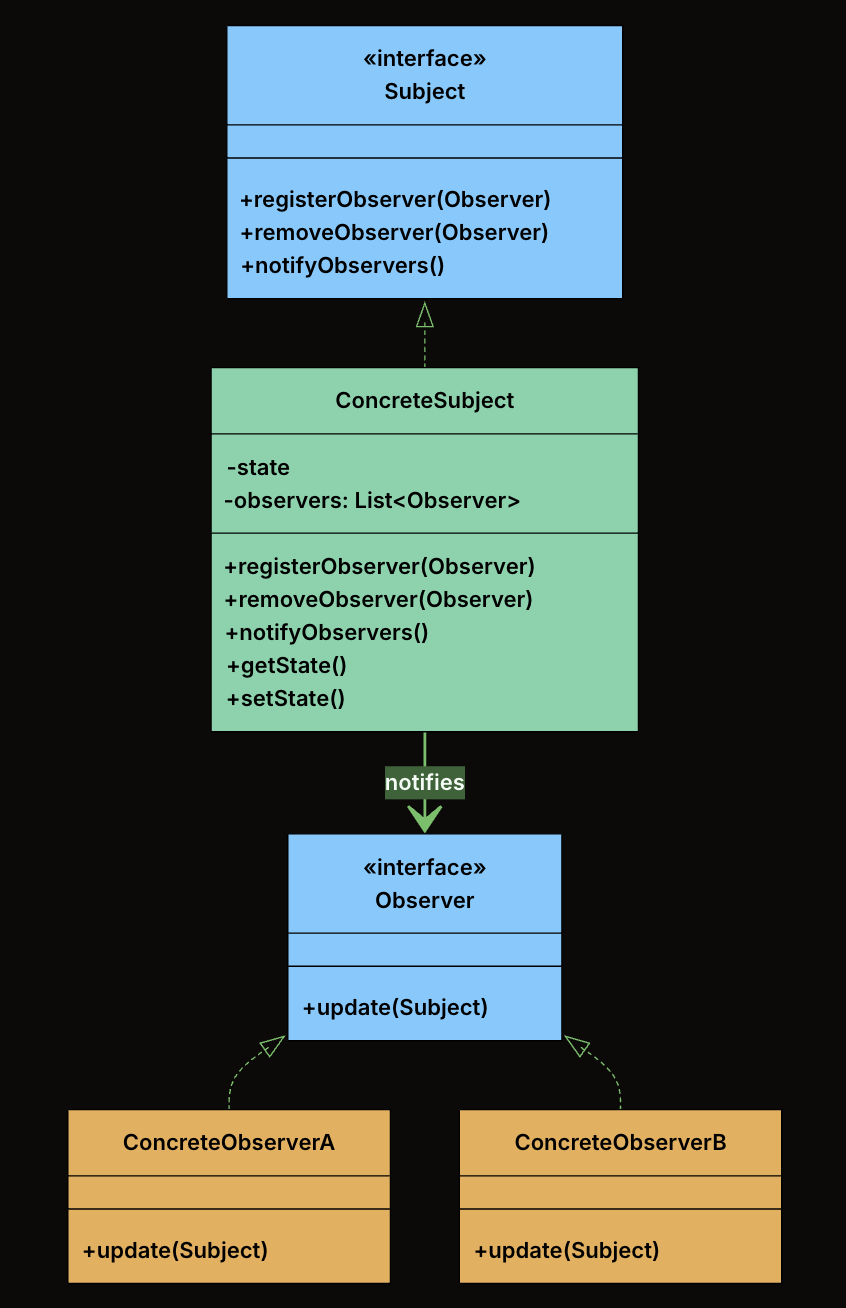
Subject Interface: Declares the interface for managing observers, registering, removing, and notifying them. Defines registerObserver(), removeObserver(), and notifyObservers() methods. The subject holds a list of observers typed to the Observer interface, not to concrete classes. This means any class that implements the Observer interface can register, and the subject never needs to know what it is.
Observer Interface: Declares the update() method that the subject calls when its state changes. All modules that want to listen to fitness data changes will implement this interface.
ConcreteSubject: Implements the Subject interface. Holds the actual state and notifies observers when that state changes. Maintain a list of registered observers and calls notifyObservers() whenever its state changes.
ConcreteObservers: Implements the Observer interface. Defines what happens when the subject’s state changes. When update() is called, each observer pulls relevant data from the subject and performs its own logic (e.g., update UI, log progress, send alerts).