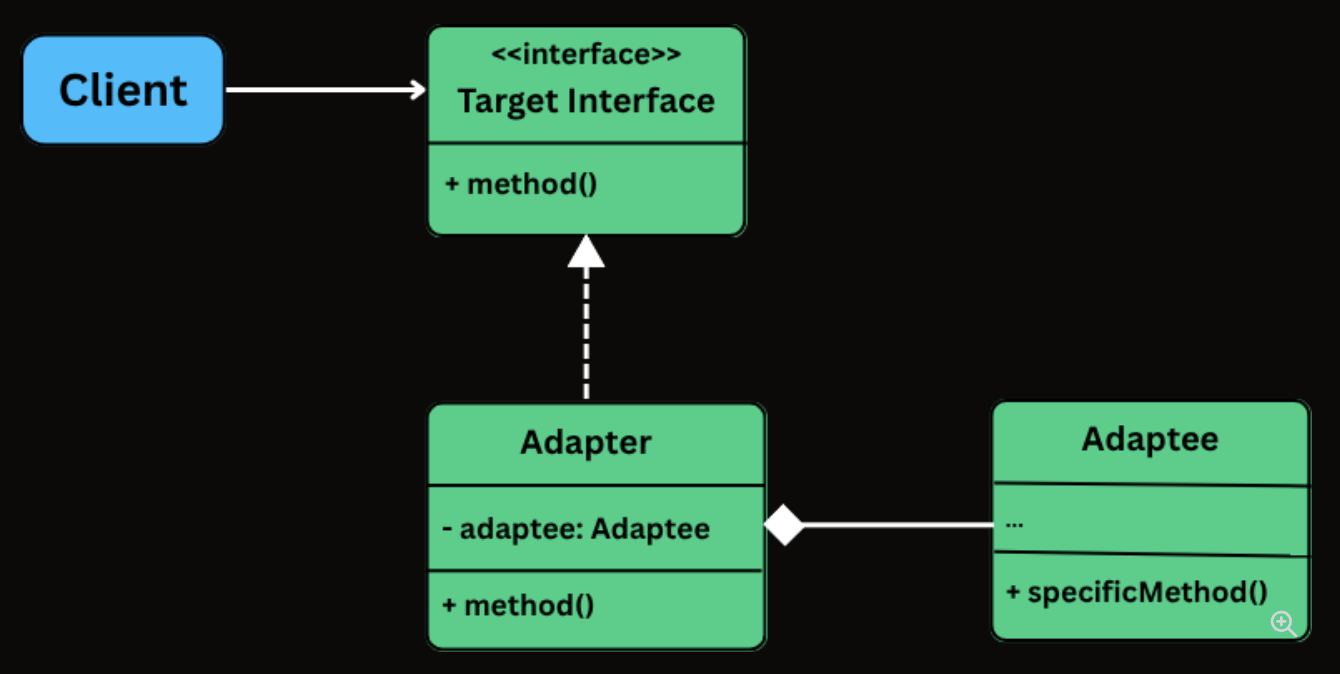
The Adapter Design Pattern is a structural design pattern that allows incompatible interfaces to work together by converting the interface of one class into another that the client expects.
It’s particularly useful in situations where:
You’re integrating with a legacy system or a third-party library that doesn’t match your current interface.
You want to reuse existing functionality without modifying its source code.
You need to bridge the gap between new and old code, or between systems built with different interface designs.
class LegacyGateway {
    private long transactionReference;
    private boolean paymentSuccessful;

    public void executeTransaction(double totalAmount, String currency) {
        System.out.println("LegacyGateway: Executing " + currency + " " + totalAmount);
        transactionReference = System.nanoTime();
        paymentSuccessful = true;
        System.out.println("LegacyGateway: Done. Ref: " + transactionReference);
    }

    public boolean checkStatus(long ref) {
        System.out.println("LegacyGateway: Checking status for ref: " + ref);
        return paymentSuccessful;
    }

    public long getReferenceNumber() {
        return transactionReference;
    }
}
Implement the Adapter Class
class LegacyGatewayAdapter implements PaymentProcessor {
    private final LegacyGateway legacyGateway;
    private long currentRef;

    public LegacyGatewayAdapter(LegacyGateway legacyGateway) {
        this.legacyGateway = legacyGateway;
    }

    @Override
    public void processPayment(double amount, String currency) {
        System.out.println("Adapter: Translating processPayment() for " + amount + " " + currency);
        legacyGateway.executeTransaction(amount, currency);
        currentRef = legacyGateway.getReferenceNumber(); // Store for later use
    }

    @Override
    public boolean isPaymentSuccessful() {
        return legacyGateway.checkStatus(currentRef);
    }

    @Override
    public String getTransactionId() {
        return "LEGACY_TXN_" + currentRef;
    }
}
Client Code
public class ECommerceAppV2 {
    public static void main(String[] args) {
        // Modern processor
        PaymentProcessor processor = new InHousePaymentProcessor();
        CheckoutService modernCheckout = new CheckoutService(processor);
        System.out.println("--- Using Modern Processor ---");
        modernCheckout.checkout(199.99, "USD");

        // Legacy gateway through adapter
        System.out.println("\n--- Using Legacy Gateway via Adapter ---");
        LegacyGateway legacy = new LegacyGateway();
        processor = new LegacyGatewayAdapter(legacy);
        CheckoutService legacyCheckout = new CheckoutService(processor);
        legacyCheckout.checkout(75.50, "USD");
    }
}
class LegacyGateway
{
    private long transactionReference;
    private bool paymentSuccessful;

    public void ExecuteTransaction(double totalAmount, string currency)
    {
        Console.WriteLine($"LegacyGateway: Executing {currency} {totalAmount}");
        transactionReference = DateTimeOffset.Now.Ticks;
        paymentSuccessful = true;
        Console.WriteLine($"LegacyGateway: Done. Ref: {transactionReference}");
    }

    public bool CheckStatus(long reference)
    {
        Console.WriteLine($"LegacyGateway: Checking status for ref: {reference}");
        return paymentSuccessful;
    }

    public long GetReferenceNumber() => transactionReference;
}
Implement the Adapter Class
class LegacyGatewayAdapter : IPaymentProcessor
{
   private LegacyGateway legacyGateway;
   private long currentRef;

   public LegacyGatewayAdapter(LegacyGateway legacyGateway)
   {
       this.legacyGateway = legacyGateway;
   }

   public void ProcessPayment(double amount, string currency)
   {
       Console.WriteLine($"Adapter: Translating processPayment() for {amount} {currency}");
       legacyGateway.ExecuteTransaction(amount, currency);
       currentRef = legacyGateway.GetReferenceNumber();
   }

   public bool IsPaymentSuccessful()
   {
       return legacyGateway.CheckStatus(currentRef);
   }

   public string GetTransactionId()
   {
       return "LEGACY_TXN_" + currentRef;
   }
}
Client Code
public class ECommerceAppV2
{
   public static void Main(string[] args)
   {
       // Modern processor
       IPaymentProcessor processor = new InHousePaymentProcessor();
       CheckoutService modernCheckout = new CheckoutService(processor);
       Console.WriteLine("--- Using Modern Processor ---");
       modernCheckout.Checkout(199.99, "USD");

       // Legacy gateway through adapter
       Console.WriteLine("\n--- Using Legacy Gateway via Adapter ---");
       LegacyGateway legacy = new LegacyGateway();
       processor = new LegacyGatewayAdapter(legacy);
       CheckoutService legacyCheckout = new CheckoutService(processor);
       legacyCheckout.Checkout(75.50, "USD");
   }
}
class ECommerceAppV2 {
  static main(): void {
    // Modern processor
    let processor: PaymentProcessor = new InHousePaymentProcessor();
    const modernCheckout = new CheckoutService(processor);
    console.log("--- Using Modern Processor ---");
    modernCheckout.checkout(199.99, "USD");

    // Legacy gateway through adapter
    console.log("\n--- Using Legacy Gateway via Adapter ---");
    const legacy = new LegacyGateway();
    processor = new LegacyGatewayAdapter(legacy);
    const legacyCheckout = new CheckoutService(processor);
    legacyCheckout.checkout(75.5, "USD");
  }
}
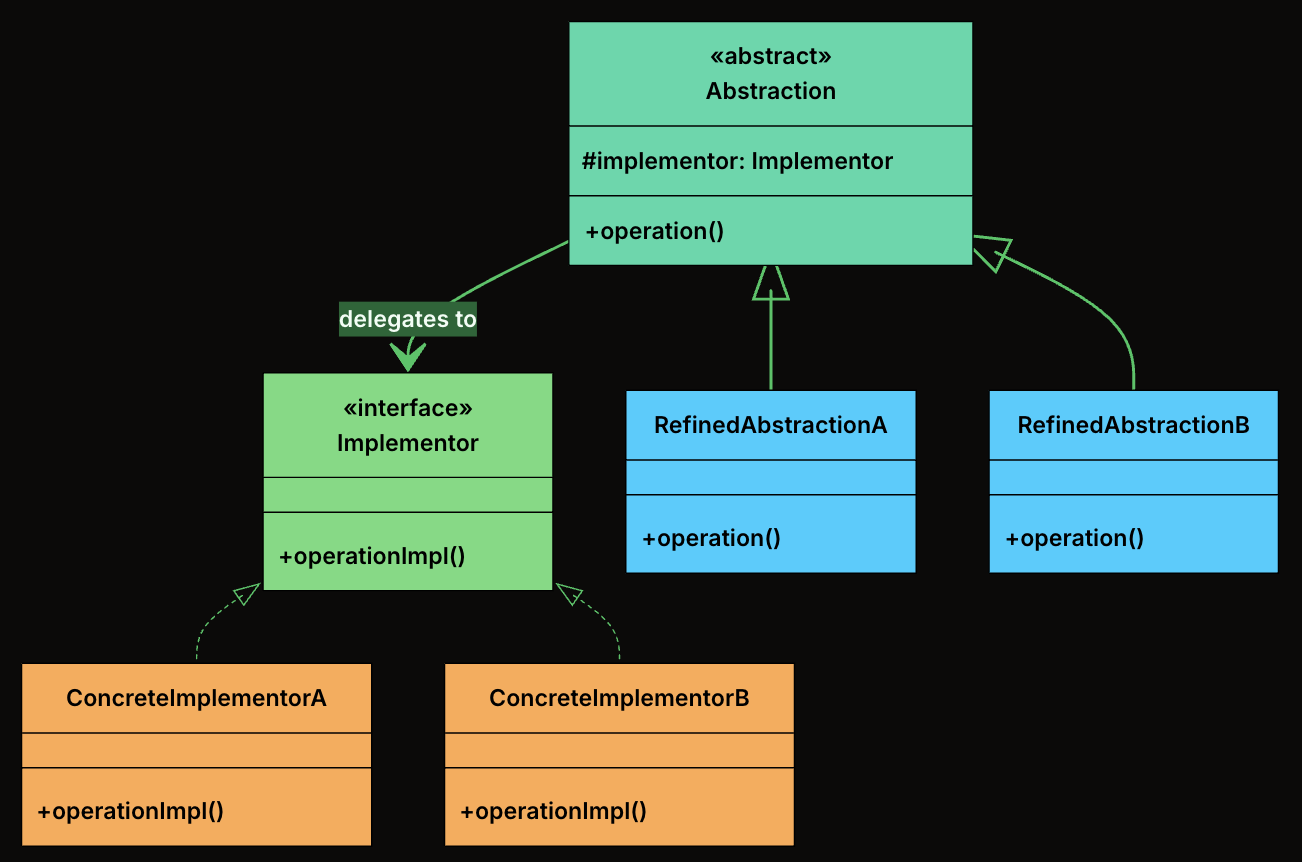
The Bridge Design Pattern is a structural pattern that lets you decouple an abstraction from its implementation, allowing the two to vary independently.
It’s particularly useful in situations where:
You have classes that can be extended in multiple orthogonal dimensions (e.g., shape vs. rendering technology, UI control vs. platform).
You want to avoid a deep inheritance hierarchy that multiplies combinations of features.
You need to combine multiple variations of behavior or implementation at runtime.
Abstraction: The high-level interface that clients interact with. It defines operations in terms that make sense to the domain (e.g., “draw a shape”) and delegates the low-level work to an implementor.
RefinedAbstraction: A concrete subclass of Abstraction that adds domain-specific state or behavior. It still delegates to the implementor for low-level operations.
Implementor: The interface that defines the low-level operations that concrete implementations must provide. This is the “other side” of the bridge.
ConcreteImplementors: A concrete class that implements the Implementor interface with a specific technology or strategy.
class VectorRenderer implements Renderer {
    @Override
    public void renderCircle(float radius) {
        System.out.println("Drawing a circle of radius " + radius + " using VECTOR rendering.");
    }

    @Override
    public void renderRectangle(float width, float height) {
        System.out.println("Drawing a rectangle " + width + "x" + height + " using VECTOR rendering.");
    }
}
RasterRenderer
class RasterRenderer implements Renderer {
    @Override
    public void renderCircle(float radius) {
        System.out.println("Drawing pixels for a circle of radius " + radius + " (RASTER).");
    }

    @Override
    public void renderRectangle(float width, float height) {
        System.out.println("Drawing pixels for a rectangle " + width + "x" + height + " (RASTER).");
    }
}
Define the Abstraction
abstract class Shape {
    protected Renderer renderer;

    public Shape(Renderer renderer) {
        this.renderer = renderer;
    }

    public abstract void draw();
}
Create Concrete Shapes
Circle
class Circle extends Shape {
    private final float radius;

    public Circle(Renderer renderer, float radius) {
        super(renderer);
        this.radius = radius;
    }

    @Override
    public void draw() {
        renderer.renderCircle(radius);
    }
}
Rectangle
class Rectangle extends Shape {
    private final float width;
    private final float height;

    public Rectangle(Renderer renderer, float width, float height) {
        super(renderer);
        this.width = width;
        this.height = height;
    }

    @Override
    public void draw() {
        renderer.renderRectangle(width, height);
    }
}
Client Code
public class BridgeDemo {
    public static void main(String[] args) {
        Renderer vector = new VectorRenderer();
        Renderer raster = new RasterRenderer();

        Shape circle1 = new Circle(vector, 5);
        Shape circle2 = new Circle(raster, 5);

        Shape rectangle1 = new Rectangle(vector, 10, 4);
        Shape rectangle2 = new Rectangle(raster, 10, 4);

        circle1.draw();     // Vector
        circle2.draw();     // Raster
        rectangle1.draw();  // Vector
        rectangle2.draw();  // Raster
    }
}
class VectorRenderer(Renderer):
    def render_circle(self, radius):
        print(f"Drawing a circle of radius {radius} using VECTOR rendering.")

    def render_rectangle(self, width, height):
        print(f"Drawing a rectangle {width}x{height} using VECTOR rendering.")
RasterRenderer
class RasterRenderer(Renderer):
    def render_circle(self, radius):
        print(f"Drawing pixels for a circle of radius {radius} (RASTER).")

    def render_rectangle(self, width, height):
        print(f"Drawing pixels for a rectangle {width}x{height} (RASTER).")
class VectorRenderer : IRenderer
{
    public void RenderCircle(float radius)
    {
        Console.WriteLine($"Drawing a circle of radius {radius} using VECTOR rendering.");
    }

    public void RenderRectangle(float width, float height)
    {
        Console.WriteLine($"Drawing a rectangle {width}x{height} using VECTOR rendering.");
    }
}
RasterRenderer
class RasterRenderer : IRenderer
{
    public void RenderCircle(float radius)
    {
        Console.WriteLine($"Drawing pixels for a circle of radius {radius} (RASTER).");
    }

    public void RenderRectangle(float width, float height)
    {
        Console.WriteLine($"Drawing pixels for a rectangle {width}x{height} (RASTER).");
    }
}
Define the Abstraction
abstract class Shape
{
    protected IRenderer renderer;

    public Shape(IRenderer renderer)
    {
        this.renderer = renderer;
    }

    public abstract void Draw();
}
Create Concrete Shapes
Circle
class Circle : Shape
{
    private readonly float radius;

    public Circle(IRenderer renderer, float radius) : base(renderer)
    {
        this.radius = radius;
    }

    public override void Draw()
    {
        renderer.RenderCircle(radius);
    }
}
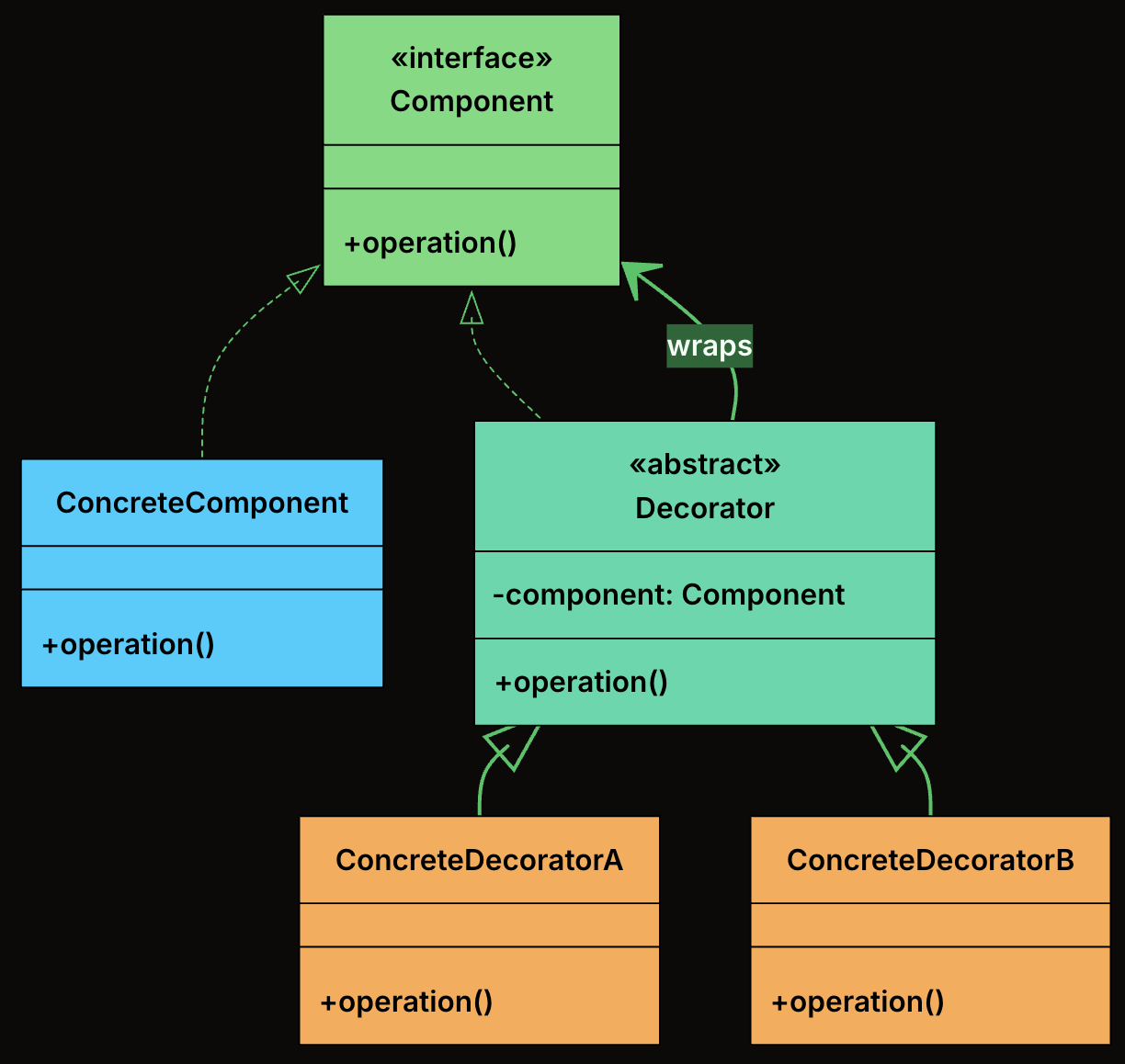
The Decorator Design Pattern is a structural pattern that lets you dynamically add new behavior or responsibilities to objects without modifying their underlying code.
It’s particularly useful in situations where:
You want to extend the functionality of a class without subclassing it.
You need to compose behaviors at runtime, in various combinations.
You want to avoid bloated classes filled with if-else logic for optional features.
Component: Declares the common interface that both the core object and all decorators implement.
ConcreteComponent: The base object that can be wrapped with decorators. It provides the default behavior.
Decorator: An abstract class that implements the Component interface and holds a reference to another Component. It forwards calls to the wrapped object.
ConcreteDecorator: Extend the base decorator to add new functionality before/after calling the wrapped component’s method.
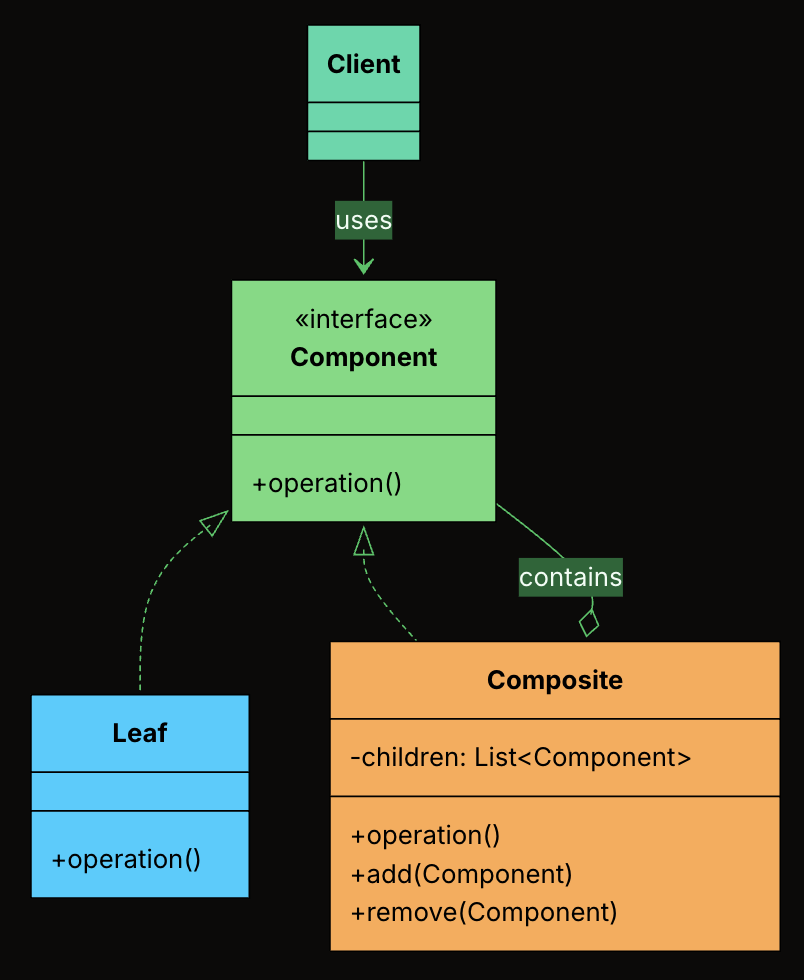
The Composite Design Pattern is a structural pattern that lets you treat individual objects and compositions of objects uniformly.
It allows you to build tree-like structures (e.g., file systems, UI hierarchies, organizational charts) where clients can work with both single elements and groups of elements using the same interface.
It’s particularly useful in situations where:
You need to represent part-whole hierarchies.
You want to perform operations on both leaf nodes and composite nodes in a consistent way.
You want to avoid writing special-case logic to distinguish between “single” and “grouped” objects.
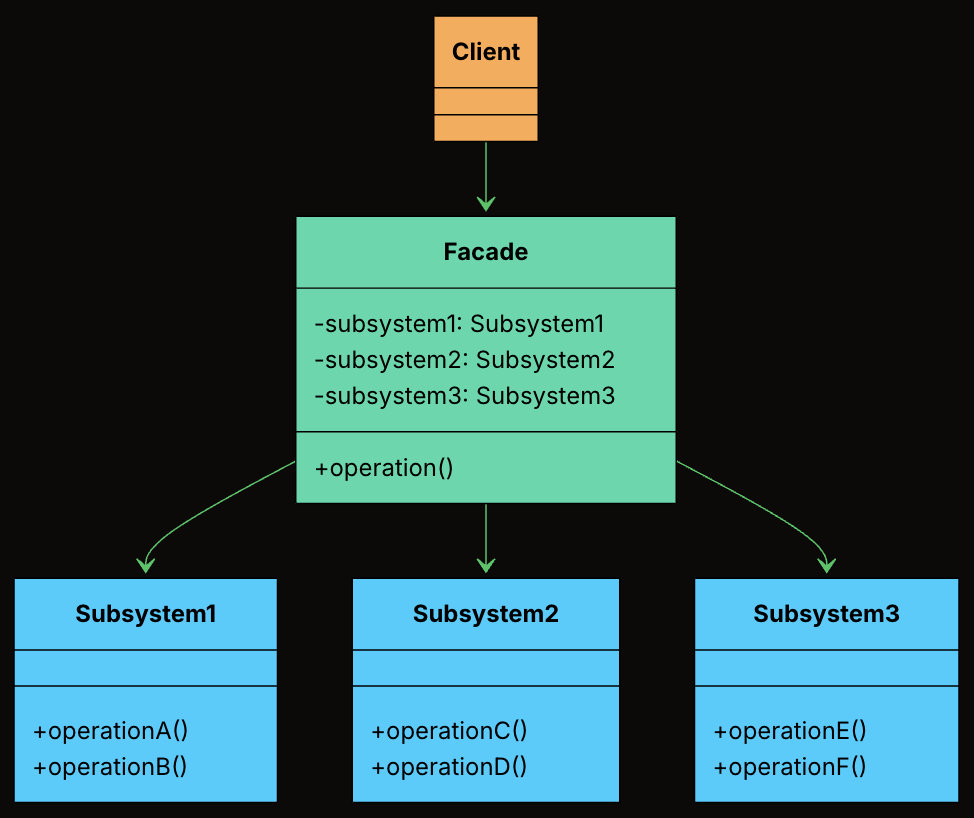
The Facade Design Pattern is a structural design pattern that provides a single, simplified interface to a complex subsystem. Instead of forcing clients to coordinate many moving parts, a facade hides the internal complexity and exposes a clean, easy-to-use entry point.
It’s particularly useful in situations where:
Your system contains many interdependent classes or low-level APIs.
The client doesn’t need to know how those parts work internally.
You want to reduce coupling and make the system easier to learn and use.
Facade: Knows which subsystem classes to use and in what order. Delegates requests to appropriate subsystem methods without exposing internal details to the client.
Subsystem Classes: Provides the actual business logic to handle a specific task. Do not know about the facade. Can still be used independently if needed.
Client: Uses the Facade to initiate a deployment, instead of interacting with the subsystem classes directly.
class DeploymentFacade {
    private VersionControlSystem vcs = new VersionControlSystem();
    private BuildSystem buildSystem = new BuildSystem();
    private TestingFramework testingFramework = new TestingFramework();
    private DeploymentTarget deploymentTarget = new DeploymentTarget();

    public boolean deployApplication(String branch, String serverAddress) {
        System.out.println("\nFACADE: --- Initiating FULL DEPLOYMENT for branch: " + branch + " to " + serverAddress + " ---");
        boolean success = true;

        try {
            vcs.pullLatestChanges(branch);

            if (!buildSystem.compileProject()) {
                System.err.println("FACADE: DEPLOYMENT FAILED - Build compilation failed.");
                return false;
            }

            String artifactPath = buildSystem.getArtifactPath();

            if (!testingFramework.runUnitTests()) {
                System.err.println("FACADE: DEPLOYMENT FAILED - Unit tests failed.");
                return false;
            }

            if (!testingFramework.runIntegrationTests()) {
                System.err.println("FACADE: DEPLOYMENT FAILED - Integration tests failed.");
                return false;
            }

            deploymentTarget.transferArtifact(artifactPath, serverAddress);
            deploymentTarget.activateNewVersion(serverAddress);

            System.out.println("FACADE: APPLICATION DEPLOYED SUCCESSFULLY to " + serverAddress + "!");
        } catch (Exception e) {
            System.err.println("FACADE: DEPLOYMENT FAILED - An unexpected error occurred: " + e.getMessage());
            e.printStackTrace();
            success = false;
        }

        return success;
    }
}
Client Code
public class DeploymentAppFacade {
    public static void main(String[] args) {
        DeploymentFacade deploymentFacade = new DeploymentFacade();

        // Deploy to production
        deploymentFacade.deployApplication("main", "prod.server.example.com");

        // Deploy a feature branch to staging
        System.out.println("\n--- Deploying feature branch to staging ---");
        deploymentFacade.deployApplication("feature/new-ui", "staging.server.example.com");
    }
}
Define Facade Class
class DeploymentFacade:
   def __init__(self):
       self.vcs = VersionControlSystem()
       self.build_system = BuildSystem()
       self.testing_framework = TestingFramework()
       self.deployment_target = DeploymentTarget()

   def deploy_application(self, branch, server_address):
       print(f"\nFACADE: --- Initiating FULL DEPLOYMENT for branch: {branch} to {server_address} ---")
       success = True

       try:
           self.vcs.pull_latest_changes(branch)

           if not self.build_system.compile_project():
               print("FACADE: DEPLOYMENT FAILED - Build compilation failed.", file=sys.stderr)
               return False

           artifact_path = self.build_system.get_artifact_path()

           if not self.testing_framework.run_unit_tests():
               print("FACADE: DEPLOYMENT FAILED - Unit tests failed.", file=sys.stderr)
               return False

           if not self.testing_framework.run_integration_tests():
               print("FACADE: DEPLOYMENT FAILED - Integration tests failed.", file=sys.stderr)
               return False

           self.deployment_target.transfer_artifact(artifact_path, server_address)
           self.deployment_target.activate_new_version(server_address)

           print(f"FACADE: APPLICATION DEPLOYED SUCCESSFULLY to {server_address}!")
       except Exception as e:
           print(f"FACADE: DEPLOYMENT FAILED - An unexpected error occurred: {str(e)}", file=sys.stderr)
           import traceback
           traceback.print_exc()
           success = False

       return success
Client Code
class DeploymentAppFacade:
   @staticmethod
   def main():
       deployment_facade = DeploymentFacade()

       # Deploy to production
       deployment_facade.deploy_application("main", "prod.server.example.com")

       # Deploy a feature branch to staging
       print("\n--- Deploying feature branch to staging ---")
       deployment_facade.deploy_application("feature/new-ui", "staging.server.example.com")

if __name__ == "__main__":
   DeploymentAppFacade.main()
class DeploymentAppFacade {
public:
   static void main() {
       DeploymentFacade deploymentFacade;

       // Deploy to production
       deploymentFacade.deployApplication("main", "prod.server.example.com");

       // Deploy a feature branch to staging
       cout << "\n--- Deploying feature branch to staging ---" << endl;
       deploymentFacade.deployApplication("feature/new-ui", "staging.server.example.com");
   }
};

int main() {
   DeploymentAppFacade::main();
   return 0;
}
Define Facade Class
class DeploymentFacade
{
   private VersionControlSystem vcs = new VersionControlSystem();
   private BuildSystem buildSystem = new BuildSystem();
   private TestingFramework testingFramework = new TestingFramework();
   private DeploymentTarget deploymentTarget = new DeploymentTarget();

   public bool DeployApplication(string branch, string serverAddress)
   {
       Console.WriteLine($"\nFACADE: --- Initiating FULL DEPLOYMENT for branch: {branch} to {serverAddress} ---");
       bool success = true;

       try
       {
           vcs.PullLatestChanges(branch);

           if (!buildSystem.CompileProject())
           {
               Console.Error.WriteLine("FACADE: DEPLOYMENT FAILED - Build compilation failed.");
               return false;
           }

           string artifactPath = buildSystem.GetArtifactPath();

           if (!testingFramework.RunUnitTests())
           {
               Console.Error.WriteLine("FACADE: DEPLOYMENT FAILED - Unit tests failed.");
               return false;
           }

           if (!testingFramework.RunIntegrationTests())
           {
               Console.Error.WriteLine("FACADE: DEPLOYMENT FAILED - Integration tests failed.");
               return false;
           }

           deploymentTarget.TransferArtifact(artifactPath, serverAddress);
           deploymentTarget.ActivateNewVersion(serverAddress);

           Console.WriteLine($"FACADE: APPLICATION DEPLOYED SUCCESSFULLY to {serverAddress}!");
       }
       catch (Exception e)
       {
           Console.Error.WriteLine($"FACADE: DEPLOYMENT FAILED - An unexpected error occurred: {e.Message}");
           Console.Error.WriteLine(e.StackTrace);
           success = false;
       }

       return success;
   }
}
Client Code
public class DeploymentAppFacade
{
   public static void Main(string[] args)
   {
       DeploymentFacade deploymentFacade = new DeploymentFacade();

       // Deploy to production
       deploymentFacade.DeployApplication("main", "prod.server.example.com");

       // Deploy a feature branch to staging
       Console.WriteLine("\n--- Deploying feature branch to staging ---");
       deploymentFacade.DeployApplication("feature/new-ui", "staging.server.example.com");
   }
}
Define Facade Class
class DeploymentFacade {
  private vcs = new VersionControlSystem();
  private buildSystem = new BuildSystem();
  private testingFramework = new TestingFramework();
  private deploymentTarget = new DeploymentTarget();

  deployApplication(branch: string, serverAddress: string): boolean {
    console.log(
      "\nFACADE: --- Initiating FULL DEPLOYMENT for branch: " +
        branch +
        " to " +
        serverAddress +
        " ---",
    );
    let success = true;

    try {
      this.vcs.pullLatestChanges(branch);

      if (!this.buildSystem.compileProject()) {
        console.error("FACADE: DEPLOYMENT FAILED - Build compilation failed.");
        return false;
      }

      const artifactPath = this.buildSystem.getArtifactPath();

      if (!this.testingFramework.runUnitTests()) {
        console.error("FACADE: DEPLOYMENT FAILED - Unit tests failed.");
        return false;
      }

      if (!this.testingFramework.runIntegrationTests()) {
        console.error("FACADE: DEPLOYMENT FAILED - Integration tests failed.");
        return false;
      }

      this.deploymentTarget.transferArtifact(artifactPath, serverAddress);
      this.deploymentTarget.activateNewVersion(serverAddress);

      console.log(
        "FACADE: APPLICATION DEPLOYED SUCCESSFULLY to " + serverAddress + "!",
      );
    } catch (e) {
      console.error(
        "FACADE: DEPLOYMENT FAILED - An unexpected error occurred: " +
          (e as Error).message,
      );
      console.error(e);
      success = false;
    }

    return success;
  }
}
Client Code
class DeploymentAppFacade {
  static main(): void {
    const deploymentFacade = new DeploymentFacade();

    // Deploy to production
    deploymentFacade.deployApplication("main", "prod.server.example.com");

    // Deploy a feature branch to staging
    console.log("\n--- Deploying feature branch to staging ---");
    deploymentFacade.deployApplication(
      "feature/new-ui",
      "staging.server.example.com",
    );
  }
}